NVIDIA RTX Desktop Manager maintient l’ordinateur de bureau ouvert
Summary: Cet article fournit des informations sur le problème du bureau nouvellement créé par NVIDIA RTX Desktop Manager.
Αυτό το άρθρο ισχύει για
Αυτό το άρθρο δεν ισχύει για
Αυτό το άρθρο δεν συνδέεται με κάποιο συγκεκριμένο προϊόν.
Δεν προσδιορίζονται όλες οι εκδόσεις προϊόντων σε αυτό το άρθρο.
Symptoms
Les ordinateurs Dell équipés d’un processeur graphique séparé NVIDIA peuvent rencontrer un problème lorsque NVIDIA RTX Desktop Manager ne peut pas fermer le bureau nouvellement créé.
- Ouvrez NVIDIA RTX Desktop Manager et cliquez sur ENABLE RTX DESKTOP MANAGER . L’application crée le bureau 1 par défaut.
- Cliquez sur le bouton New Desktop pour créer un deuxième bureau.
- Cliquez sur l’icône X dans le coin supérieur droit du bureau 2 , mais constatez qu’il ne peut pas être fermé.
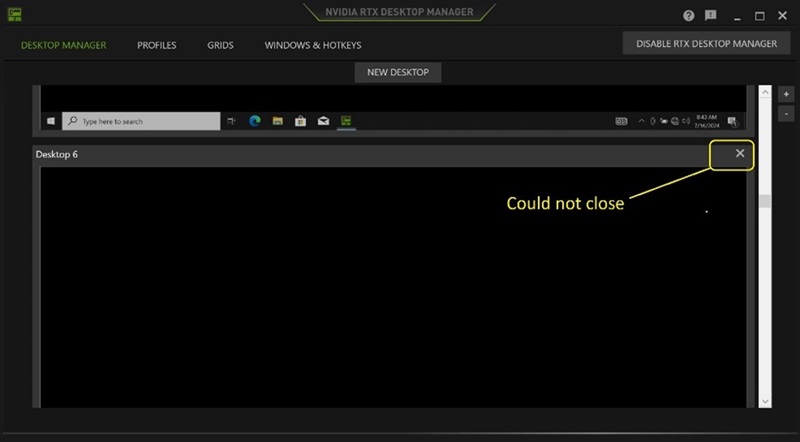
(Figure 1 : NVIDIA RTX Desktop Manager)
Plates-formes concernées :
- Precision 7780
- Precision 7680
- Precision 7770
- Precision 7670
- Precision 7560
- Precision 7760
- Precision 7550
- Precision 7750
- Precision 7540
- Precision 7740
- Precision 7530
- Precision 7730
- Precision 7520
- Precision 7720
- Precision 5480
- Precision 5490
- Latitude 3490
- Latitude 3480
- Latitude 3470
- Inspiron 3550
- Latitude 3530
- Latitude 3520
Cause
Sans objet
Resolution
La mise à jour du lecteur graphique NVIDIAvers la version 552.84 ou ultérieure sur l’ordinateur résout le problème. Pour télécharger et installer le pilote, consultez l’article Téléchargement et installation de pilotes Dell.
Επηρεαζόμενα προϊόντα
Dell Latitude 3480/3488, Latitude 3490, Latitude 3520, Latitude 3530, Latitude 3550, Latitude 3470, Precision 5480, Precision 5490, Precision 7520, Precision 7530, Precision 7540, Precision 7550, Precision 7560, Precision 7670, Precision 7680
, Precision 7720, Precision 7730, Precision 7740, Precision 7750, Precision 7760, Precision 7770, Precision 7780
...
Ιδιότητες άρθρου
Article Number: 000227614
Article Type: Solution
Τελευταία τροποποίηση: 21 Μαΐ 2026
Version: 3
Βρείτε απαντήσεις στις ερωτήσεις σας από άλλους χρήστες της Dell
Υπηρεσίες υποστήριξης
Ελέγξτε αν η συσκευή σας καλύπτεται από τις Υπηρεσίες υποστήριξης.