Secure Connect Gateway Virtual Edition: Resetting Admin Password
Summary: This procedure explains how to reset a forgotten administrator password for Secure Connect Gateway Virtual Edition, but you must know the root password.
Αυτό το άρθρο ισχύει για
Αυτό το άρθρο δεν ισχύει για
Αυτό το άρθρο δεν συνδέεται με κάποιο συγκεκριμένο προϊόν.
Δεν προσδιορίζονται όλες οι εκδόσεις προϊόντων σε αυτό το άρθρο.
Instructions
Procedure:
Note: Take a snapshot of the VM before applying the workaround.
- Connect to the Secure Connect Gateway appliance system using SSH with root credentials (username and password).
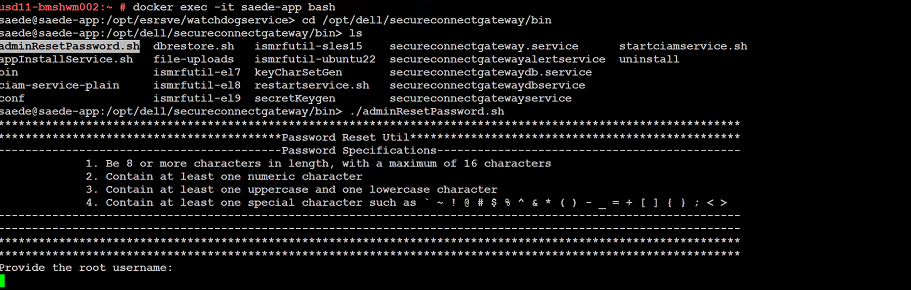
- After logging in successfully, run the commands listed below:
➢ docker exec -it saede-app bash
➢ cd /opt/dell/secureconnectgateway/bin
➢ ls
➢ ./adminResetPassword.sh
Password Requirements:
The password must be:
- Eight or more characters in length, with a maximum of 16 characters
- Contain at least one numeric character
- Contain at least one upper case and one lower case character
- Contain at least one special character such as
' ~ ! @ # $ % ^ & * ( ) - _ + = { } [ ] ; < >
Provide the root username and password.
Provide the new admin password.
Additional Information
Screenshot of the command to change the password:
Επηρεαζόμενα προϊόντα
Secure Connect Gateway - Virtual EditionΙδιότητες άρθρου
Article Number: 000250890
Article Type: How To
Τελευταία τροποποίηση: 29 Δεκ 2025
Version: 2
Βρείτε απαντήσεις στις ερωτήσεις σας από άλλους χρήστες της Dell
Υπηρεσίες υποστήριξης
Ελέγξτε αν η συσκευή σας καλύπτεται από τις Υπηρεσίες υποστήριξης.