VxRail: vCenter Unable to get Deployment Status
Summary: The VxRail deployment page freezes and the VxRail Management Interface (VAMI) shows “Unable to get deployment status” because vCenter cannot reach the DNS server.
Αυτό το άρθρο ισχύει για
Αυτό το άρθρο δεν ισχύει για
Αυτό το άρθρο δεν συνδέεται με κάποιο συγκεκριμένο προϊόν.
Δεν προσδιορίζονται όλες οι εκδόσεις προϊόντων σε αυτό το άρθρο.
Symptoms
Deployment Page Stuck
The VxRail deployment page shows a job that does not progress.
Initial configuration vCenter
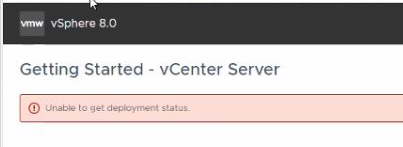
VAMI Error Message
The VAMI page displays:
Unable to get deployment status
Cause
Network Connectivity Failure
vCenter is unable to resolve or reach the DNS server required for deployment validation.
Diagnostic Evidence
Firstbootlogindicates failure to configure network.
The inability to contact DNS prevents the VAMI pre‑check from retrieving deployment status.

Resolution
Resolve DNS Connectivity
- Verify that the vCenter Server Appliance can ping the DNS server.
- If ping fails, check network ACLs or firewalls that may block ICMP traffic between vCenter and DNS.
- Correct any DNS server address or routing issues and repeat the deployment pre‑check.
Επηρεαζόμενα προϊόντα
VxRail, VxRail Appliance Series, VxRail SoftwareΙδιότητες άρθρου
Article Number: 000340653
Article Type: Solution
Τελευταία τροποποίηση: 04 Αυγ 2026
Version: 3
Βρείτε απαντήσεις στις ερωτήσεις σας από άλλους χρήστες της Dell
Υπηρεσίες υποστήριξης
Ελέγξτε αν η συσκευή σας καλύπτεται από τις Υπηρεσίες υποστήριξης.