Dell NativeEdge: Device Staging Partition Full
Summary: In rare circumstances, it is possible that the device's staging partition free space is fully consumed.
Symptoms
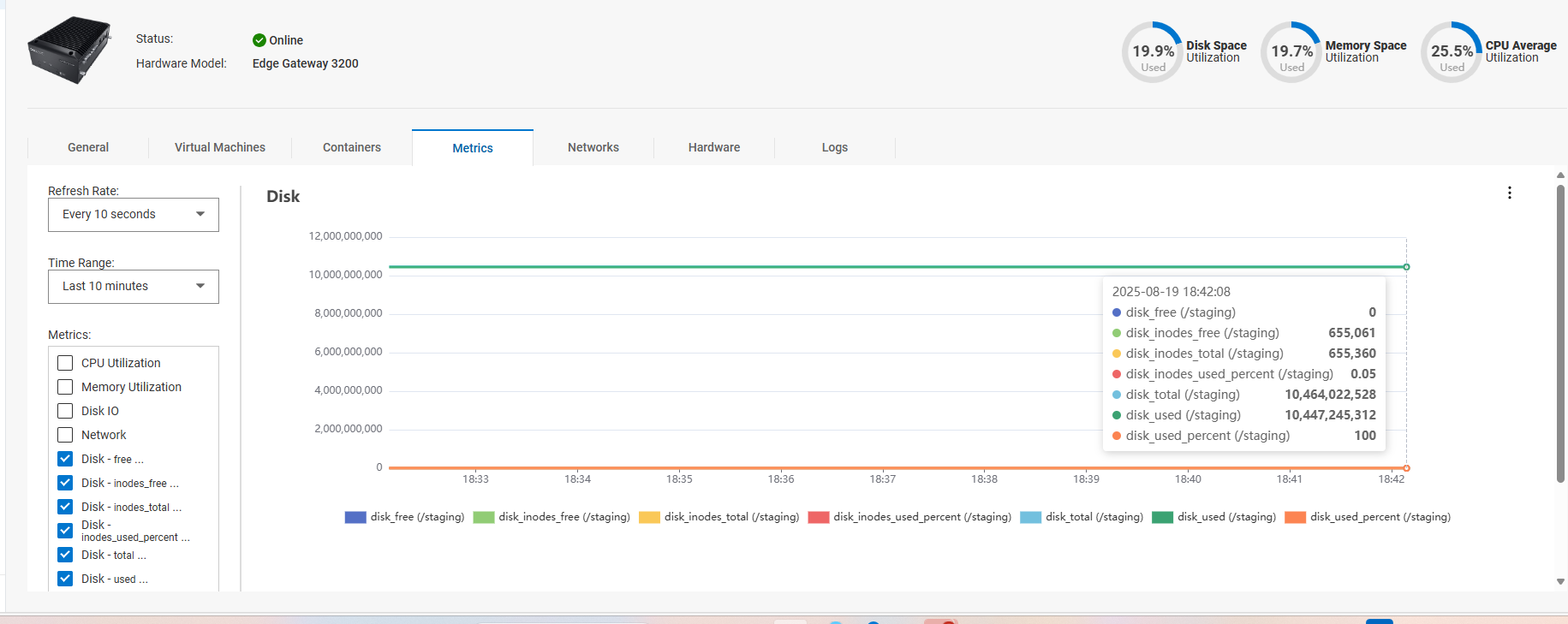
In NativeEdge 3.1 (and earlier), it is possible for the staging partition (/staging) free space to be fully consumed.
The staging partition is used by the NativeEdge device for storing of logs.
It is possible that that if there is no free space on the partition that it will affect powering on virtual machines.
This issue can affect any NativeEdge device.
This can be validated by using the custom metrics option of the device.
Cause
Due to a configuration issue with the internal logging tool, this will generate additional logging to occur if the ece-agent service restarts.
Resolution
Fix:
NativeEdge Engineering has created a dedicated EdgeOS hotfix to address this issue (3.2 Hotfix 1)
This is a EdgeOS bundle, which can only be deployed when the orchestrator has been upgraded to Dell Automation Platform 1.0.
Workaround:
If this occurs on NativeEdge 3.1, then NativeEdge Escalation Engineering can customize the support bundle option to query for staging disk usage and if needed can also truncate logs in this partition.
Additional Information