PowerScale: Using Dynamic Licensing when connectivity is disconnected
Summary: For disconnected or dark-site customers using PowerScale, registering their cluster with Dynamic Licensing needs interaction with the Software Licensing Portal. Users must download a registration file with the '.dl' extension and upload it to the PowerScale UI (WebUI) after registering the product in the portal. However, the OneFS UI only accepts files with a '.json' extension, creating an incompatibility that prevents successful registration. The error seen states "You are only allowed to select a JSON file for the upload". ...
Αυτό το άρθρο ισχύει για
Αυτό το άρθρο δεν ισχύει για
Αυτό το άρθρο δεν συνδέεται με κάποιο συγκεκριμένο προϊόν.
Δεν προσδιορίζονται όλες οι εκδόσεις προϊόντων σε αυτό το άρθρο.
Instructions
Example error:
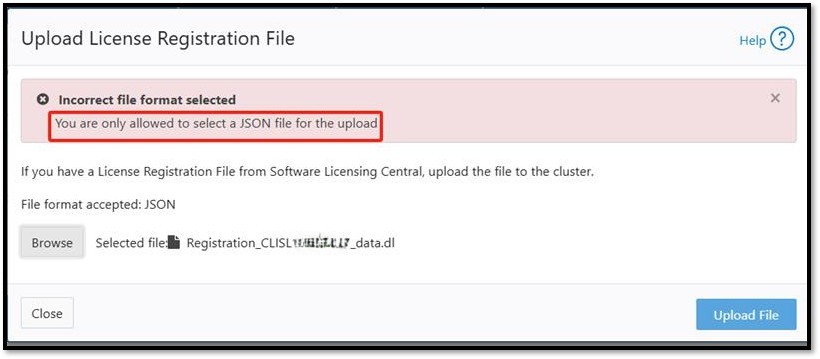
Users have two options to resolve the file extension issue:
-
Change the File Extension:
Rename the downloaded registration file from '.dl'to '.json'and upload it through the OneFS UI. - Use CLI for Upload Without Renaming:
Upload the '.dl' file directly using the following CLI command:
isi license add --path=/ifs/Registration_<SWID>_data.dl
Επηρεαζόμενα προϊόντα
PowerScale OneFSΙδιότητες άρθρου
Article Number: 000411200
Article Type: How To
Τελευταία τροποποίηση: 06 Ιαν 2026
Version: 2
Βρείτε απαντήσεις στις ερωτήσεις σας από άλλους χρήστες της Dell
Υπηρεσίες υποστήριξης
Ελέγξτε αν η συσκευή σας καλύπτεται από τις Υπηρεσίες υποστήριξης.