PowerProtect Data Manager VM Yedeklemesi SyncInProgress Kodu AVB0016 Başarısız Oluyor
Summary: PowerProtect Data Manager sanal makine (VM) yedeklemesi kod AVB0016 başarısız oluyor. SyncInProgress" "Mevcut etkin anlık görüntü nedeniyle tam senkronizasyon başlatılamıyor."
This article applies to
This article does not apply to
This article is not tied to any specific product.
Not all product versions are identified in this article.
Symptoms
PowerProtect Data Manager kullanıcı arayüzü, hata için aşağıdaki mesajları gösterir:
ABV0016: VM Direct engine 'localhost' is unable to back up the virtual machine 'VM1' on vCenter 'vcsa01' because of a vCenter API issue.

The VM Direct engine cannot complete the backup of this virtual machine because a vCenter API operation did not complete successfully.
To troubleshoot this issue:

     *Verify that the vCenter can be reached.
     *If the vCenter is busy, wait for some activities to complete and then retry the operation.
     *Verify that the virtual machine exists on the vCenter.
----
Read Less
The error cannot be retried. Unable to successfully complete SDM Delta Sync operation. Unsuccessful after 'xx' attempts over 5m0.627607105s The vCenter task for 'SDM Snapshot Sync deltaSync' completed with state 'error': DPD Sync in progress
Arıza 1:
PowerProtect Data Manager vmdm.log aşağıdaki hata mesajları veriyor:
Result: {
  "sessionId" : "61e7c5f0-bb85-4474-a23f-95c990c917d6",
  "state" : "Failure",
  "logFile" : "/opt/emc/vmdirect/runtime/logs/vpod/BackupJobSessions-61e7c5f0-bb85-4474-a23f-95c990c917d6.log",
  "error" : "The error cannot be retried.  Unable to successfully complete SDM Delta Sync operation.  Unsuccessful after 70 attempts over 5m1.694291645s.  The vCenter task for 'SDM Snapshot Sync deltaSync' completed with state 'error':  DPD Sync in progress (500)",
  "proxyHostName" : "localhost",
  "errorCode" : "ABV0016"
dpd.log sisteminde (ESXi'de) aşağıdaki hata gösteriliyor:
dpd.log:YYYY-MM-DDTHH:MM:SSZ error dpd[16520988] [Originator@6876 sub=Task opID=1d0ce776-e77a] Task 'Dp.Task.Sync.475.b2616635-352a-4726-986e-e42be7e94bac-1.52f20afe-9cef-83ec-b147-ce7acd07c2ca' failed with error: (dp.fault.SyncInProgress)
Hata 2:
Bu hatanın başka bir varyasyonu aşağıdadır:
PowerProtect Data Manager vmdm.log:
Result: {
  "sessionId" : "126c6bcf-635f-4579-97d7-8dd831a22048",
  "state" : "Failure",
  "logFile" : "/opt/emc/vmdirect/runtime/logs/vpod/BackupJobSessions-126c6bcf-635f-4579-97d7-8dd831a22048.log",
  "error" : "Unable to successfully complete SDM Full Sync operation.  Unsuccessful after 39 attempts over 10m14.630663716s.  The vCenter task for 'SDM Snapshot Sync fullSync' completed with state 'error':  DPD Sync in progress (500)",
  "proxyHostName" : "localhost",
  "errorCode" : "ABV0016"
dpd.log (ESXi ana bilgisayarı)
YYYY-MM-DDTHH:MM:SSZ error dpd[2216236] [Originator@6876 sub=Snapshot opID=055f891e-8923] StartFullSyncIpc: Failed for disk '2d21e5b0-15a9-469e-1bbf-03d75e771c31': error 'Cannot start full sync due to existing active snapshot'
Cause
VMware'in Data Protection Daemon (DPD) hizmetindeki sorun.
Resolution
Geçici çözüm hatası 1:
DPD'nin bir SyncInProgress mesajı döndürdüğü hata 1 için etkilenen ESXi ana bilgisayarında DPD hizmetini aşağıdaki gibi yeniden başlatın:
- vSphere UI'dan etkilenen VM'yi ve VM'nin bulunduğu ESXi ana bilgisayarını bulun.
- DPD hizmetini yeniden başlatın:
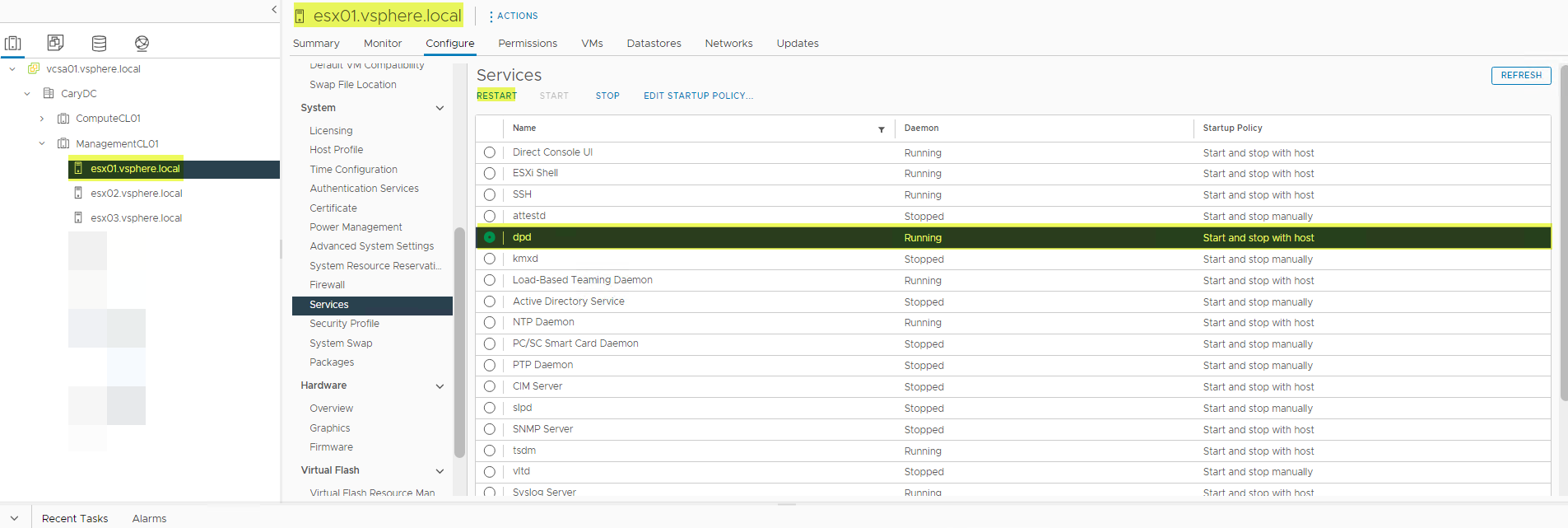
- DPD hizmetini yeniden başlatırken bir hata alabilirsiniz. Bunu yaparsanız önce TSDM hizmetini, ardından DPD hizmetini yeniden başlatın.
- TSDM hizmetini yeniden başlatın.
- Başarısız yedeklemeyiyeniden deneyin.
Çözüm
Etkilenen Sürümler:
vSphere 7.0.3 (tümü), 8.0.0
Etkilenen vSphere sürümleri için vSphere'in gelecekteki bir sürümünde beklenen düzeltme.
Hata 2 için Geçici Çözüm:
DPD'nin "Mevcut etkin anlık görüntü nedeniyle tam senkronizasyon başlatılamıyor" mesajını döndürdüğü 2. hata için geçici çözüm, LWD'yi sıfırlamaktır. LWD aşağıdaki gibi sıfırlanabilir:
1. Yöntem:
-
VM'deki Protection Mechanism öğesini VAPD'den LWD'ye aşağıdaki gibi değiştirin:
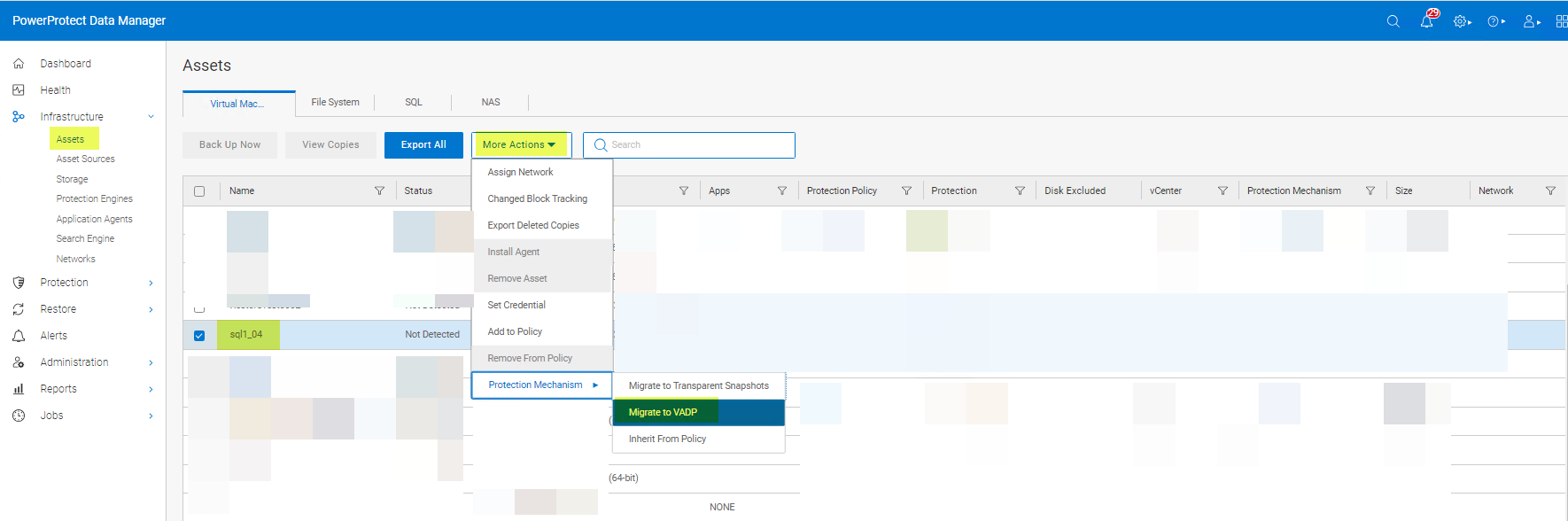
- Koruma mekanizmasınıtekrar Transparent Snapshots olarak değiştirin:
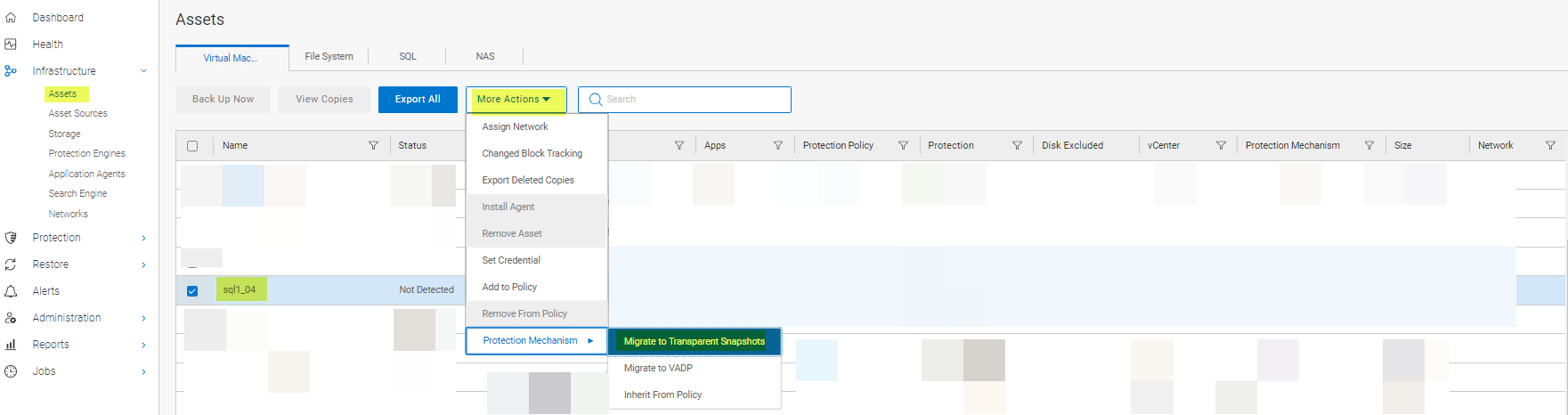
2. Yöntem:
VM'yi koruma politikasından kaldırıp yeniden ekleyin. PowerProtect Data Manager'ın vVersion değeri 19.12 ise Yöntem 1 veya Yöntem 3'ü kullanın. Yöntem 2, PowerProtect Data Manager 19.12 ile çalışmaz.
3. Yöntem:
Vmconfig aracını kullanarak LWD'yi devre dışı bırakın ve yeniden etkinleştirin.
Çözüm:
Etkilenen Sürümler:
7.0.3 (tümü) ve 8.0.0
Bu sorunun temel nedeni VMware tarafından hala araştırılmaktadır.
Affected Products
PowerProtect Data ManagerArticle Properties
Article Number: 000217246
Article Type: Solution
Last Modified: 16 Feb 2024
Version: 4
Find answers to your questions from other Dell users
Support Services
Check if your device is covered by Support Services.