Recover from NetWorker Management Console Fails with Connection Error when Browsing from the Current Date
Summary: Recover initiated from the NetWorker Management Console (NMC) UI fails with "connection" error when browsing backups from the current date.
This article applies to
This article does not apply to
This article is not tied to any specific product.
Not all product versions are identified in this article.
Symptoms
Recover initiated from the NetWorker Management Console (NMC) UI fails with "connection" error when browsing backups from the current date.

A connection attempt failed because the connected party did not properly respond after a period of time, or established connection failed because connected host failed to respond.
Cause
Connection failure occurs when the NMC times out while waiting for the NetWorker server's response.
Resolution
- Set the GST_RA_TIMEOUT environment variable as a System variable on the NMC server. The variable value can be less than or greater than in the example shown below. The timeout value is expressed in seconds.
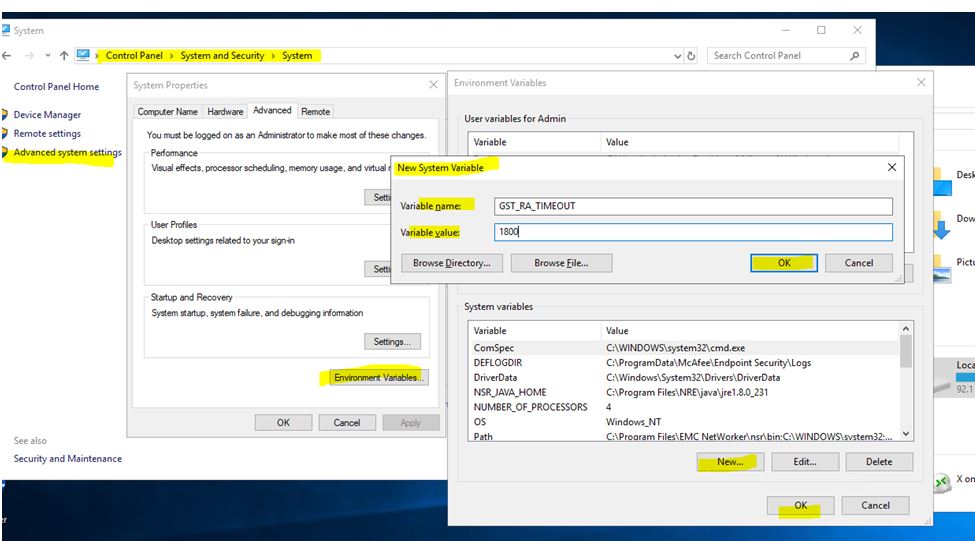
- Restart the GST service for the changes to take effect.
Article Properties
Article Number: 000220597
Article Type: Solution
Last Modified: 20 Dec 2023
Version: 1
Find answers to your questions from other Dell users
Support Services
Check if your device is covered by Support Services.