Redundant boot path when entering boot menu on Inspiron 3891 with Ubuntu 20.04
Summary: Redundant boot path when entering boot menu on Inspiron 3891 with Ubuntu 20.04
Symptoms
You may notice a redundant bootable device in the Inspiron 3891 boot menu when pressing F12 in Ubuntu 20.04. As shown in Fig.1, the second item with additional suffix 2 (circled in red) is the redundant device.
If you select the redundant boot device, the system will not boot into Ubuntu OS. Instead, a command-line interface appears, as depicted in Fig. 2.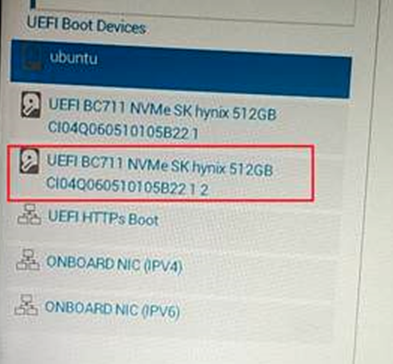
Fig. 1 Boot up menu

Fig. 2 Command-line interface
Cause
Resolution
Select the first device to enter the Ubuntu OS
When you have chosen the second device and the system is in the Command-Line interface, press Ctrl + Alt + Delete to shut down the system, then restart system and choose the first device.
To dismiss the redundant device permanently, reinstall Ubuntu OS by OSRI tool using the link https://www.dell.com/support/home/en-us/drivers/osiso/recoverytool/linux.