ECS: Unable to create SAML Service Provider from UI receiving "Error 7000 (http: 400): InvalidResponse...
Summary: The aim is to generate a "SAML Service Provider Metadata" file to use S3 authentication on ECS with Microsoft ADFS. It may fail as described. This knowledge article shows a workaround for 3.7 only, for 3.6, see the resolution section. ...
This article applies to
This article does not apply to
This article is not tied to any specific product.
Not all product versions are identified in this article.
Symptoms
Steps to reproduce:-
- Log in to ECS UI.
- Navigate to Manage->Identity and Access (S3).
- Click on SAML Service Provider Metadata.
- Upload Java Key xml or txt file.
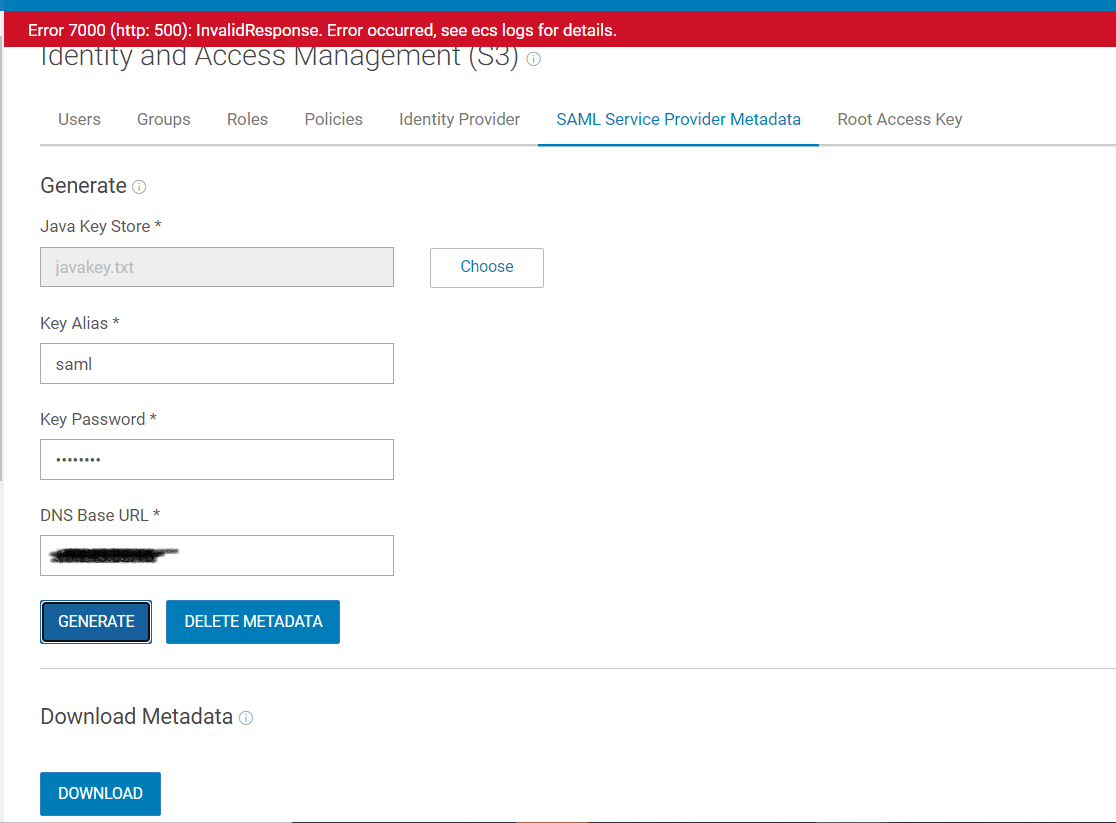
- Provide Key Alias, Key Password, DNS Base URL and click on Generate.
Its throwing error "Error 7000 (http: 500): InvalidResponse Error occurred, see ecs logs for details." Or "Error 7000 (http: 400): InvalidResponse Error occurred, see ecs logs for details."
The error message is not specific, and the user cannot identify what went wrong.
Cause
We have two separate API's wrt to create (POST) and update (PUT) service-provider. Issue is with UI, when it fails its sending update service provider and backend does not find key for the service-provider as does not exist.
Resolution
When running into this issue, the workaround is to click on Delete Metadata and then UI understands and sends POST request to create Service Provider.
A future ECS Version will contain a fix for this issue.
For 3.6, Delete metadata is greyed out by default, as expected, because there is no metadata. If the users get same error, ensure that the key is 64base.
Additional Information
See attached PDF: DellEMC-ECS_IAMandHadoopS3A_Implementation.pdf
Affected Products
Elastic Cloud StorageProducts
ECS, ECS ApplianceArticle Properties
Article Number: 000207887
Article Type: Solution
Last Modified: 19 Jul 2023
Version: 5
Find answers to your questions from other Dell users
Support Services
Check if your device is covered by Support Services.