ECS:無法從收到「Error 7000 (HTTP:400): 不正確Response...
Summary: 其目的在於產生一個「SAML Service Provider Metadata」檔案,以使用 ECS 與 Microsoft ADFS 的 S3 驗證。它可能會如所述失敗。此知識文章顯示僅 3.7 的因應措施,適用于 3.6,請參閱「解析」一節。
This article applies to
This article does not apply to
This article is not tied to any specific product.
Not all product versions are identified in this article.
Symptoms
重現步驟:
- 登入 ECS UI。
- 流覽至 Manage->Identity and Access (S3)。
- 按一下 SAML 服務供應商中繼資料。
- 上傳 JAVA 金鑰 xml 或 txt 檔案。
- 提供金鑰別名、金鑰密碼、DNS 基本 URL,然後按一下[ Generate] (產生)。
其傳入錯誤「Error 7000 (HTTP:500):InvalidResponse Error occurred, see ecs logs for details.」或「Error 7000 (HTTP:400): InvalidResponse Error occurred, see ecs logs for details.」
錯誤訊息不是特定的,使用者也無法識別出什麼錯誤。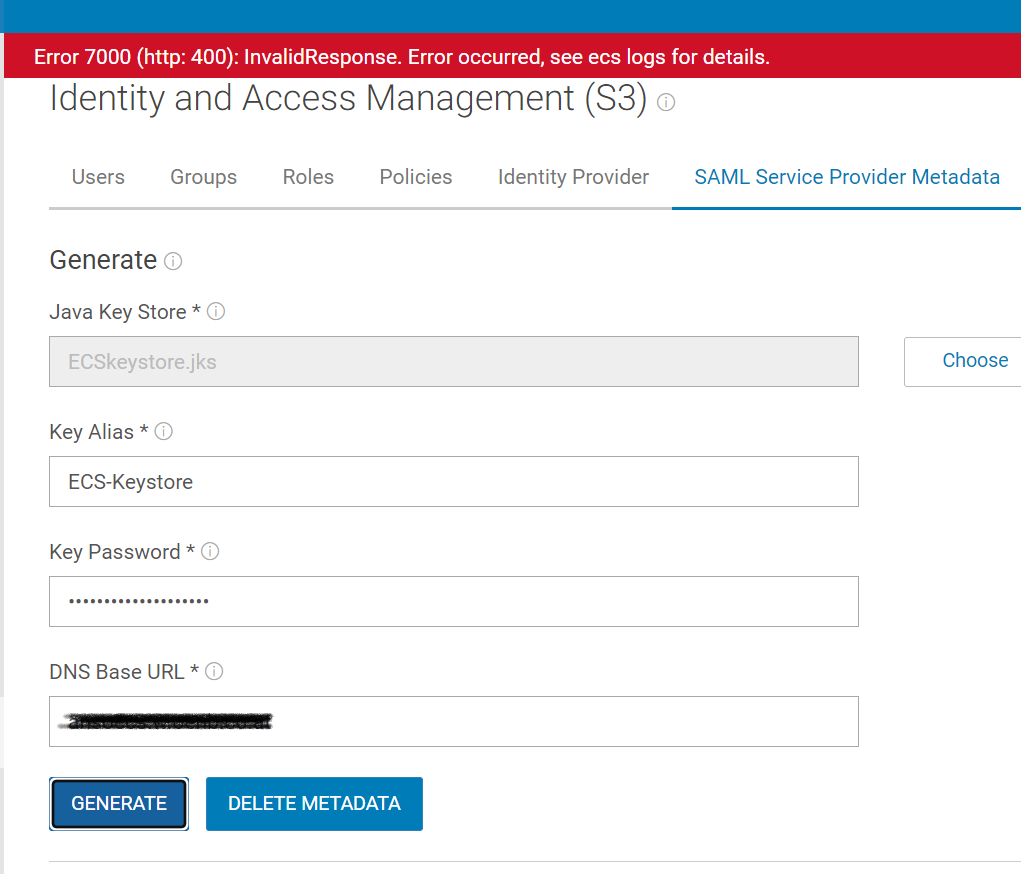

Cause
我們有兩個獨立的 API 分層可建立 (POST) 和更新 (PUT) 服務供應商。問題出在 UI,當 UI 無法傳送更新服務供應商時,後端則找不到服務提供者的金鑰,因為不存在。
Resolution
遇到此問題時,因應措施是按一下[Delete Metadata] (刪除中繼資料),然後 UI 會瞭解並傳送 POST 要求以建立服務提供者。
未來的 ECS 版本將包含此問題的修正方法。
若為 3.6,刪除中繼資料依預期預設為灰色,因為沒有中繼資料。如果使用者收到相同的錯誤,請確定金鑰為 64base。
Additional Information
請參閱附加的 PDF:DellEMC-ECS_IAMandHadoopS3A_Implementation.pdf
Affected Products
Elastic Cloud StorageProducts
ECS, ECS ApplianceArticle Properties
Article Number: 000207887
Article Type: Solution
Last Modified: 19 Jul 2023
Version: 5
Find answers to your questions from other Dell users
Support Services
Check if your device is covered by Support Services.