ECS:无法从收到“Error 7000 (http:400): 响应无效...
Summary: 目标是生成“SAML Service Provider Metadata”文件,以便在 ECS 上使用 Microsoft ADFS 进行 S3 身份验证。它可能会失败,如上所述。本知识文章仅显示 3.7 的解决方法,对于 3.6,请参阅解析部分。
This article applies to
This article does not apply to
This article is not tied to any specific product.
Not all product versions are identified in this article.
Symptoms
重现的步骤:-
- 登录 到 ECS UI。
- 导航至 Manage->Identity and Access (S3)。
- 单击 SAML 服务提供商元数据 。
- 上传 Java 密钥 xml 或 txt 文件。
- 提供密钥别名、密钥密码、DNS 基本 URL,然后单击 “生成”。
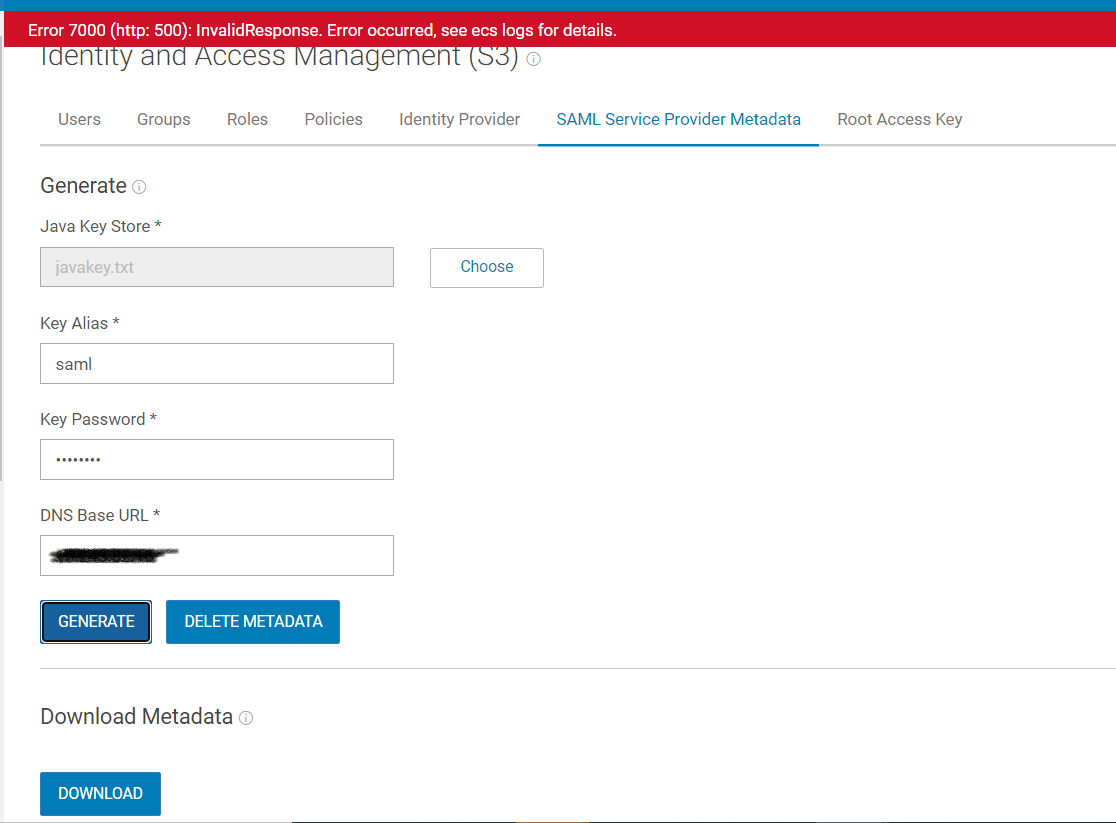
其引发错误“Error 7000 (http:500):发生无效响应错误,请参阅 ecs 日志了解详细信息。”或“Error 7000 (http:400): 发生无效响应错误,请参阅 ecs 日志了解详细信息。”
错误消息不具体,用户无法识别出错的内容。
Cause
我们有两个单独的 API 来创建 (POST) 和更新 (PUT) 服务提供商。问题出在 UI 中,当其发送更新服务提供商失败并且后端找不到服务提供商的密钥时,因为不存在。
Resolution
遇到此问题时,解决方法是单击 Delete Metadata ,然后 UI 了解并发送 POST 请求以创建服务提供商。
未来的 ECS 版本将包含此问题的修复。
对于 3.6,默认情况下,删除元数据按预期显示为灰色,因为没有元数据。如果用户收到相同的错误,请确保密钥为 64base。
Additional Information
请参阅附加的 PDF:DellEMC-ECS_IAMandHadoopS3A_Implementation.pdf
Affected Products
Elastic Cloud StorageProducts
ECS, ECS ApplianceArticle Properties
Article Number: 000207887
Article Type: Solution
Last Modified: 19 Jul 2023
Version: 5
Find answers to your questions from other Dell users
Support Services
Check if your device is covered by Support Services.