NMC 安装失败,并显示错误“Unable to Verify Authentication Server's Hostname or Port”(无法验证身份验证服务器的主机名或端口)
Summary: 在 Windows 主机上安装 NMC 失败,并显示错误:无法验证身份验证服务器的主机名或端口。
This article applies to
This article does not apply to
This article is not tied to any specific product.
Not all product versions are identified in this article.
Symptoms
- NetWorker Management Console (NMC) 安装在 Windows 主机上失败,并显示身份验证失败消息。
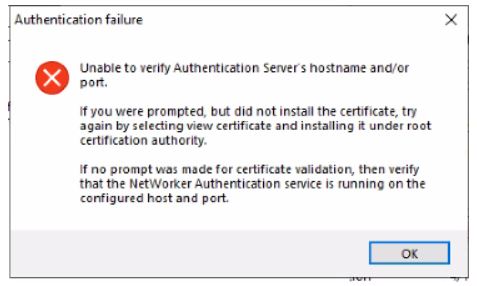
图 1:在 Windows 上安装 NMC 期间,将显示身份验证失败消息。
- NMC 服务器安装在独立于 NetWorker 服务器的 Windows 主机上。
- NetWorker 身份验证服务已启动并正在运行。
- 端口 9090 处于打开状态。
nsrports -t NetWorker_ServerName -p 9090
Cause
NMC 安装通过早于版本 1.2 的 TLS 与 NetWorker 身份验证服务协商。
Resolution
在 NetWorker 服务器上执行以下操作:
- 创建以下内容的备份拷贝:
C:\Program Files\EMC NetWorker\nsr\authc-server\tomcat\conf\server.xml.
- 编辑 server.xml 文件并查找字符串。
sslEnabledProtocols="TLSv1.2"
将字符串更改为
sslEnabledProtocols="TLSv1.2, TLSv1.1, TLSv1"
提醒:这些更改是临时的,仅用于完成 NMC 安装。NMC 安装完成后,可以恢复它们。
- 保存 对文件的更改。
- 重新启动 NetWorker 服务。
net stop nsrexecd /y
net start nsrd
- 安装 NMC 服务器上的 NetWorker 和 NMC。这一次,应显示安装证书的提示。
- 将证书添加 到 Root 受信任证书列表。继续,直到安装完成。
Affected Products
NetWorker FamilyArticle Properties
Article Number: 000219009
Article Type: Solution
Last Modified: 23 Jul 2024
Version: 4
Find answers to your questions from other Dell users
Support Services
Check if your device is covered by Support Services.