NMM: SQL Backup fails with error "0x80070005 received on CreateVssBackupComponents"
Summary: NetWorker Module for Microsoft (NMM) SQL backup fails with error "0x80070005 received on CreateVssBackupComponents"
Symptoms
The SQL backup of a database, instance, or an Availability Group fails to throw the below error:
savefs: Error 0x80070005 received on CreateVssBackupComponents.
savefs: Failed to determine if volume is a mounted snapshot
Cause
The error code 0x80070005 means access denied. So according to the above error, the user specified in the "Remote user" and "Password" attributes of the client resource used to backup the client does not have enough privileges to backup the specified save sets.
Resolution
Ensure that the following privileges are taken care of before performing backup and recovery:
Grant the Windows login account that the NMM backup process uses to connect to SQL Server the following roles:
- SQL Server system administrator (sysadmin) role to issue the T-SQL BACKUP query.
- SQL Server sysadmin role to open a shared memory handle when initializing the VDI.
Ensure that the NMM administrator is a member of the:
- Local backup operators group
- Local administrators group
Disable User Account Control (UAC) for these user accounts, Perform these steps:
- Open the Local Security Policy (
secpol.msc) on the client. - Go to Local Policies -> Security Options.
- Change User Account Control: Behavior of the elevation prompts for administrators in Admin Approval Mode to Elevate without prompting.
- Disable User Account Control: Run all administrators in Admin Approval Mode.
- Restart the machine.
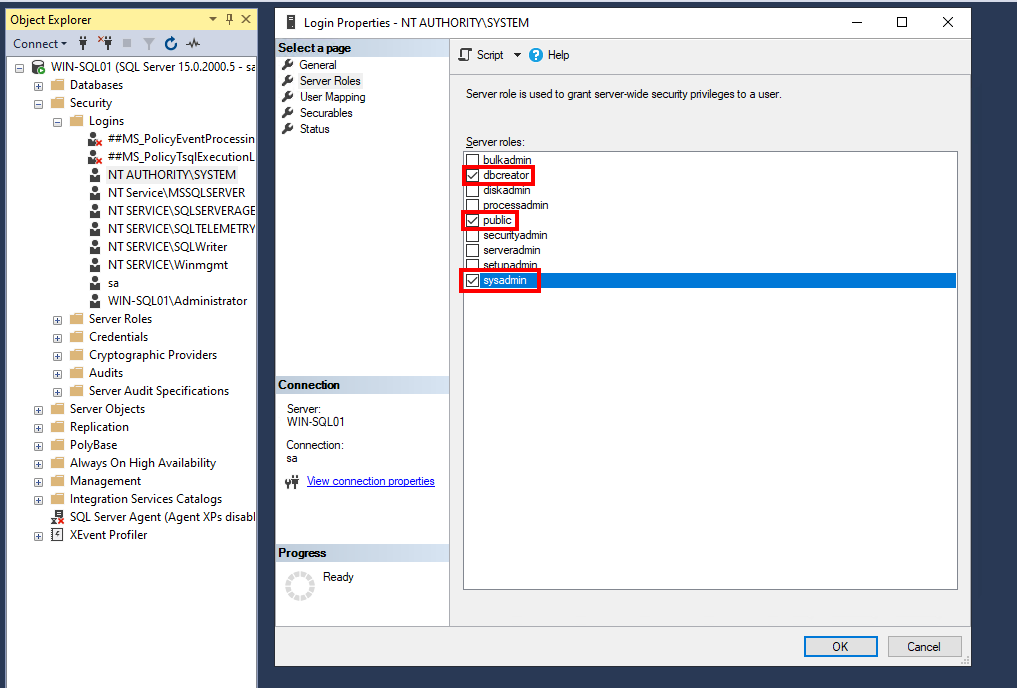
In the SQL Management Studio -> Security -> Log in -> Log in Properties page, grant the SQL Server system dbcreator, public, and sysadmin permissions to the Windows log in account, as shown in the following figure. Provide these permissions to the NTAUTHORITY\SYSTEM user.