Data Domain: DD9410|DD9910 BIOS Password Prompt After Controller Upgrade
Summary: After upgrading to a DD9410 or DD9910 controller, the DD system prompts to set a BIOS password. This is due to a registry key being incorrectly set during the upgrade process.
This article applies to
This article does not apply to
This article is not tied to any specific product.
Not all product versions are identified in this article.
Symptoms
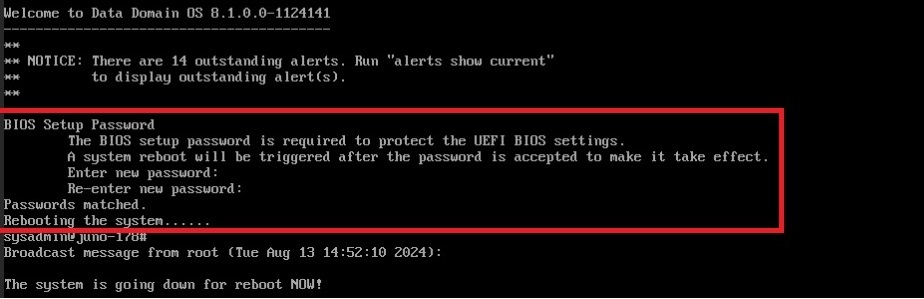
- After the headswap command and system reboot, the system prompts for a BIOS password.
- A new BIOS password is created, but the system does not accept or recognize it after the reboot.
- Updating the password again with a more complex (or any) password results in the same error.
- The system displays a prompt to set the BIOS password and reboot.
- Affected Systems:
- Controller upgrades to DD9910 or DD9410
- DDOS versions <=8.1.x.x
Cause
The root cause of the issue is related to the controller upgrade process of DD9410 or DD9910, which results in a registry value being set incorrectly.
Resolution
Workaround:
- Contact Dell Technical Support to set the appropriate registry key
- Reference this KB article (#234245) when raising the case.
- Remote access (for example ScreenShare) to the system is required
Fix:
- Fixed in DDOS >=8.2.0.0
Affected Products
DD9410 Appliance, DD9910 ApplianceProducts
Data Domain, Data Domain Deduplication Storage Systems, DD OS 8.1Article Properties
Article Number: 000234245
Article Type: Solution
Last Modified: 01 Nov 2024
Version: 1
Find answers to your questions from other Dell users
Support Services
Check if your device is covered by Support Services.