ECS: S3 Browser message: The difference between the request time and the server’s time is too large.
Summary: Cannot connect to ECS with S3 Browser.
This article applies to
This article does not apply to
This article is not tied to any specific product.
Not all product versions are identified in this article.
Symptoms
The following error displays when connecting with S3 Browser or s3curl: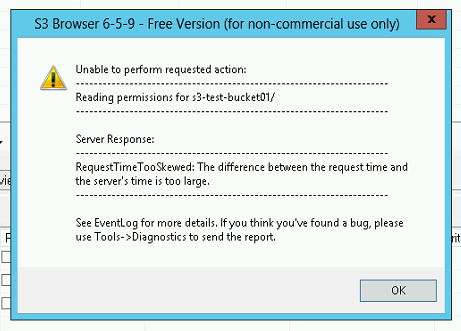
Cause
The date on ECS was not synchronized with the Network Time Protocol (NTP) server and was either behind or ahead several minutes.
# viprexec date

Output from host : 192.168.219.1
Tue Oct 30 22:54:13 UTC 2024

Output from host : 192.168.219.2
Tue Oct 30 22:54:37 UTC 2024

Output from host : 192.168.219.3
Tue Oct 30 21:08:03 UTC 2024

Output from host : 192.168.219.4
Tue Oct 30 21:08:14 UTC 2024

Output from host : 192.168.219.6
Tue Oct 30 22:01:13 UTC 2024

Output from host : 192.168.219.5
Tue Oct 30 22:01:13 UTC 2024
Resolution
Follow KB ECS: xDoctor: RAP081: Symptom Code: 2048: NTP daemon not running to restart the NTP service on the nodes.
Affected Products
ECS Appliance Hardware Gen1 U-SeriesProducts
ECS Appliance, ECS Appliance Hardware Gen1 U-SeriesArticle Properties
Article Number: 000035360
Article Type: Solution
Last Modified: 09 Sept 2025
Version: 4
Find answers to your questions from other Dell users
Support Services
Check if your device is covered by Support Services.