How to Use Command Prompt to Verify Install Date of Microsoft Windows
Summary: Explore step-by-step instructions to verify the original installation date of Windows on your Dell computer.
This article applies to
This article does not apply to
This article is not tied to any specific product.
Not all product versions are identified in this article.
Symptoms
Cause
The computer user wants to verify the Windows original installation date.
Resolution
Note: Systems on a Domain may not show an accurate installation date. This information is provided for systems not on a Domain.
The following steps provide the most accurate way to check for the Windows installation date.
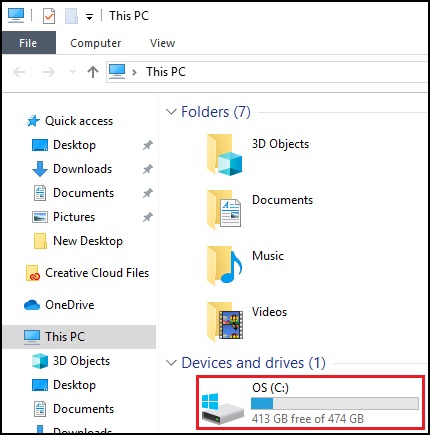
- Open File Explorer and double left click the C: Drive.
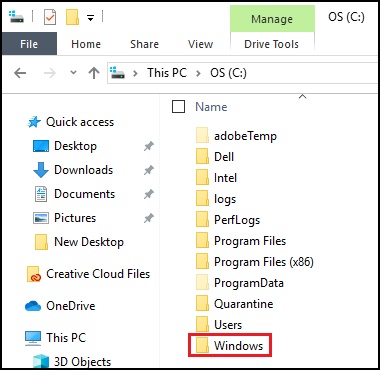
- Look for the Windows folder.
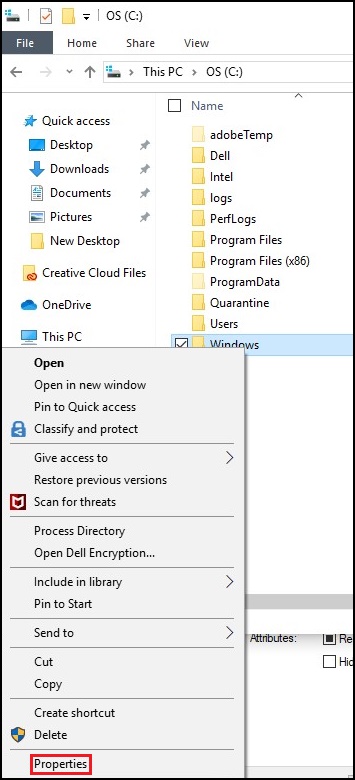
- Right click the Windows folder and select properties.
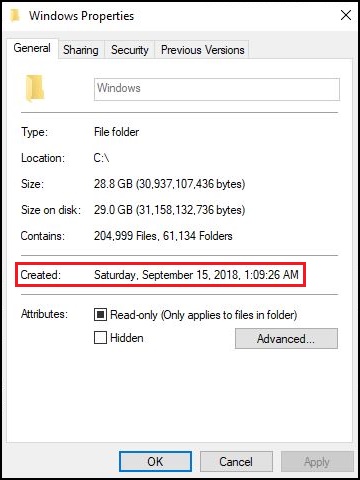
- Look for the Created date of the folder.
Alternate Method
Note: The original install date provided by System Info reflects major changes to Windows, including a "Reset This PC" or major Window updates. The method above is the preferred way of finding the installation date.
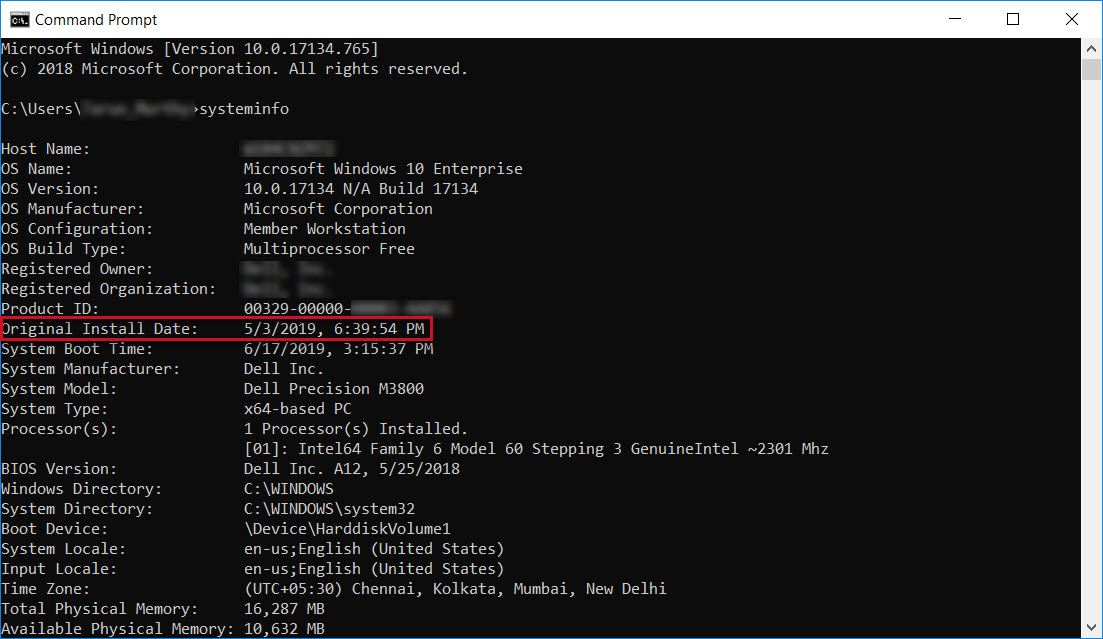
The following steps in the Command Prompt can be used to verify the installation date of Windows on your Dell system.
- Press the Windows logo + Q key on the keyboard.
- In the search box, type: CMD
- Click the Command Prompt or cmd option in the list.
- In the Command Prompt window, type: systeminfo
- Look for Original Install Date.
- This is the date when the operating system was installed on your PC.
Affected Products
Alienware, Dell All-in-One, Dell Pro All-in-One, Dell Pro Max Micro, Dell Pro Max Slim, Dell Pro Max Tower, Dell Pro Micro, Dell Pro Slim, Dell Pro Tower, Dell Slim, Dell Tower, Inspiron, OptiPlex, Vostro, XPS, G Series, G Series, Alienware
, Dell Laptops, Dell Plus, Dell Pro, Dell Pro Max, Dell Pro Plus, Dell Pro Premium, Inspiron, Latitude, Dell Pro Rugged, Vostro, XPS, Fixed Workstations, Mobile Workstations, Dell Pro Max Micro XE FCM2250, Dell Pro Max Slim XE FCS1250, Dell Pro Max Tower T2 XE FCT2250, Dell Pro Max 16 XE MC16250, Dell Pro Micro Plus XE QBM1250, Dell Pro Slim Plus XE5 QBS1250, Dell Pro Tower Plus XE5 QBT1250
...
Article Properties
Article Number: 000131940
Article Type: Solution
Last Modified: 11 Jul 2025
Version: 11
Find answers to your questions from other Dell users
Support Services
Check if your device is covered by Support Services.