符合從 TPM 1.2 版升級至 2.0 版資格的 Dell 電腦
Summary: 下列文章提供哪些電腦從 Dell 出貨,並可將可信賴平台模組 (TPM) 從韌體 1.2 版升級至 2.0 版的相關資訊。
This article applies to
This article does not apply to
This article is not tied to any specific product.
Not all product versions are identified in this article.
Instructions
注意:搭載 Intel 第 6 代和第 7 代處理器 (i7-7xxx、i5-7xxx、i3-7xxx、i7-6xxx、i5-6xxx 及 i3-6xxx) 的電腦無法升級至 Windows 11。升級到 TPM 2.0 不會繞過此Microsoft要求。
可信賴平台模組 (TPM) 韌體
在 2015 年至 2018 年之間製造的 Dell 電腦可能在出貨時即配備可信賴平台模組 (TPM) 韌體 1.2 版。
本文列出可能隨附 TPM 1.2 的電腦機型,以便視需要將 TPM 韌體升級至 2.0 版。
2019 年後的 Dell 電腦版本支援 TPM 韌體 2.0,但不提供降級選項。(隨附 Windows 10 且支援受限或不支援舊版的裝置。)
在升級或降級之前,請仔細閱讀以下文章:
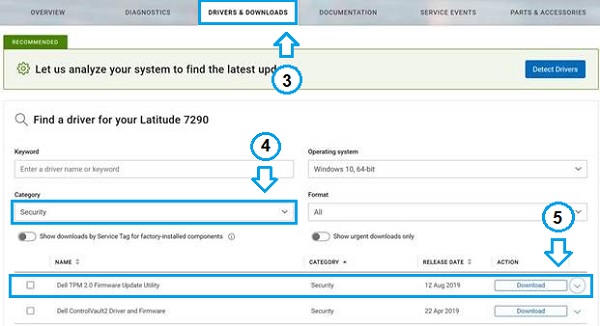
若要確認您的電腦可更新至 TPM 韌體 2.0 版:
-
前往 Dell 產品支援網頁。
-
輸入您的產品服務編號,或從我們的產品清單中選取您的型號。
-
按一下驅動程式與下載標籤。
-
從下拉式類別方塊中選取安全性。
-
尋找 Dell TPM 2.0 韌體更新公用程式。
-
如果列出此更新,它會確認您可以執行更新。
參考連結:
可能隨附 TPM 1.2 韌體的電腦
- Latitude 3180
- Latitude 3189
- Latitude 3380
- Latitude 3470
- Latitude 3480/3488
- Latitude 3570
- Latitude 3580/3588
- Latitude 5175 二合一
- Latitude 5179 二合一
- Latitude 5280/5288
- Latitude 5285 二合一
- Latitude 5289 二合一
- Latitude 5414 Rugged
- Latitude 5420 Rugged
- Latitude 5424 Rugged
- Latitude 5480/5488
- Latitude 7202 Rugged 平板電腦
- Latitude 7214 Rugged Extreme
- Latitude 7275
- Latitude 7280
- Latitude 7285 二合一
- Latitude 7370
- Latitude 7380
- Latitude 7389 二合一
- Latitude 7414 Rugged
- Latitude 7424 Rugged Extreme
- Latitude 7480
- Latitude E5270
- Latitude E5470
- Latitude E5570
- Latitude E7270
- Latitude E7470
- Precision 3510
- Precision 3520
- Precision 3530
- Precision 5510
- Precision 5520
- Precision 5530
- Precision 5530 二合一
- Precision 5720 多合一
- Precision 7510
- Precision 7520
- Precision 7530
- Precision 7710
- Precision 7720
- Precision 7730
- Precision Rack 3930/3930XL
- Precision Tower 3420
- Precision Tower 3620
- Precision Tower 3630/3630XL *
- Precision Tower 5810/5810XL *
- Precision Tower 5820/5820XL *
- Precision Tower 7810/7810XL *
- Precision Tower 7820/7820XL *
- Precision Tower 7910/7910XL *
- Precision Tower 7920/7920XL *
注意:若為 TPM 2.0,您必須先將這些電腦的 BIOS 更新至可用的最新版本。
- OptiPlex 3040
- OptiPlex 3046
- OptiPlex 3050
- OptiPlex 3050 多合一
- OptiPlex 3060
- OptiPlex 3240 多合一
- OptiPlex 5040
- OptiPlex 5050
- OptiPlex 5055 Ryzen 加速處理單元
- OptiPlex 5060
- OptiPlex 5250 多合一
- OptiPlex 5260 多合一
- OptiPlex 7040
- OptiPlex 7050
- OptiPlex 7060
- OptiPlex 7440 多合一
- OptiPlex 7450 多合一
- OptiPlex 7460 多合一
- OptiPlex 7760 多合一
- OptiPlex XE3
- XPS 13 9350 (壽命結束)
- XPS 13 9360
- XPS 13 9365 二合一
- XPS 13 9370
- XPS 13 9380
- XPS 13 9380
- XPS 15 9550
- XPS 15 9560
- XPS 15 9570
- XPS 15 9575 二合一
- XPS 27 7760
- Dell Edge Gateway 5000
- Dell Edge Gateway 5000 OEM Ready
- Dell Edge Gateway 5100
- Dell Edge Gateway 5100 OEM Ready
- Dell Embedded Box PC 5000
- Dell Embedded Box PC 5000 OEM
Additional Information
建議的文章
以下是一些與本主題相關的建議文章,您可能會感興趣。
- TPM 1.2 與 2.0 的功能比較
- 系統 BIOS 設定 Latitude、Precision 或 XPS 中遺失 TPM 選項
- 如何故障診斷並解決受信任平台模組 (TPM) 和 BitLocker 的常見問題
- Windows 11 的可信賴平台模組 (TPM) 常見問題
- 如何啟用可信賴平台模組 (TPM)
- 如何成功更新 Dell 電腦上的 TPM 韌體
- 使用指令檔編寫或自動化進行來自 Dell 的 TPM 韌體更新
- 啟用可信賴平台模組安全性功能
- 您無法啟用可信賴平台模組 (TPM),因為 BIOS 中沒有選項
- 收到「The update image is not for this system」的錯誤訊息時,該如何更新 TPM 韌體
- TPM 韌體降級至 TPM 1.2 版失敗,並顯示錯誤「Update FAILED:Invalid source version」
- TPM 錯誤嘗試、回復時間與鎖定復原
- Windows 7 和 10 作業系統升級和降級的受信任平台模組 (TPM) 升級和降級程序
- TPM 無法在 1.2 或 2.0 之間變更,因為 TPM 為擁有狀態
Affected Products
Dell Edge Gateway 5000, Dell Edge Gateway 5100, Dell Embedded Box PC 5000, Latitude 3180, Latitude 3189, Latitude 5280/5288, Latitude 5285 2-in-1, Latitude 5289 2-in-1, Latitude 7214 Rugged Extreme, Latitude 7280, Latitude 7285 2-in-1
, Latitude 13 3380, Latitude 7370, Latitude 7380, Latitude 7389 2-in-1, Dell Latitude 3480/3488, Latitude 5414 Rugged, Latitude 5420 Rugged, Latitude 5424 Rugged, Latitude 5480/5488, Latitude 7414 Rugged, Latitude 7424 Rugged Extreme, Latitude 7480, Dell Latitude 3580/3588, Latitude 3470, Latitude 3570, Latitude 5175 2-in-1, Latitude 5179 2-in-1, Latitude 7275, Latitude E5270, Latitude E5470, Latitude E5570, Latitude E7270, Latitude E7470, OptiPlex 3040 Micro, OptiPlex 3040 Small Form Factor, OptiPlex 3040 Tower, OptiPlex 3046 Tower, OptiPlex 3046 Micro, OptiPlex 3046 Small Form Factor, OptiPlex 3050 All-In-One, OptiPlex 3050 Tower, OptiPlex 3050 Micro, OptiPlex 3050 Small Form Factor, OptiPlex 3060 Tower, OptiPlex 3060 Micro, OptiPlex 3060 Small Form Factor, OptiPlex 3240 All-in-One, OptiPlex 5040 Tower, OptiPlex 5040 Small Form Factor, OptiPlex 5050 Tower, OptiPlex 5050 Micro, OptiPlex 5050 Small Form Factor, OptiPlex 5055 Ryzen APU Tower, OptiPlex 5060 Tower, OptiPlex 5060 Micro, OptiPlex 5060 Small Form Factor, OptiPlex 5250 All-In-One, OptiPlex 5260 All-In-One, OptiPlex 7040 Tower, OptiPlex 7040 Micro, OptiPlex 7040 Small Form Factor, OptiPlex 7050 Tower, OptiPlex 7050 Micro, OptiPlex 7050 Small Form Factor, OptiPlex 7060 Tower, OptiPlex 7060 Micro, OptiPlex 7060 Small Form Factor, OptiPlex 7440 All-In-One, OptiPlex 7450 All-In-One, OptiPlex 7460 All-In-One, OptiPlex 7760 All-In-One, Optiplex XE3, Dell Edge Gateway 5000 OEM Ready, Dell Edge Gateway 5100 OEM Ready, Dell Embedded Box PC 5000 OEM, Precision 3930 XL Rack, Precision 3630 XL Tower, T5810 XL, 5820 XL Tower, T7810 XL, 7820 XL Tower, T7910 XL, 7920 XL Tower, Precision 3520, Precision 3530, Precision 5520, Precision 5530 2 in 1, Precision 5530, Precision 7520, Precision 7530, Precision 7720, Precision 7730, Precision 3630 Tower, Precision 3930 Rack, Precision 5720 AIO, Precision 5820 Tower, Precision 7820 Tower, Precision 7920 Tower, Precision 3510, Precision 5510, Precision 7510, Precision 7710, Dell Precision Tower 3420, Dell Precision Tower 3620, Precision Tower 5810, Dell Precision Tower 7810, Precision Tower 7910, XPS 13 9350 (End of Life), XPS 13 9360, XPS 13 9365 2-in-1, XPS 13 9370, XPS 13 9380, XPS 15 9550, XPS 15 9560, XPS 15 9570, XPS 15 9575 2-in-1, XPS 27 7760
...
Article Properties
Article Number: 000132583
Article Type: How To
Last Modified: 25 Jun 2025
Version: 16
Find answers to your questions from other Dell users
Support Services
Check if your device is covered by Support Services.