Precision 7740:鍵盤功能指南
Summary: 本文提供 Dell Precision 7740 行動工作站鍵盤快速鍵功能指南
This article applies to
This article does not apply to
This article is not tied to any specific product.
Not all product versions are identified in this article.
Symptoms
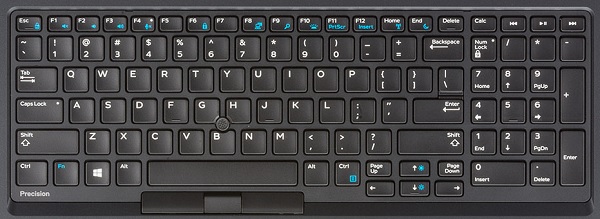
Cause
| 功能鍵組合 | 結果 |
|---|---|
| Fn + Esc | 切換 Fn 鍵鎖定 |
| Fn + F1 | 切換靜音 |
| Fn + F2 | 降低音量 |
| Fn + F3 | 提高音量 |
| Fn + F4 | 切換麥克風靜 音 LED -麥克風可錄製音訊 LED 開啟 - 麥克風靜音,且無法錄製音訊 |
| Fn + F6 | 作為捲動鎖定鍵 |
| Fn + F8 | 切換影像輸出 |
| Fn + F10 | 鍵盤背光照明 停用、暗、亮 |
| Fn + F11 | 作為 Print Screen Key (列印螢幕鍵) |
| Fn + F12 | 作為插入鍵使用 |
| Fn + 右 Ctrl | 作為內容功能表金鑰 |
| Fn + 左游標 | 作為首頁金鑰 |
| Fn + 右游標 | 作為終端金鑰使用 |
| Fn + B | 用作暫停/中斷鍵 |
| Fn + 方向鍵 (向上) | 降低 LCD 亮度 |
| Fn + 方向鍵 (向下) | LCD 亮度增加 |
| Fn + Home | 切換 WiFi 無線電 |
| Fn + End | S3 睡眠模式 |
Resolution
 造訪我們的
造訪我們的 如需其他文章和資訊,請造訪我們的
 您也可以在我們的
Affected Products
Precision 7740Article Properties
Article Number: 000134169
Article Type: Solution
Last Modified: 28 Sept 2023
Version: 4
Find answers to your questions from other Dell users
Support Services
Check if your device is covered by Support Services.