使用 Killer 乙太網路介面卡的網際網路速度緩慢
Summary: Killer Control Center 軟體可讓您設定有線連線的速度限制。透過有線連線連接時,設定較低的值會導致速度變慢。
This article applies to
This article does not apply to
This article is not tied to any specific product.
Not all product versions are identified in this article.
Symptoms
受影響的平台:
- Latitude
- OptiPlex
- Precision 工作站
- Inspiron
- Vostro
- XPS
- G 系列
- Alienware
在配備 Killer E2400 或 E2500 乙太網路介面卡的 Dell 或 Alienware 電腦上,最大化有線連線速度。
配備 Killer 乙太網路配接卡的電腦可能無法透過有線連線達到最大頻寬。
Cause
不適用
Resolution
Killer Control Center 軟體中有一個限速選項,您可以調整該選項以解決此問題。
以下是更改速度限制的步驟:
- 開啟 Killer Control Center
- 按一下左側功能表上的設定
- 按一下 設定頻寬限制 (圖 1)
- 根據您的連線設定上傳和下載速度,然後按一下套用設定 (圖 2)
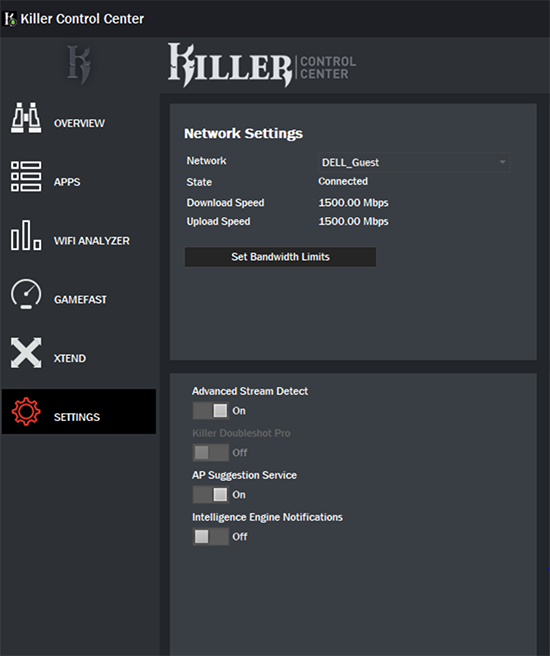 |
| 圖 1:(僅英文)Killer Control Center 設定 |
 |
| 圖 2:(僅英文)Killer Control Center 設定 |
如果問題仍然存在,請參閱以下文章,以取得其他故障診斷步驟:

Affected Products
Inspiron, OptiPlex, Vostro, XPS, G Series, G Series, Alienware, Inspiron, Latitude, Vostro, XPS, Fixed Workstations, Mobile WorkstationsArticle Properties
Article Number: 000135709
Article Type: Solution
Last Modified: 15 Apr 2025
Version: 7
Find answers to your questions from other Dell users
Support Services
Check if your device is covered by Support Services.