How to find Dell Replacement Parts and Accessories Online
Summary: Learn how and where to find Dell replacement parts, laptop parts, monitor parts, and spare parts online using your Service Tag, model, or part number.
This article applies to
This article does not apply to
This article is not tied to any specific product.
Not all product versions are identified in this article.
Instructions
How do I Find the Right Replacement Part and Accessories for my Dell computer?
From the Support Homepage, we recommend that you identify your Dell computer by providing your Find your Service Tag or Serial Number. This allows us to offer options to you based on the information we have about your equipment.
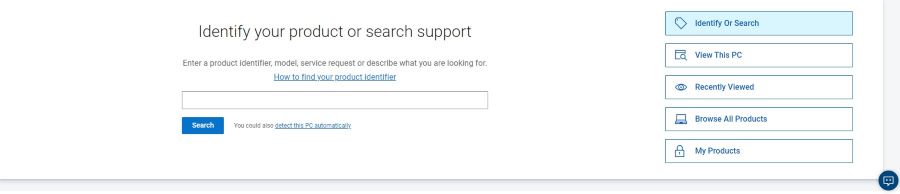
Figure 1: (English Only) Identify your product or search support
When you identify your computer, you are taken to the support page for your product and a range of tabs delivering the information you may need. The button tab is Parts and Repairs, click to view.
While accessing the Parts, Batteries & Updates page, you can search by Brand and Model, Service Tag, Part Number or, use the Browse Part by Type options.
Alternatively, you can access the Parts and Accessories page directly by visiting the Parts, Batteries & Upgrades for your Dell computer.
Note: The offers for Dell-branded parts and upgrades availability might vary depending on location. If parts are not available on our website in your location, Find a Business Partner. (English only - select your location)
How do I Buy Devices, Accessories, or Other Dell products
If you are looking to purchase devices or accessories for your Dell computer, then access the main Dell website in your location (quickly accessed by clicking the DELL icon at the upper left of the website). From here, you can highlight Computers & Accessories > Electronics & Accessories > View all Electronics & Accessories (or one of the other categories that is available).
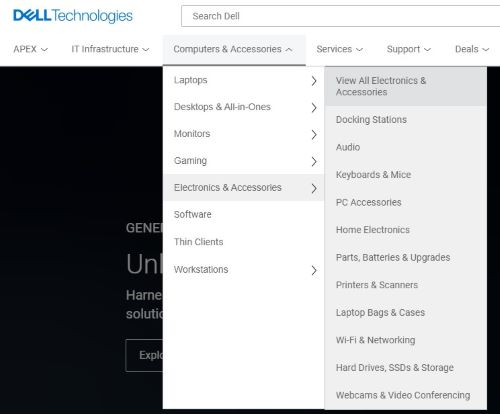
Figure 2: (English Only) View all Electronics & Accessories
Note: Other companies may offer hardware upgrades to Dell computers. Dell Technologies does not validate or endorse these upgrades. If you decide to upgrade upon the recommendation of these companies, you may want to determine if they have tested their product with your specific Dell model; many companies perform their own validation testing on Dell computers. If you encounter problems installing or using these products, contact the upgrade vendor or product manufacturer.
Affected Products
Alienware, Inspiron, Legacy Desktop Models, Vostro, XPS, G Series, G Series, Alienware, Inspiron, Latitude, Dell Pro Rugged, Vostro, XPS, Legacy Laptop Models, Fixed Workstations, Mobile WorkstationsArticle Properties
Article Number: 000136422
Article Type: How To
Last Modified: 09 Oct 2026
Version: 15
Find answers to your questions from other Dell users
Support Services
Check if your device is covered by Support Services.