Using Your Dell Laptop Charger Internationally: Plug Types, Voltage & Travel Tips
Summary: Yes, most Dell AC adapters work in any country (100–240V). Learn how to check your adapter, find the right travel plug, and charge your Dell laptop safely anywhere.
Instructions
This article provides information about using the AC adapter of your Dell laptop while traveling to another location. Most Dell AC adapters work worldwide (100–240V), but check the regulatory label on the back and ensure that the plug fits local outlets.
The adapter brick itself usually works fine worldwide. But the power cable may not fit wall sockets in another country. This guide helps you check your adapter, find the right travel plug, and stay powered up wherever you go.
Table of Contents
- Does my Dell AC adapter work in other countries?
- How to check your adapter's voltage range
- Why power plugs and sockets vary by country
- Quick reference: Common plug types by region
- What's the difference between a travel adapter and a voltage converter?
- How to use your Dell laptop abroad — Step by step
- Can I charge my Dell laptop in a car or on a plane?
- Travel adapter safety — What to look for
- Frequently asked questions
- Quick travel checklist
Does My Dell AC Adapter Work in Other Countries?
Yes, in most cases it does. But there's one small thing to check first.
The AC adapter provided with your Dell laptop works with electrical outlets worldwide. However, the power cable might not be compatible with the power sockets available in another location.
Here's a simple way to think about it:
- The adapter brick (the black box): Most Dell AC adapters can operate between 100 VAC and 240 VAC and work effectively across different locations. This means the brick usually handles any voltage worldwide.
- The power cable (the cord that plugs into the wall): The plug shape may not physically fit the wall socket. A travel adapter solves this.
How to Check Your Charger or Adapter's Voltage Range
Before you travel, take one minute to check the label on your adapter. This simple step can save your device from damage.
Steps:
- Unplug your Dell AC adapter from the wall outlet.
- Turn the adapter brick over so the label faces up.
- Locate the label on the back of your Dell AC adapter brick and confirm its input voltage range.
- Find the line that reads "Input" followed by a voltage range.
What you'll see, and what it means:
| Label reading | What it means |
|---|---|
| Input: 100–240V | Works worldwide. You only need a travel plug adapter. |
| Input: 100–127V only | Works in North America, Japan, and similar low-voltage countries. May need a voltage converter for 220–240V countries. |
| Input: 220–240V only | Works in high-voltage countries only. Not safe for the US, Canada, or Japan without a converter. |

Why Power Plugs and Sockets Vary by Country
Different countries use power supplies at different voltages (usually 110 V or 220–240 V) and AC frequencies (usually 50 Hz or 60 Hz).
In some locations, the mains supply is between 220 and 240 volts (50 or 60 Hz); and others on 100–127 volts.
There are different types of electrical plugs used around the world. Each plug type has specific characteristics including pin configuration, grounding capability, and amperage ratings. Understanding these differences is essential for international travel and ensuring electrical safety.
This is why the plug that works perfectly at home may not physically fit into a wall socket in another country, even when the voltage is identical.
For the full country-by-country reference, visit the IEC World Plugs guide .
What's the Difference Between a Travel Adapter and a Voltage Converter?
This is one of the most common points of confusion for travelers. Here's a clear breakdown:
Travel Plug Adapter
A travel adapter lets your plug fit into a different country's wall socket. Most universal travel adapters only adapt the plug shape, they do not convert voltage.
- Lightweight and compact
- All you need for most modern Dell laptops (which support 100–240V)
- Widely available at electronics stores and airports worldwide
Voltage Converter
A voltage converter changes the electrical voltage from the wall, so it is safe for your device.
- Needed for single-voltage devices (some older appliances, certain hair dryers, etc.)
- Not needed for most modern Dell laptops (which support 100–240V)
Which one do you need?
Most modern electronics (phone chargers, laptops) are dual-voltage ("100–240V") and work worldwide.
In simple terms:
- If Dell AC adapter label says 100–240V, you only need a travel plug adapter.
- If Dell AC adapter says a single voltage only (like 110V or 220V), you need both a travel adapter AND a voltage converter.
How to Use Your Dell Laptop While Travelling — Step by Step
Follow these steps before and during your trip to ensure everything works smoothly.
Before You Travel
- Check your adapter voltage. Turn over your Dell AC adapter brick and read the "Input" voltage label. Confirm it reads 100–240V.
- Research your destination. Check the plug type and voltage standard used in the country or region you are visiting. Visit the IEC World Plugs website
.
- Purchase a travel adapter if needed. You can use universal travel adapters that are compatible with standard wall outlets worldwide. Such travel adapters are compact and ideal for travel.
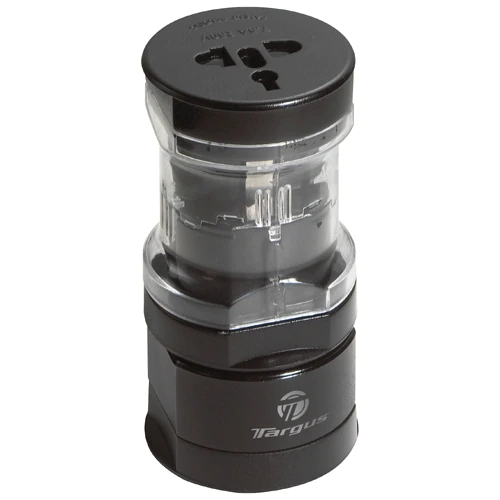
- Verify your adapter covers your destination's plug type. Budget universal adapters frequently omit certain types of plugs. Verify the compatibility list before purchase.
- Buy your adapter before you leave home. Purchasing one before your trip means you won't waste precious travel time hunting for the right adapter at your destination.
When You Arrive
- Connect your Dell power cable to the travel adapter firmly.
- Plug the travel adapter into the local wall socket.
- Connect the other end of the power cable to your Dell AC adapter brick.
- Connect your AC adapter to your Dell laptop's charging port.
- Confirm charging. Check that your laptop shows it is charging.
Can I Charge My Dell Laptop in a Car or on a Plane?
Yes, with the right accessory.
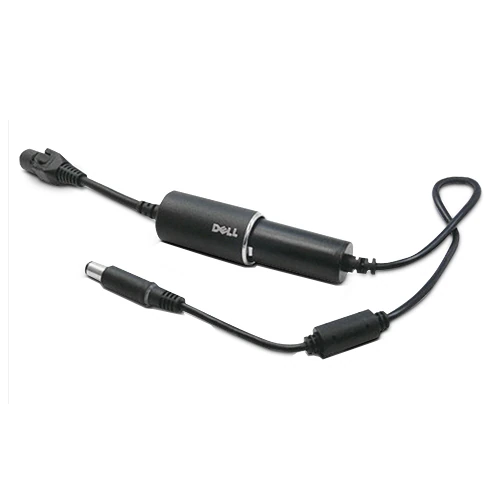
Auto-air adapters can help you stay productive on the road or in-flight. An auto-air adapter plugs into an auto outlet (12V socket in the car) or air outlet. Auto-air adapters are sold as a separate accessory (optional purchase).
Power up and stay productive on the road, in-flight, or in your office with the Dell Auto/Air Adapter. It is an all-in-one DC device that will power your Dell laptops.
Before you buy, check the wattage: Before you purchase, ensure that the auto-air adapter can provide sufficient power to your laptop. For example, if your Dell laptop requires a 90W adapter, you must use an auto-air adapter that can provide 90W of power.
Travel Adapter Safety — What to Look For
Not all travel adapters are equal. A low-quality adapter can overheat or short-circuit and potentially damage your laptop. Here's how to choose one that is safe and reliable.
Look for these safety features:
- Safety certifications: FCC, CE, and UL or ETL marks indicate independent testing for overcurrent protection, short-circuit prevention, and fire resistance.
- Safety shutters on the socket openings to prevent accidental contact.
- A built-in fuse.
- A firm, secure fit: the adapter should not wobble in the socket.
What to avoid:
- Avoid buying cheap, uncertified adapters. Unbranded adapters with no safety certifications may overheat, short-circuit, and damage expensive electronics.
- Avoid daisy-chaining adapters. Connecting adapters in series creates resistance and heat buildup.
- Be aware of wattage limits. An adapter rated for 10A maximum cannot safely power a 1,500W hair dryer. Calculate requirements: Watts ÷ Voltage = Amps.
Frequently Asked Questions (FAQs)
Q: Can I use my Dell AC adapter in another country?
A: Yes, usually. Most Dell AC adapters can operate between 100 VAC and 240 VAC and work effectively across different locations. Check the label on the back of the adapter brick to confirm its input voltage range and make sure you have the correct plug adapter for your destination.
Q: Do I need a voltage converter for my Dell laptop?
A: For most travelers, no. Most modern laptop adapters are dual-voltage (100–240V), so they work worldwide. Check the label on your charger for "INPUT: 100–240V". If it shows this range, you only need a plug adapter, not a voltage converter.
Q: Is a travel adapter the same as a voltage converter?
A: No, they do different things. A plug adapter only changes the physical shape of your plug to fit power outlets; it doesn't change the voltage. A voltage converter actually converts the electrical voltage (e.g., from 220V to 110V). If your device isn't dual-voltage, you'll need both an adapter and a converter to use it safely.
Q: Where can I buy a travel adapter?
A: You can use universal travel adapters that are compatible with standard wall outlets worldwide. They are available at most electronics retailers, travel stores, supermarkets, and major airports. It is recommended buying one before your trip, so you are prepared from the moment you arrive.
Q: Can the frequency difference (50 Hz vs. 60 Hz) affect my Dell laptop?
A: For your Dell laptop, no. The world runs in one of two electricity frequencies: 50 Hz or 60 Hz. It's not a concern unless you have a clock or a device where the clock function is critical. Most devices are designed to accommodate a range of frequencies; the power label on that type of device will say "50–60 Hz." However, some older appliances with motors or heating elements (like clocks or certain dryers) can be affected by the frequency difference.
Q: My Dell laptop isn't charging in another country. What should I check?
A: Work through this quick checklist:
- Confirm the travel adapter is firmly seated in both the wall socket and your Dell power cable, no wobbling.
- Verify the adapter brick label reads 100–240V.
- Try a different wall socket, some sockets in hotels may be switched off separately.
- Confirm the travel adapter is the correct type for that country's power sockets.
- Check that the power cable is securely connected to both the adapter brick and your laptop.
- For USB-C charging: ensure your cable is rated for the required wattage.
Q: What if my adapter label only shows a single voltage, like 110V or 220V?
A: If the label reads "Input: 110V", "120V", or "220V" only, the device is designed for one voltage system. Taking a 120V-only device to a 230V country without a voltage converter will permanently damage it.