이미징 중 Latitude XX20 컴퓨터 블루 스크린
Summary: System Center Configuration Manager 또는 Microsoft Deployment Toolkit을 사용하여 Latitude XX20 이미징을 수행할 때 "액세스할 수 없는 부팅 디바이스" 블루 스크린 오류가 발생합니다.
This article applies to
This article does not apply to
This article is not tied to any specific product.
Not all product versions are identified in this article.
Symptoms
SCCM(System Center Configuration Manager) 또는 MDT(Microsoft Deployment Toolkit)가 포함된 Latitude XX20 CAB 파일 IRST 드라이버를 사용하여 Tiger Lake 컴퓨터를 이미징할 때 블루 스크린 오류가 표시됨 이 문제는 RAID On 모드 인 컴퓨터를 이미징할 때만 발생하며 AHCI 모드의 컴퓨터에는 영향을 주지 않습니다.
해당되는 플랫폼:
- Latitude 3120
- Latitude 3320
- Latitude 3420
- Latitude 3520
- Latitude 5320
- Latitude 5420
- Latitude 5520
- Latitude 7320
- Latitude 7420
- Latitude 7520
- Latitude 9420
- Latitude 9520
Cause
폴더 명명 규칙으로 인해 올바른 드라이버가 잘못 추출됩니다.
Resolution
이미징 중에 액세스할 수 없는 부팅 디바이스 블루 스크린을 해결하는 방법에는 두 가지가 있습니다.
방법 1: 수동 드라이버 CAB 가져오기
- Dell 지원으로 이동하여 영향을 받는 Latitude 플랫폼에 대한 Windows 10 드라이버 CAB를 다운로드합니다.
- CAB 파일의 압축을 풉니다.
- 삭제하거나
7320-win10-A00-WP0RY\7320\win10\x64\storage\5KRPN_A00-00\F6\[2]NonVMD폴더 구조에서 디렉토리로 이동하거나 파일을 삭제합니다.iaAHCIC.inf및iaStorAC.inf해당 디렉토리에서.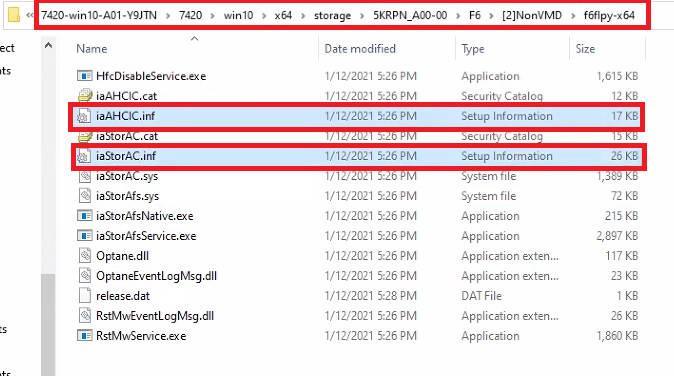
- Microsoft Endpoint Configuration Manager 콘솔을 엽니다.
- 압축을 푼 폴더에서 드라이버를 가져와 드라이버 패키지를 생성합니다.
- 작업 순서의 드라이버 삽입 작업에서 패키지를 사용합니다.
방법 2: Dell Command System Driver Library Import Easy 버튼 사용
- Microsoft Endpoint Configuration Manager 콘솔을 엽니다.
- 소프트웨어 라이브러리, 드라이버 패키지로 차례로 이동한 다음 버튼 표시줄에서 Dell Command System 드라이버 라이브러리가져오기 버튼을 클릭합니다.
- 마법사의 안내에 따라 작업 중인 영향을 받는 Latitude 플랫폼에 적합한 CAB 파일을 선택하고 다운로드합니다. 마법사가 완료되면 Dell 시스템 Cab 드라이버 패키지 폴더에 드라이버 패키지가 생성됩니다. 다운로드한 모델 드라이버 패키지를 클릭하여 패키지의 드라이버 목록을 표시합니다.
- 다음 두 드라이버를 찾아 삭제합니다. 드라이버를 비활성화하는 것으로는 효과가 없습니다. 드라이버를 삭제해야 합니다.
iaAHCIC.infiaStorAC.inf

- 드라이버를 제거한 드라이버 패키지를 마우스 오른쪽 버튼으로 클릭하고 배포 지점 업데이트를 클릭한 다음 확인을 클릭합니다.
- 작업 순서에 드라이버 적용 작업을 추가합니다.
Affected Products
Latitude 3120, Latitude 3320, Latitude 5320, Latitude 7320, Latitude 3420, Latitude 7420, Latitude 9420, Latitude 3520, Latitude 5520, Latitude 7520, Latitude 9520, Latitude 5420Article Properties
Article Number: 000183787
Article Type: Solution
Last Modified: 19 Apr 2025
Version: 5
Find answers to your questions from other Dell users
Support Services
Check if your device is covered by Support Services.