Latitude 7420, 7320, 7520, or 5420 Integrated Camera is Disabled After BIOS Recovery
Summary: The integrated camera on a Latitude 7420, 7320, 7520, or 5420 laptop may be disabled after performing BIOS recovery.
This article applies to
This article does not apply to
This article is not tied to any specific product.
Not all product versions are identified in this article.
Symptoms
Latitude 7420, 7320, 7520, and 5420 users may notice that the camera does not work after a BIOS recovery.
Affected Products:
- Latitude 5420
- Latitude 7320
- Latitude 7420
- Latitude 7520
Cause
The camera may be disabled after a BIOS recovery when Latitude 7420, 7320, and 7520 computers are running BIOS 1.1.2 or an earlier version. Latitude 5420 computers are running BIOS 1.1.1, or an earlier version are also affected.
Resolution
Reviewing the BIOS camera setting reveals that the BIOS recovery process disabled the camera.
Dell released BIOS updates to prevent this from occurring. Version 1.2.3 is available for Latitude 7230, 7420, and 7520 computers. BIOS version 1.3.12 is available for Latitude 5420 computers.
If the BIOS camera setting has been disabled already, the setting may instead be enabled.
To enable the BIOS camera setting:
- From the affected computer, open the BIOS.
Note: For more information about how to access the BIOS, reference Access UEFI (BIOS) System Setup from Windows on your Dell Computer.
- From the left pane, select Integrated Devices.
- Check the checkbox for Enable Camera.
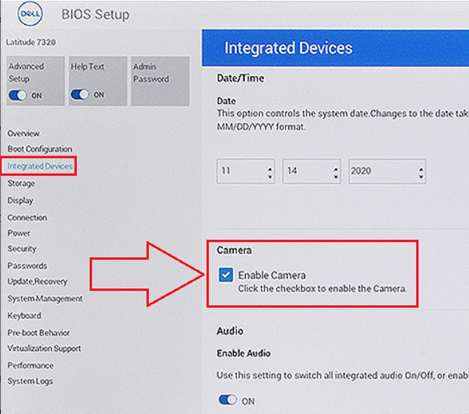
Figure 1. Enabling the camera in the BIOS
Camera still not working? Check out our troubleshooting guide to resolve common webcam or camera issues.
Affected Products
Latitude 7320, Latitude 7420, Latitude 7520, Latitude 5420Article Properties
Article Number: 000185666
Article Type: Solution
Last Modified: 21 May 2025
Version: 7
Find answers to your questions from other Dell users
Support Services
Check if your device is covered by Support Services.