SRDF SRA: Error while adding array pair in the SRM UI: SRA Command 'discoverDevices' failed. No devices found.
Summary: SRDF Replication Adapter (SRA) Command 'discoverDevices' failed. No devices found. Please check the EmcSrdfSra logs for more information about the error.
This article applies to
This article does not apply to
This article is not tied to any specific product.
Not all product versions are identified in this article.
Symptoms
The following error displays while adding an array pair using SRA in the Site Recovery Manager (SRM) user interface (UI):
SRA Command ‘discoverDevices’ failed. No devices found. Please check the EmcSrdfSra logs for more information on the error.
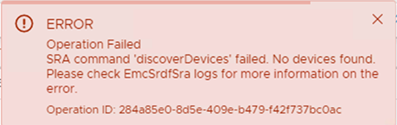
This issue is seen in new array setups.
Additional Information about the configuration where this issue was seen:
- vCenter version: 6.7
- SRM version: 8.1
- SRA version: 9.2.0
- Solutions Enabler (SE) version: 9.2.1 client installed on SRM
- SYMAPI Server: Embedded Managed Array with SE 9.2.1
Cause
These errors appeared because no SRDF pair was established between the local and remote arrays. There was only one SRDF group configured with no device pairs. This is why the array discovery failed.
The local and remote arrays were responding to symrdf ping.
The 'symrdf list' command returned, "There are no RDF devices that are configured in this symmetrix."Resolution
Create an SRDF pair between the local and remote array and establish the SRDF session. Retry the added pair from the SRM UI. The device discovery is then successful.
Affected Products
SRDF Adapter for VMware Site Recovery ManagerArticle Properties
Article Number: 000190100
Article Type: Solution
Last Modified: 26 Aug 2025
Version: 3
Find answers to your questions from other Dell users
Support Services
Check if your device is covered by Support Services.