Avamar: Narzędzie GoAV do zarządzania i rozwiązywania problemów
Summary: GoAV to narzędzie napisane dla Avamar w języku programowania "Go". GoAV to narzędzie interfejsu wiersza poleceń (CLI) używane w Avamar do zbierania informacji i rozwiązywania problemów ze środowiskiem Avamar. ...
This article applies to
This article does not apply to
This article is not tied to any specific product.
Not all product versions are identified in this article.
Instructions
Omówienie
GoAV to narzędzie napisane w języku Go, które zapewnia administratorom Avamar solidny interfejs do zarządzania środowiskami i rozwiązywania problemów z Avamarem. Zawiera różne funkcje automatyzacji i diagnostyki, a częste aktualizacje wprowadzają nowe możliwości.
Pobieranie najnowszej wersji GoAV Narzędzie:
1. Przejdź do strony rozwiązania GoAV Central , aby pobrać narzędzie i dokumentację:

2. Pobierz goav.zip ze strony.
3. Kliknij kartę "Associated Files", aby pobrać powiązane pliki GoAV Dokumentacja:
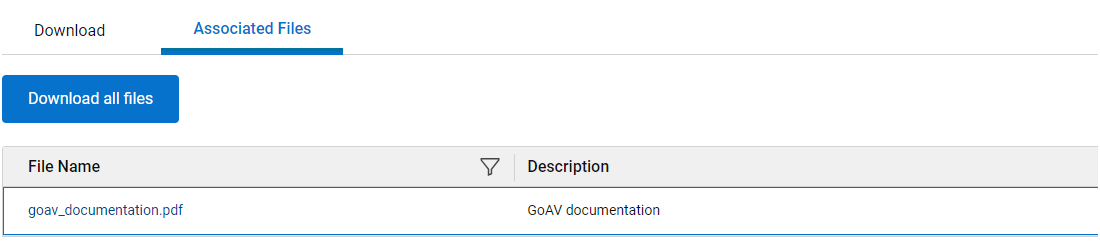
Instalowanie GoAV Narzędzie:
1. Prześlij goav.zip do węzła Avamar Utility Node
2. Wyodrębnij plik .zip pliku:
unzip -o goav.zip
3. Upewnij się, że GoAV binarny plik wykonywalny:
chmod a+x goav
4. Sprawdź zainstalowaną wersję:
./goav version show
===========================================================
GoAv    :        1.93
Avamar  :        19.12
Date    :        20 Mar 2025 12:03 EDT
===========================================================
COMMAND :  ./goav version show
NOTE: This tool was created and is maintained by the ISG Support Tools team
===========================================================
GoAV : 1.93
Aktualizacja istniejącej wersji GoAV Version:
Uruchom następujące polecenie, aby zaktualizować GoAV:
./goav update
Funkcja aktualizacji sprawdza bieżącą wersję GoAV w witrynie repozytorium i próbuje pobrać najnowszą wersję.
Struktura dowodzenia:
GoAV jest zgodny ze strukturalną hierarchią poleceń, umożliwiając użytkownikom uruchamianie różnych zadań związanych z Avamar.
Command line tool for Avamar.

Usage:
  goav [command]

Available Commands:
  activity      Activity related operations.
  client        Client related operations.
  dataset       Dataset related operations.
  dd            DataDomain related operation
  documentation Generate GOAV PDF documentation.
  envinfo       Environment Information.
  help          Help about any command
  idpa          Allows a user to check or fix multiple internal client/policy issues
  mft           Allows for upload/download to or from Dell MFT.
  ndmp          NDMP related operations
  plugin        Avamar plugin related operation.
  policy        Policy related operations.
  proxy         Avamar VMImage proxy related operations.
  rabbitmq      RabbitMQ related operations.
  replication   Replication related operations.
  retention     Retention related operations.
  rule          Rules related operations.
  schedule      Schedule related operations.
  security      certificate, keystore, secure operations
  system        Avamar system related operations.
  update        Update GOAV to latest version.
  vcenter       vCenter related operations.
  version       Displays GoAV version information.
  vm            Virtual Machine related operations.

Flags:
  -d, --debug                debug output
  -f, --force                Ignore Configuration
  -h, --help                 help for goav
  -n, --noheader             Do not display header
  -s, --validate-signature   Validate GoAV digital Signature

Use "goav [command] --help" for more information about a command.
Uzyskiwanie pomocy dotyczącej polecenia:
Aby uzyskać szczegółową pomoc dotyczącą dowolnego polecenia, użyj "-h lub --help":
./goav client show-gsan -h


Show Avamar clients in gsan, as opposed to mcdb
Gsan is where backups are actually stored, it is useful to get a list from gsan instead of mcdb sometimes!

Usage:
  goav client show-gsan [flags]

Aliases:
  show-gsan, list-gsan

Examples:
./goav client show-gsan
./goav client show-gsan --domain /REPLICATE
./goav client show-gsan --hasBackups
./goav client show-gsan --noBackups --domain /MC_RETIRED --hasbackups

Flags:
      --domain string   Specify domain root to start recursive search from (default "/")
      --hasBackups      List clients with backups in gsan, excluding clients without backups
  -h, --help            help for show-gsan
      --noBackups       List clients with no backups in gsan, excluding clients with backups
      --out string      Specify output filename for report (default "/home/admin/goav_clients/client_list_report_2023-07-10-1689007451.csv")

Global Flags:
  -d, --debug      debug output
  -f, --force      Ignore Configuration
  -n, --noheader   Do no display header
Przykładowe użycie:
Aby wyświetlić wszystkie serwery proxy Avamar:
./goav proxy show
===========================================================
GoAv    :        1.93
Avamar  :        19.12
Date    :        10 Jul 2023 12:48 EDT
===========================================================
COMMAND :  ./goav proxy show
NOTE: This tool was created and is maintained by the ISG Support Tools team
===========================================================
              name                 | domainFqdn |            vcenterHost            |                    id                    | activated | autoDsMapping | clientVersion
-------------------------------+------------+-----------------------------------+------------------------------------------+-----------+---------------+----------------
  abc-proxy-95.example.company.com | /clients   | xyz-test1-vcenter.lab.company.com | e90b74a9c0c4569d1a0b84fd6ff4f3026939bd12 | true      | false         | 19.12.100-83
  abc-proxy-96.example.company.com | /clients   | xyz-test1-vcenter.lab.company.com | 214d56edb74df890bd88f0c06360216b423ce5fd | true      | false         | 19.12.100-83
Referencje:
Poniższe artykuły bazy wiedzy zawierają dodatkowe informacje na temat
GoAV Funkcje:
-
-
Artykuł 000221404: Avamar: Jak korzystać
GoAVMenu sprawdzania poprawności działania systemu -
Artykuł 000215679: Avamar: Informacje o
GoAVFunkcja DD Check-SSL -
Artykuł 000220471: Avamar: Jak korzystać
GoAVMenedżer ds. wdrażania proxy -
Artykuł 000225881: Avamar: Jak korzystać
GoAVFunkcja Integrated Data Protection Appliance -
Artykuł 000223619: Avamar: Jak korzystać
GoAVMenu odzyskiwania systemu od podstaw klienta -
Artykuł 000210222: Avamar: Sposób użycia
GoAVZestaw funkcji oprogramowania RabbitMQ -
Artykuł 000227896: Avamar: Niezgodność identyfikatora klienta (CID) z
GoAVKorygowania -
Artykuł 000188866: IDPA: Wdrażanie poprawek i poprawek proxy IDPA 2.6 i Avamar za pomocą
GoAV
-
Additional Information
Aby uzyskać dodatkowe informacje, obejrzyj ten film:
Affected Products
AvamarArticle Properties
Article Number: 000192151
Article Type: How To
Last Modified: 17 Nov 2025
Version: 25
Find answers to your questions from other Dell users
Support Services
Check if your device is covered by Support Services.