NetWorker NVP-vProxy: 备份失败并显示错误: VDDK Error: 13: “您无权访问此文件。”“无法分配 SCSI 目标 ID”
Summary: 使用 Hotadd 传输模式的基于 Dell EMC NetWorker vProxy 的备份显示一个或多个虚拟机失败,并显示有关 VMDK 文件访问权限的 VDDK 13 错误。
This article applies to
This article does not apply to
This article is not tied to any specific product.
Not all product versions are identified in this article.
Symptoms
vProxy 会话日志显示一个或多个虚拟机失败,并显示以下错误:
2021-10-12T22:11:52Z ERROR:  [@(#) Build number: 78] 654f8808-ce2a-4472-9f50-e037ab7038b3:vm-231097:VCENTER: Failed to open source VMDK '[DATASTORE_NAME] VM-NAME/VM_NAME_#.vmdk': VDDK Error: 13: You do not have access rights to this file.
2021-10-12T22:11:52Z ERROR:  [@(#) Build number: 78] 654f8808-ce2a-4472-9f50-e037ab7038b3:vm-231097:VCENTER: Failed to initialize Block Reader.
2021-10-12T22:11:52Z ERROR:  [@(#) Build number: 78] 654f8808-ce2a-4472-9f50-e037ab7038b3:vm-231097:VCENTER: Failed to backup virtual disk "Hard disk 2".
为 vProxy VDDK 启用调试日志记录会在vbackupd-vddk.log中显示以下错误:
2021-10-12T18:11:52.409-04:00 error -[02778] [Originator@6876 sub=transport] Cannot use mode hotadd to access [DATASTORE_NAME] VM-NAME/VM_NAME_#.vmdk: Cannot mount using this method. (Mounting 421dd75d-c2a2-ff69-69d3-5b8f7cde98ca using transport hotadd failed : Failed to allocate SCSI target ID..)
Cause
原因未知。 默认情况下,vProxy 使用四个 SCSI 控制器从 OVA 文件部署。 部署 vProxy 时,没有可用于更改 SCSI 控制器数量的配置选项。
但是,查看一个或多个已部署 vProxy 的硬件设置时,它们仅显示一个 SCSI 控制器。 发生 VDDK 错误的原因是 vProxy 没有预期的四个 SCSI 控制器的默认值,并且在备份期间没有足够的空间来装载其他客户端磁盘。
但是,查看一个或多个已部署 vProxy 的硬件设置时,它们仅显示一个 SCSI 控制器。 发生 VDDK 错误的原因是 vProxy 没有预期的四个 SCSI 控制器的默认值,并且在备份期间没有足够的空间来装载其他客户端磁盘。
Resolution
要解决此问题,您可以执行以下作:
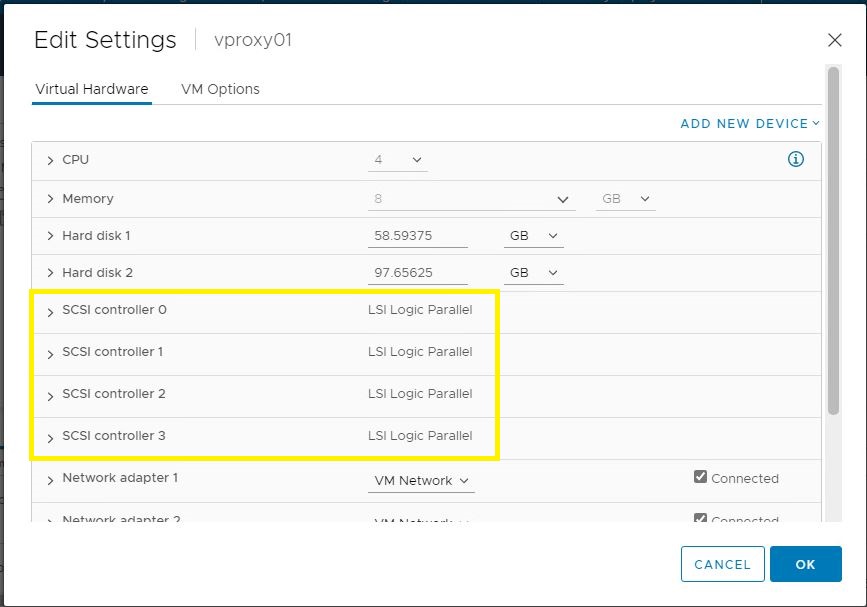
完成后,vProxy 硬件设置应如下所示:
1. 确保 NetWorker Management Console (NMC) 中没有正在运行的 vProxy 备份。
2. 关闭 VMware 中的 vProxy 虚拟机。
3. 转至Edit Settings,然后将缺少的 SCSI 控制器添加到受影响的 vProxy,因此总共有 4 个。
4. 重新启动 vProxy。 它会检测并自动配置新控制器。
2. 关闭 VMware 中的 vProxy 虚拟机。
3. 转至Edit Settings,然后将缺少的 SCSI 控制器添加到受影响的 vProxy,因此总共有 4 个。
4. 重新启动 vProxy。 它会检测并自动配置新控制器。
完成后,vProxy 硬件设置应如下所示:
Additional Information
NVP-vProxy:如何启用调试日志记录
注意:出现“您没有访问权限”错误可能还有其他原因,在本例中,消息与“无法分配 SCSI 目标 ID”相关联。有关“您没有访问权限”错误的其他文档,请参阅:
注意:出现“您没有访问权限”错误可能还有其他原因,在本例中,消息与“无法分配 SCSI 目标 ID”相关联。有关“您没有访问权限”错误的其他文档,请参阅:
- HotAdd 问题:NVP vProxy:虚拟机备份失败,并显示“VDDK error:13: You do not have access rights to this file."
- 端口问题:NVP vProxy:备份失败并显示“VDDK Error:13: 您无权访问此文件。”
- 权限问题:NVP vProxy:虚拟机备份失败,并显示“无法打开源代码 VMDK'[DATASTORE] UUID/VM_NAME.vmdk':VDDK Error: 13: You do not have access rights to this file."
- 虚拟机路径包含特殊字符:当虚拟机路径包含特殊字符时,NetWorker vProxy 备份失败,并显示“您无权访问此文件”
Affected Products
NetWorkerProducts
NetWorker Family, NetWorker SeriesArticle Properties
Article Number: 000192687
Article Type: Solution
Last Modified: 06 Apr 2022
Version: 1
Find answers to your questions from other Dell users
Support Services
Check if your device is covered by Support Services.