NVP vProxy: VM Back Up Fails to Create a Snapshot when the VM is Configured with Bus Sharing
Summary: NetWorker VMware Protection (NVP) vProxy backup fails, stating that it fails to create a snapshot of a virtual machine (VM) configured with a shared disk.
This article applies to
This article does not apply to
This article is not tied to any specific product.
Not all product versions are identified in this article.
Symptoms
- VM backup session log reports:
YYYY-MM-DDTHH:mm:SSZ INFO:   [154] Creating snapshot of virtual machine ...
YYYY-MM-DDTHH:mm:SSZ ERROR:  [154] Unable to create non-quiesced snapshot after a retry attempt: An error occurred while saving the snapshot: Cannot snapshot shared disk.
YYYY-MM-DDTHH:mm:SSZ ERROR:  [154] Unable to create snapshot.
Or
YYYY-MM-DDTHH:mm:SSZ INFO:   [@(#) Build number: 93] Creating snapshot of virtual machine ...
YYYY-MM-DDTHH:mm:SSZ ERROR:  [@(#) Build number: 93] Unable to create non-quiesced snapshot after a retry attempt: Virtual machine is configured to use a device that prevents the snapshot operation: Device '' is a SCSI controller engaged in bus-sharing.
YYYY-MM-DDTHH:mm:SSZ ERROR:  [@(#) Build number: 93] Unable to create snapshot.
NetWorker server:
- Linux: /nsr/logs/policy/Policy_Name/Workflow_Name/
- Windows: C:\Program Files\EMC NetWorker\nsr\logs\policy\Policy_Name\Workflow_Name\
vProxy: /opt/emc/vproxy/runtime/logs/recycle/vbackupd/Date/
- The vProxy /opt/emc/vproxy/runtime/logs/vbackupd/vbackupd-snapmgr.log reports:
YYYY-MM-DDTHH:mm:SSZ INFO:   Task to create snapshot completed, errors = true.
YYYY-MM-DDTHH:mm:SSZ ERROR:  Unable to create non-quiesced snapshot after a retry attempt: An error occurred while saving the snapshot: Cannot snapshot shared disk.
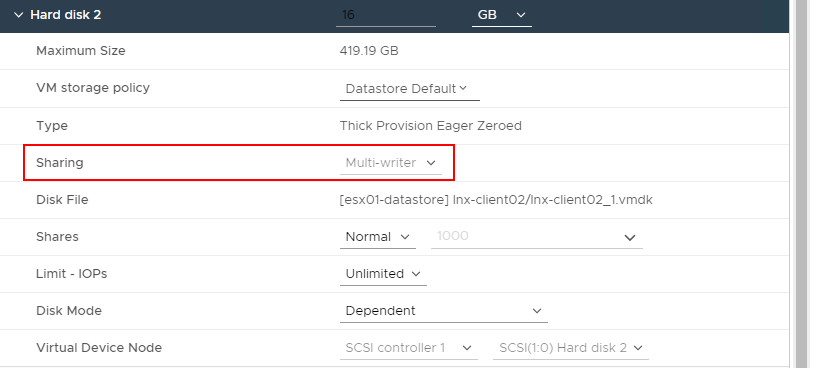
- The VM is configured with a shared multi-write disk in VMware:
- vSphere Task Console may report the following during backups:

Cause
This is expected behavior. VMware does not support snapshots of virtual machines configured for bus sharing. See VMware article Manage Virtual Machines With Snapshots
If a VM is configured for bus sharing, the Create Snapshot options are unavailable (unavailable) in VMware:


Resolution
Since VMware is unable to snapshot the VM, the VM is not supported by NetWorker VMware Protection (NVP) backups. Remove the VM from any NetWorker protection group that it is configured in.
To backup this VM, install the NetWorker client software on the VM and configure the NetWorker client to back up the system. See the NetWorker Installation and NetWorker Administration Guides for information about installing and configuring the NetWorker client. NetWorker documentation and software are available on the Dell Support NetWorker Product Page.
Additional Information
Affected Products
NetWorkerProducts
NetWorker Family, NetWorker SeriesArticle Properties
Article Number: 000225705
Article Type: Solution
Last Modified: 07 May 2025
Version: 3
Find answers to your questions from other Dell users
Support Services
Check if your device is covered by Support Services.