Dell 大框架顯示器觸控螢幕功能無法運作
Summary: 修正當多個視訊輸入插入顯示器時,Dell 大框架顯示器 (LFM) 上的無觸控功能的相關資訊。
This article applies to
This article does not apply to
This article is not tied to any specific product.
Not all product versions are identified in this article.
Symptoms
Cause
將影像輸入插入 Dell 大畫面顯示器時,您只能將一個視訊輸入連接至電腦,觸控功能便可正常運作。如果您從一台電腦插入兩個視訊輸入,觸控功能將無法運作。若有多部電腦,每部電腦都必須使用一條 HDMI 或 DisplayPort (DP) 纜線和一條 USB 上游纜線連接至顯示器。
Resolution
影像輸入來源和 USB 配對
請務必同時連接影像輸入來源纜線 和符合下表 的 USB 上游纜線。範例:若您連接 HDMI 1 和 USB 2,則不會有觸控功能。
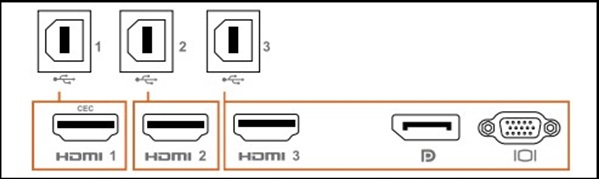
表格
| 輸入來源 | USB 上行 | 觸控功能是否有效 |
|---|---|---|
| HDMI 1 (CEC) | USB 1 | ✔ |
| HDMI 2 | USB 2 | ✔ |
| HDMI 3 | USB 3 | ✔ |
| DisplayPort (DP) | ||
| VGA |
Affected Products
Dell P5524QT, Dell P6524QT, Dell P7524QT, Dell P8624QTArticle Properties
Article Number: 000228000
Article Type: Solution
Last Modified: 16 Apr 2025
Version: 3
Find answers to your questions from other Dell users
Support Services
Check if your device is covered by Support Services.