PowerProtect VM direct Engine is not able to disable or redeploy due to active sessions
Summary: The PowerProtect Data Manager Appliance is used to protect the vSphere environment with the virtual machine (VM) Direct Engine solution. The VM Direct Engine has been disabled, but it cannot be deleted or redeployed in the environment. ...
This article applies to
This article does not apply to
This article is not tied to any specific product.
Not all product versions are identified in this article.
Symptoms
The vproxymgmt command-line utility shows that the status is "DisablePending" for a disabled VM Direct Engine and "MaintenancePending" for a VM Direct Engine being redeployed. The status of the disabled VM Direct Engine must be "Disabled" before the option is available to delete. The status of the redeployed VM Direct Engine must be "Deploying" before the redeployment can start.
my-ppdm:~ # source /opt/emc/vmdirect/unit/vmdirect.env
my-ppdm:~ # /opt/emc/vmdirect/bin/vproxymgmt get -secret
Total '3' vProxies VMs available.

VProxy ID: 858bdbd9-6ca8-4fc6-a991-ff5bbcf5a13b
Type: External
Hostname: my-ppdm-proxy01.my-domain.com
Disabled: true
Status: MaintenancePending
Protection Type: VM
VCenter inventory source ID: 104f656f-a20b-5059-bd9b-bb8482548d94
VCenter: my-vcenter.my-domain.com
VM Name: my-ppdm-proxy01.my-domain.com
AdminCredentials-Username: 'admin' Password: '########'
RootCredentials-Username: 'root' Password: '########'
VM Configured Capacity Units: 80
VM Configured Control Units: 10000
VM Capacity Units in use: 72
VM Control Units in use: 7255
VM Control Sessions in use: 1
VM Transport Sessions in use: 18


VProxy ID: de15b583-89d8-4240-927e-1a416fa826d1
Type: Embedded
Hostname: localhost
Disabled: false
Status: Ready
Protection Type: VM
VM Configured Capacity Units: 16
VM Configured Control Units: 10000
VM Capacity Units in use: 0
VM Control Units in use: 0
VM Control Sessions in use: 0
VM Transport Sessions in use: 0


VProxy ID: c22cbdcb-8cbe-4f7a-9e11-26ed78b0dfdd
Type: External
Hostname: my-ppdm-proxy02.my-domain.com
Disabled: true
Status: DisablePending
Protection Type: VM
VCenter inventory source ID: 104f656f-a20b-5059-bd9b-bb8482548d94
VCenter: my-vcenter.my-domain.com
VM Name: my-ppdm-proxy02.my-domain.com
AdminCredentials-Username: 'admin' Password: '########'
RootCredentials-Username: 'root' Password: '########'
VM Configured Capacity Units: 80
VM Configured Control Units: 10000
VM Capacity Units in use: 80
VM Control Units in use: 8110
VM Control Sessions in use: 2
VM Transport Sessions in use: 20

my-ppdm:~ #
Cause
There are no active VM backups running in the environment, but the VM Direct Engine "VM Control Sessions in use" attribute shows stale sessions. The "VM Control Sessions in use" attribute should be zero, when there are no VM Direct Engine backups running in the environment. The cause of the stale "VM Control Sessions in use" attribute sessions is unknown.
Resolution
Workaround:
The procedure cleans up the stale ProxySessions metadata in the PowerProtect environment.
-
Ensure that there are no active VM Direct Engine backups or restores being performed.
-
Take a VMware Snapshot of the PowerProtect Appliance virtual machine.
-
Open an SSH session to PowerProtect Data Manager and authenticate with the admin account.
-
Use the
sucommand and authenticate with the root password:sudo su
-
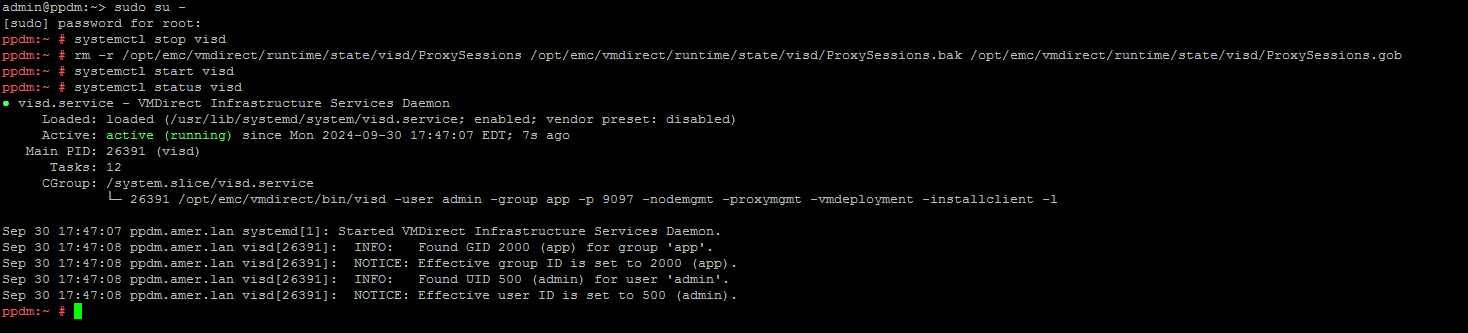
Stop the
visddaemon:systemctl stop visd
-
Remove the ProxySession files:
rm -r /opt/emc/vmdirect/runtime/state/visd/ProxySessions /opt/emc/vmdirect/runtime/state/visd/ProxySessions.bak /opt/emc/vmdirect/runtime/state/visd/ProxySessions.gob
-
Start the
visddaemon:systemtctl start visd
-
Validate the status of the
visddaemon:systemctl status visd
-
Validate the "VM Control Sessions in use" attribute shows zero for all VM Direct Engine instances.
-
Once functionality is validated, delete the VMware Snapshot of the PowerProtect Appliance virtual machine.
Example output:
Article Properties
Article Number: 000230761
Article Type: Solution
Last Modified: 18 Jul 2025
Version: 2
Find answers to your questions from other Dell users
Support Services
Check if your device is covered by Support Services.