PowerFlex: Re-Initialize Replication after Replication Break
Summary: The replication consistency group might get deleted for various reasons, and the replication between source and target sites stops. The common ground for all cases is the end of the Journal capacity. ...
This article applies to
This article does not apply to
This article is not tied to any specific product.
Not all product versions are identified in this article.
Symptoms
From the command line, we can find warning messages stating "volumes in broken replication consistency groups."
# scli --query_all_replication_pairs
query_all_replication_pairs returned 0 Replication Pairs.
WARNING: The System contains 2 volumes in broken replication consistency groups

# scli --query_all_replication_consistency_groups
Protection Domain aef4ce8300000000 Name: RHEL7-PD
WARNING: The Protection Domain contains 2 volumes in broken replication consistency groups
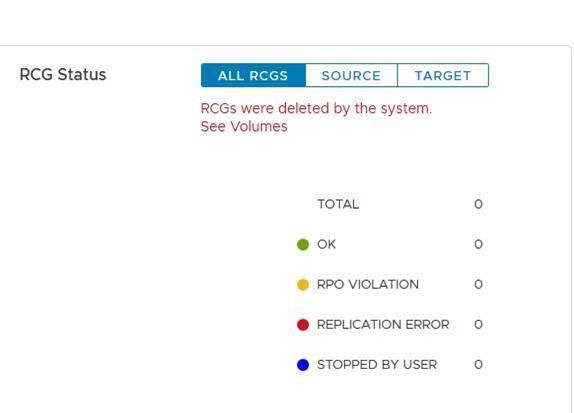
From the user interface, the Replication Consistency Groups (RCGs) status has the following error 'RCGs were deleted by the system'.
The purpose of those log files is to enable smooth reinitialization of the replication between the sites. The log files are used to quickly restart the replication process after the cause of the break is resolved.
Cause
Examples of reasons that might cause replication break:
a. Long network failure between source and target sites
b. Sudden decrease of capacity on the source or target sites - for example in a Data Unavailable (DU) scenario
Once replication is broken, the MDM will automatically delete all the replication consistency groups (RCGs) between the source and target sites. And it generates replication log files that hold all the information related to the deleted RCGs.
Resolution
a. Locate the autogenerate replication break log files under the primary MDM with the next format -
Auto-DeletedOnEndOfJournalCapacityRplCg_<RCG_ID>_<RCG_name>
Example:
# cd /opt/emc/scaleio/mdm/logs
# ls -l AutoDelete*
-rw-r--r-- 1 root root 953 Apr 14 12:15 AutoDeletedOnEndOfJournalCapacityRplCg_4ca1bc9600000000_Rep_Beta1
b. Validate that the issue that caused the replication to be broken is fixed.
c. Reinitialize replication by one of the following two methods: Using script or Manually.
Using script:
-
Generate one file that has all the relevant commands from the autogenerated log files in order to reinitialize replication
Example:
for i in `ls /opt/emc/scaleio/mdm/logs/AutoDeletedOnEndOfJournalCapacity*`;do sed -e '1,/Recreation CLIs/d' $i >> full_replication_restore_$(date +%s); done -
Validate the file was created successfully and its content
Example:
[root@112AX-7 logs]# cat full_replication_restore_1587387678 scli --add_replication_consistency_group --replication_consistency_group_name rcg_sanity --destination_system_object_id 416af83800000000 --protection_domain_id b3dd0a5900000000 --remote_protection_domain_id 4ff0744e00000000 --rpo 60 --target_volume_access_mode no_access scli --add_replication_pair --replication_consistency_group_name rcg_sanity --source_volume_id 0da61f0d00000003 --destination_volume_id 1981bbaf00000005 --copy_type full scli --add_replication_consistency_group --replication_consistency_group_name rcg_SANITY2 --destination_system_object_id 416af83800000000 --protection_domain_id b3dd0a5900000000 --remote_protection_domain_id 4ff0744e00000000 --rpo 60 --target_volume_access_mode no_access scli --add_replication_pair --replication_consistency_group_name rcg_SANITY2 --source_volume_id 0da61f2500000000 --destination_volume_id 1981bbb000000006 --copy_type full scli --add_replication_consistency_group --replication_consistency_group_name rcg_sanity3 --destination_system_object_id 416af83800000000 --protection_domain_id b3dd0a5900000000 --remote_protection_domain_id 4ff0744e00000000 --rpo 60 --target_volume_access_mode no_access scli --add_replication_pair --replication_consistency_group_name rcg_sanity3 --source_volume_id 0da61f2600000001 --destination_volume_id 1981bbb100000007 --copy_type full [root@112AX-7 logs]# -
Make the generated file executable, then log in as admin to the primary MDM and run the created file.
Example:
# scli --login --username admin --password xxxxxxxxxx Logged in. User role is SuperUser. System ID is xxxxxxxxxxxxxxx # # chmod +x full_replication_restore_1587387678 ; ./full_replication_restore_1587387678 Successfully created Replication Consistency Group rcg_sanity. Object ID 357a6c4f00000001 Successfully created the Pair, ID = a1f1819900000001 Successfully created Replication Consistency Group rcg_SANITY2. Object ID 357a6c5300000003 Successfully created the Pair, ID = a1f1819a00000002 Successfully created Replication Consistency Group rcg_sanity3. Object ID 357a6c5500000005 Successfully created the Pair, ID = a1f1819b00000003 - Validate that the replication was created successfully by running
-
scli --query_all_replication_consistency_groups
scli --query_all_replication_pairs
-
Manually:
-
Check that each RCG that was auto-deleted has an autogenerated log file:
Example:
# ls /opt/emc/scaleio/mdm/logs/AutoDeletedOnEndOfJournalCapacity* /opt/emc/scaleio/mdm/logs/AutoDeletedOnEndOfJournalCapacityRplCg_357a454600000001_rcg_sanity /opt/emc/scaleio/mdm/logs/AutoDeletedOnEndOfJournalCapacityRplCg_357a6c4b00000002_rcg_SANITY2 /opt/emc/scaleio/mdm/logs/AutoDeletedOnEndOfJournalCapacityRplCg_357a6c4c00000003_rcg_sanity3 -
Repeat the next steps for each file in the list at step 1 above
a. Check that the CLI commands were generated and validate that it has the relevant information under Recreation CLIsExample:
#cat AutoDeletedOnEndOfJournalCapacityRplCg_357a6c4900000001_rcg_sanity

REPLICATION CONSISTENCY GROUP
LocalId:357a6c4900000001
RemoteId:4ca1e3ab00000001
Name:rcg_sanity
PeerMdmId:416af83800000000
RpoSeconds:60
Direction:LOCAL_TO_REMOTE
DRState:NONE
DeletionDecisionTime:20/04 08:37:35
DeletionReason:AUTOMATIC_ON_END_OF_CAPACITY
FailureDomainId:b3dd0a5900000000
RemoteFailureDomainId:4ff0744e00000000
PAIR 0
LocalId:a1f1819600000001
RemoteId:2dfad1c100000001
LocalVolumeId:0da61f0d00000003
LocalVolumeName:test1
RemoteVolumeId:1981bbaf00000005
RemoteVolumeName:test1
Recreation CLIs:
scli --add_replication_consistency_group --replication_consistency_group_name rcg_sanity --destination_system_object_id 416af83800000000 --protection_domain_id b3dd0a5900000000 --remote_protection_domain_id 4ff0744e00000000 --rpo 60 --target_volume_access_mode no_access
scli --add_replication_pair --replication_consistency_group_name rcg_sanity --source_volume_id 0da61f0d00000003 --destination_volume_id 1981bbaf00000005 --copy_type full
b. Run all the commands that appear under the "Recreation CLIs" section
Example:
# scli --add_replication_consistency_group --replication_consistency_group_name rcg_sanity --destination_system_object_id 416af83800000000 --protection_domain_id b3dd0a5900000000 --remote_protection_domain_id 4ff0744e00000000 --rpo 60 --target_volume_access_mode no_access Successfully created Replication Consistency Group rcg_sanity. Object ID 357a6c4f00000001 [root@112AX-7 logs]# scli --add_replication_pair --replication_consistency_group_name rcg_sanity --source_volume_id 0da61f0d00000003 --destination_volume_id 1981bbaf00000005 --copy_type full Successfully created the Pair, ID = a1f1819900000001 [root@112AX-7 logs]# -
Validate that the replication was created successfully by running
-
scli --query_all_replication_consistency_groups

scli --query_all_replication_pairs
-
Affected Products
PowerFlex rack, ScaleIO, PowerFlex SoftwareArticle Properties
Article Number: 000260985
Article Type: Solution
Last Modified: 03 Jul 2025
Version: 3
Find answers to your questions from other Dell users
Support Services
Check if your device is covered by Support Services.