Pluton Security Processor Details are not Displayed in Windows Settings
Summary: This article provides information about the Microsoft Pluton security processor details not visible in Windows 24H2 build 26100.2605 and earlier.
This article applies to
This article does not apply to
This article is not tied to any specific product.
Not all product versions are identified in this article.
Symptoms
Affected Platforms:
- Dell Pro 14 PC14255
- Dell Pro 16 PC16255
- Dell Pro 13 Plus PB13255
- Dell Pro 14 Plus PB14255
- Dell Pro 16 Plus PB16255
- Dell 14 Plus 2-in-1 DB04250
- Dell 16 Plus 2-in-1 DB06250
Affected Operating Systems:
- Windows 24H2 build 26100.2605 and Earlier
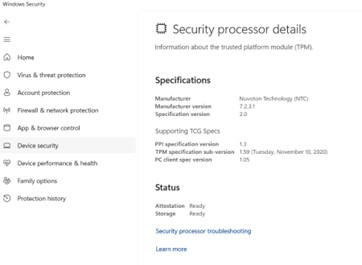
When viewing Settings > Privacy & Security > Windows Security > Device Security and selecting Security Processor Details, Microsoft Pluton Security Processor Information is not available.
Cause
Microsoft Pluton security processor details are not covered in Windows builds 24H2 and earlier.
Resolution
Microsoft Pluton security processor details will be a future user interface feature, and Microsoft plans a Windows servicing update early 2025.
Affected Products
Dell 14 Plus 2-in-1 DB04250, Dell 16 Plus 2-in-1 DB06250, Dell Pro 13 Plus PB13255, Dell Pro 14 Plus PB14255, Dell Pro 16 Plus PB16255, Dell Pro 14 PC14255, Dell Pro 16 PC16255Article Properties
Article Number: 000300944
Article Type: Solution
Last Modified: 13 May 2025
Version: 2
Find answers to your questions from other Dell users
Support Services
Check if your device is covered by Support Services.