VxRail: How to change VSPHERELOCAL Administrator User Permission from VMware HCIA Management to Administrator
Summary: If the "administrator@vsphere.local" role gets changed to "VMware HCIA Management," and no other administrator accounts are available, the steps below can be used to create an administrator account through CLI. ...
This article applies to
This article does not apply to
This article is not tied to any specific product.
Not all product versions are identified in this article.
Instructions
How to change VSPHERELOCAL\Administrator User Permission from VMware HCIA Management to Administrator.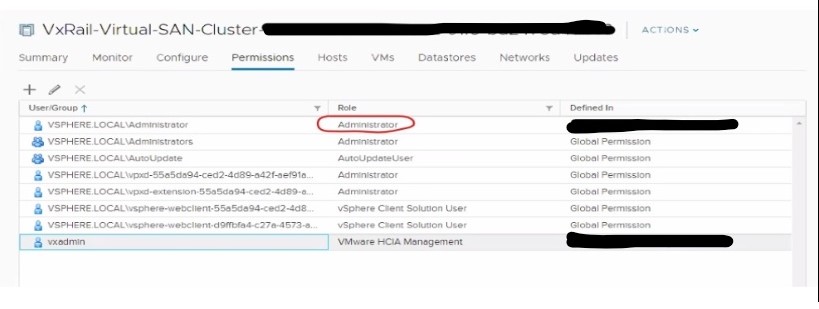
If the Role of administrator@vsphere.local is changed from Administrator to VMware HCIA Management, follow the below steps to revert to the original permission role (Administrator):
- Log in to VCSA as root on ssh session.
- Create a new user account on SSO by performing below command:
/usr/lib/vmware-vmafd/bin/dir-cli user create --account <accountname> --first-name <name> --last-name <name> --user-password '<password>' For Example: root@VCSA6.5:# [ ~ ]# /usr/lib/vmware-vmafd/bin/dir-cli user create --account <name> --first-name <name> --last-name <name> --user-password '<Password>' Enter password for administrator@vpshere.local: User account [<USER>] created successfully - Add the user to the group Administrator by performing below command:
/usr/lib/vmware-vmafd/bin/dir-cli group modify --name Administrators --add <USER> For Example: root@VCSA6.5:# [ ~ ]# /usr/lib/vmware-vmafd/bin/dir-cli group modify --name Administrators --add <USER> Enter password for administrator@vpshere.local: Account [<USER>] added to group [Administrators] Group member [<USER>] added successfully. - Access the vSphere web-client portal and try to log in with newly created user (name@vsphere.local).
- Change the Role Permission back from VMware HCIA Management to Administrator.
Additional Information
Affected Products
VxRail, VxRail Appliance Series, VxRail SoftwareArticle Properties
Article Number: 000012383
Article Type: How To
Last Modified: 08 Jul 2025
Version: 6
Find answers to your questions from other Dell users
Support Services
Check if your device is covered by Support Services.