NetWorker: How to Debug Recover Job Failures from NMC
Summary: Debugging recover job failures from NetWorker Management Console (NMC)
This article applies to
This article does not apply to
This article is not tied to any specific product.
Not all product versions are identified in this article.
Instructions
The following procedure details how to enable debugging during a recovery action of a traditional client from the NMC
- In the Recover window, right-click the recover configuration and select Recover Again.
- Click the Back button until you reach the Select the Recover Options window.
- Select Advanced Options.
- Increase the value in the Debug level attribute to enable debugging. The higher the value, the more the debug output that appears in the recover log file.
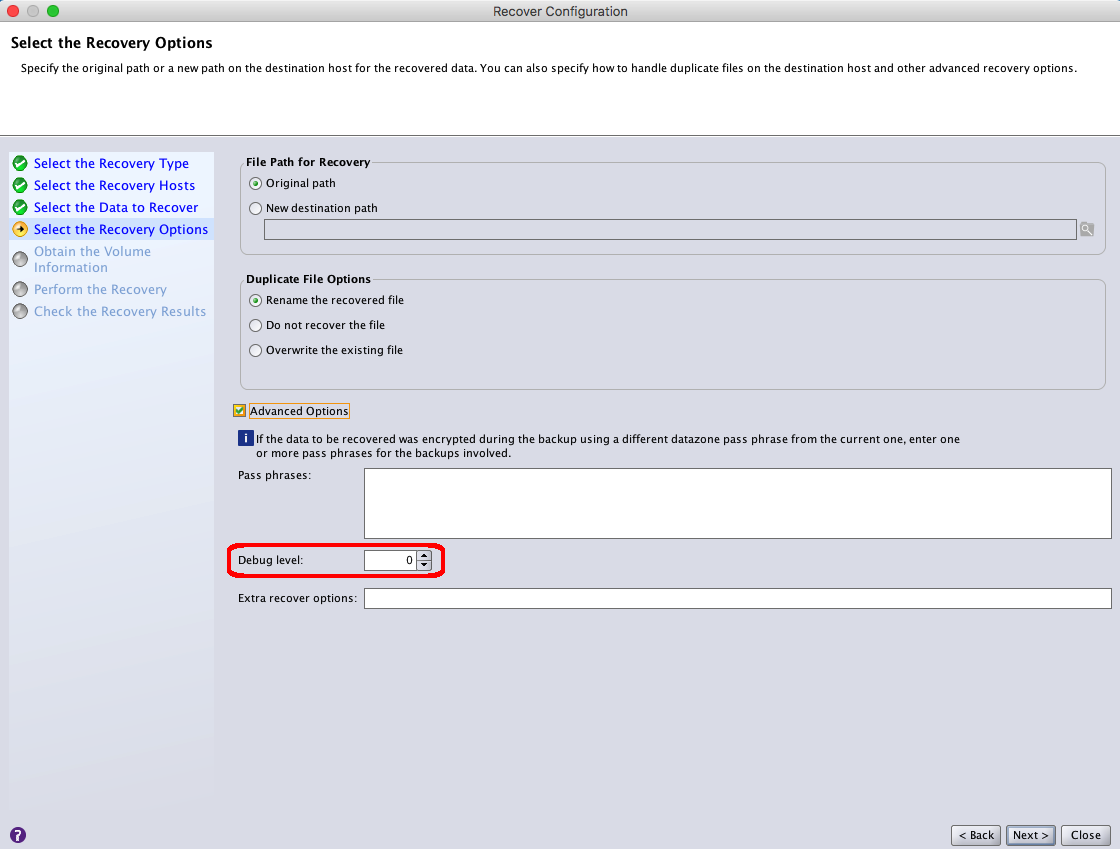
NOTE: Change the level of debug output generated in the recovery logs. The default value of 0 represents normal recovery output. The highest Debug Level can be set to up to Level 9.
- Click Next until you reach the Perform the Recover window.
- In the Recover name field, provide a new name for the recovery configuration.
- Click Run Recover.
- Monitor the status of the recovery job in the option in the Recover window.
- When the recover completes, review the recover log file.
- Linux:
/nsr/logs/recover - Windows (Default):
C:\Program Files\EMC NetWorker\nsr\logs\recover
Additional Information
Affected Products
NetWorkerProducts
NetWorkerArticle Properties
Article Number: 000019360
Article Type: How To
Last Modified: 03 Oct 2025
Version: 4
Find answers to your questions from other Dell users
Support Services
Check if your device is covered by Support Services.