Dell Unity: Must be able to change the management IP and gateway
Summary: How to change the management IP and gateway (User Correctable)
This article applies to
This article does not apply to
This article is not tied to any specific product.
Not all product versions are identified in this article.
Instructions
Change Unisphere IP addresses
You can configure each management interface on your system to accept IPv4 addresses, IPv6 addresses, or both. Typically, you configure IP management addresses during system setup, either automatically (using SLAAC, or DHCP, or both) or manually.
To change the IP management address, select the Settings icon, and then select Management > Unisphere IPs.
IPv4 Address
You can either have the system automatically assign an IPv4 address, or you can assign a static IPv4 address. You can also disable IPv4 management access.
-
If you are running the system on a dynamic network that includes DHCP and DNS servers, select Obtain an IPv4 address automatically to have the system automatically assign an IP address and gateway address to the management interface.
-
To assign a static IPv4 address, select Use a static IPv4 address, and specify the IP address, subnet mask, and gateway. The subnet mask is an IP address mask that identifies the range of IP addresses in the subnet where the system is connected. The gateway is the IP address of the router or node used to communicate outside the local subnet.
-
To configure the system so that it accepts only IPv6 management addresses for all supported components, select Disable IPv4 management access.
Selecting this option disables existing IPv4 management addresses, which can make the management function unusable. Before you select this option, ensure that you enable IPv6 first, or the management function is unusable.
IPv6 Address
You can either have the system automatically assign an IPv6 address, or you can assign a static IPv6 address. You can also disable IPv4 management access.
-
If you are running the system on a dynamic IPv6 network, select Obtain an IPv6 address automatically to have the system automatically assign an IP address and gateway address to the management interface.
-
To assign a static IPv6 address, select Use a static IPv6 address and enter the IP address, subnet prefix, and gateway. The subnet prefix is the number of significant bits in the address that will be used for routing purposes. The gateway is the IP address of the router or node used to communicate outside the local subnet.
-
To configure the system so that it accepts only IPv4 management addresses, select Disable IPv6 management access.
Selecting this option disables existing IPv6 management addresses. Before you select this option, ensure that you enable IPv4 first, or the management function is unusable.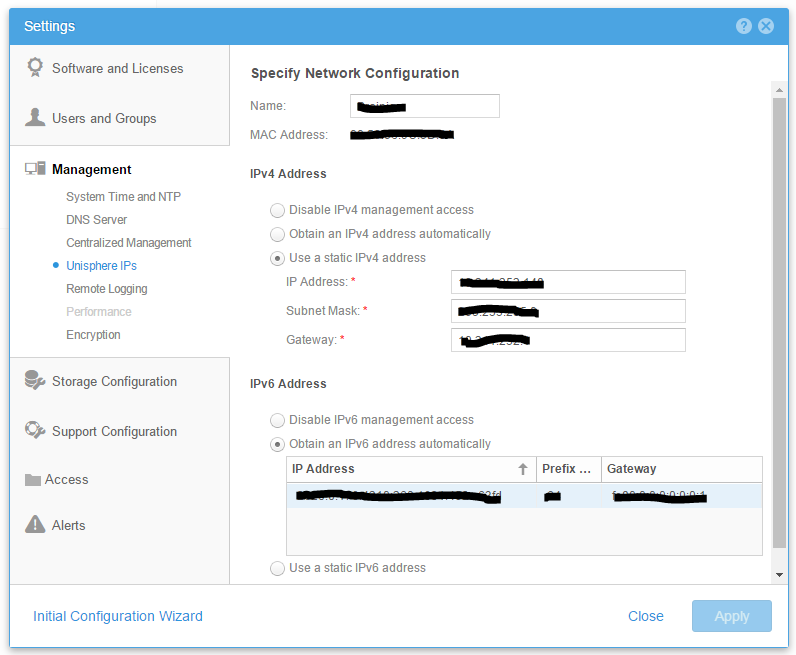
Additional Information
If you are using ESRS, you must configure a STATIC IP Address for the Management Ports.
Note: When changing the management IP, if the subnets or switches are being changed then it may require management cables to be pulled out and put back in, if done in a short time there is a race condition or chance of SP panic, see user correctable KB 000052713: Dell Unity: SP Panic When Both Management Cables are Removed/Inserted Too Fast in the Same Period. (User Correctable)
Affected Products
Dell EMC Unity FamilyProducts
Dell EMC Unity FamilyArticle Properties
Article Number: 000022616
Article Type: How To
Last Modified: 16 Oct 2025
Version: 4
Find answers to your questions from other Dell users
Support Services
Check if your device is covered by Support Services.