Dell EMC Unity:如何啟用和設定 NDMP [使用者可修正]
Summary: 如何在陣列上設定 NDMP
This article applies to
This article does not apply to
This article is not tied to any specific product.
Not all product versions are identified in this article.
Instructions
從 Unisphere GUI:
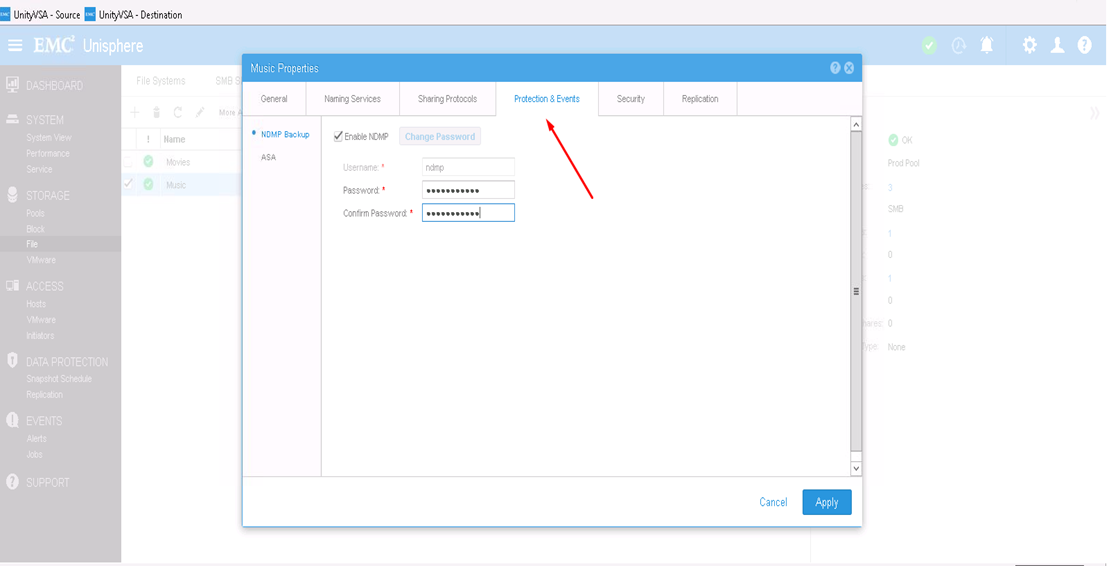
- 首先,選取要設定 NDMP 的 NAS 伺服器,然後按一下編輯圖示以進行修改
- 在「保護和事件」標籤中,您可以使用定義的使用者名稱和密碼啟用 NDMP 核取方塊

從 CLI:
1) 依下列方式找出 NAS 伺服器資源 ID: uemcli -d <array_ip> -u admin -p <admin_pwd> /net/nas/server show
2) 啟用及設定 NDMP 密碼:uemcli -d <array_ip> -u admin -p <admin_pwd> /net/nas/ndmp -server <nas_x> set enabled yes passwd ndmp_pwd
以上版本會使用使用者名稱「ndmp」在 Unity 上啟用 NDMP。
在備份用戶端中,您可以使用 NAS 伺服器 IP 位址「ndmp」作為登入使用者,以及設定 NDMP 備份的密碼。
Affected Products
Dell EMC Unity FamilyProducts
Dell EMC Unity Family, VNXe1 Series, VNXe2 SeriesArticle Properties
Article Number: 000022637
Article Type: How To
Last Modified: 16 Oct 2025
Version: 3
Find answers to your questions from other Dell users
Support Services
Check if your device is covered by Support Services.