由於 QA 目錄中的磁碟測試檔案,Avamar 數據分割區已滿
Summary: 由於 QA 目錄中的磁碟測試檔案,Avamar 數據分割區已滿。
This article applies to
This article does not apply to
This article is not tied to any specific product.
Not all product versions are identified in this article.
Symptoms
Avamar 系統發生作業系統文件系統容量問題。
典型癥狀包括:
典型癥狀包括:
- 垃圾收集或檢查點失敗 ,MSG_ERR_DISKFULL。
- HFScheck 失敗並顯示 錯誤:avmaint:hfschck:server_exception(MSG_ERR_STRIPECREATE)。
- 備份無法執行,或會因為滿容量而執行和失敗。
- 備份失敗 ,MSG_ERR_STRIPECREATE或 報告目標伺服器已滿。
- /data01/cur/gsan.log 或err.log包含 createstripetask::allocstripe 沒有足夠的空間。
- Avamar 伺服器存取狀態處於管理員模式。
Cause
Avamar 資料分割區包含 QA 目錄,其中包含 dt。X 檔案。這些是舊版磁碟輸送量效能測試腳本檔中的檔案遺留。 這些檔案可能存在於所有節點上。
例子;
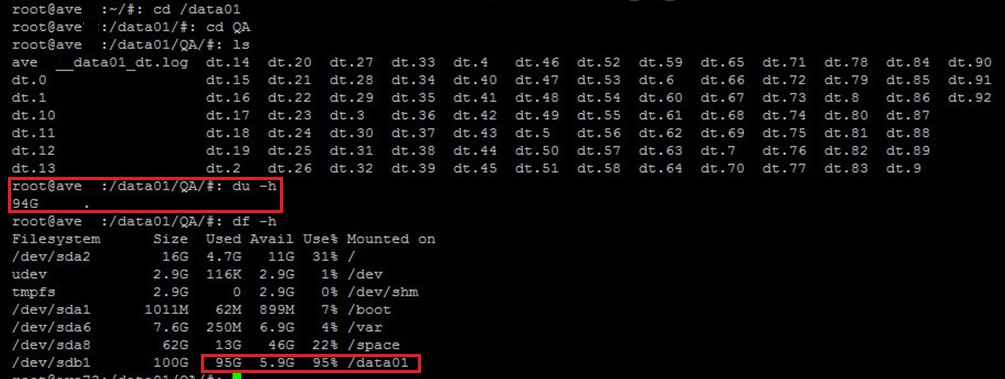
例子;
admin@storagenode1:/data04/QA/>: du -cksh *
8.0K    storagenode1__data04_dt.log
1.1G    dt.0
1.1G    dt.1
1.1G    dt.10
1.1G    dt.11
1.1G    dt.12
1.1G    dt.13
1.1G    dt.14
1.1G    dt.15
1.1G    dt.16
1.1G    dt.17
1.1G    dt.18
1.1G    dt.19
1.1G    dt.2
1.1G    dt.3
1.1G    dt.4
1.1G    dt.5
1.1G    dt.6
1.1G    dt.7
1.1G    dt.8
1.1G    dt.9
21G     total
Resolution
卸下殘留的 QA 測試目錄。
- 以系統管理員使用者身分登入。
- 載入SSH 鍵。
- 執行下列命令。
mapall --parallel --bg --user=root --noerror --all+ '/usr/local/avamar/bin/dtsh --cleanup'
Additional Information
dt 命令會將數據寫入節點上的硬碟,以進行效能指標測試。
此命令通常用於新 Avamar 系統的磁碟效能測試。這對於Avamar Virtual Edition來說很有用,因為其基礎磁碟儲存效能可能有所變動。
當 dtsh 文稿檔啟動 dt 程式以測試磁碟輸送量時。
dt 程式會在每個數據分割區下建立一個名為 QA 的工作目錄。名為 dt.1、dt.2 等的檔案會在 QA 目錄中建立。
此命令通常用於新 Avamar 系統的磁碟效能測試。這對於Avamar Virtual Edition來說很有用,因為其基礎磁碟儲存效能可能有所變動。
當 dtsh 文稿檔啟動 dt 程式以測試磁碟輸送量時。
dt 程式會在每個數據分割區下建立一個名為 QA 的工作目錄。名為 dt.1、dt.2 等的檔案會在 QA 目錄中建立。
Affected Products
AvamarProducts
Avamar, Avamar Data Store, Avamar ServerArticle Properties
Article Number: 000041013
Article Type: Solution
Last Modified: 25 May 2025
Version: 10
Find answers to your questions from other Dell users
Support Services
Check if your device is covered by Support Services.