Dell Encryption 的 UI 解析度縮放不正確
Summary: Dell Encryption (先前稱為 Dell Data Protection |加密) 在 Windows 10 中將縮放比例設為 250% 時,4k 顯示器上的縮放不正確。
This article applies to
This article does not apply to
This article is not tied to any specific product.
Not all product versions are identified in this article.
Symptoms
注意:
- 截至 2022 年 5 月,Dell Endpoint Security Suite Enterprise 已達到維護結束的期限。如需更多資訊,請參閱 Dell Data Security 的產品生命週期 (支援結束/壽命結束) 原則
- 截至 2019 年 1 月,Dell Endpoint Security Suite Pro 已達服務結束期限。如需更多資訊,請參閱 Dell Data Security 的產品生命週期 (支援結束/壽命結束) 原則
- 截至 2018 年 2 月,Dell Data Protection |安全性工具已達到服務結束期限。如需更多資訊,請參閱 Dell Data Security 的產品生命週期 (支援結束/壽命結束) 原則
- 請參考端點安全性,以取得有關目前產品的其他資訊。
受影響的產品:
- Dell Encryption Enterprise
- Dell Encryption Personal
- Dell Endpoint Security Suite Enterprise
- Dell Data Protection | Enterprise Edition
- Dell Data Protection | Personal Edition
- Dell Endpoint Security Suite Pro
- Dell Data Protection | 安全性工具
受影響的版本:
- v8.10 和 8.17
受影響的作業系統:
- Windows 10 (RTM、1511、1607、1703)
Cause
不適用
Resolution
注意:此問題已在 v8.18 中解決。
在配備 UHD (4k) 螢幕的特定裝置上,且 Windows 10 內的 UI 縮放比例設定為 250%,使用者介面可能會顯示不正確,且難以在 Dell Data Security 主控台應用程式中瀏覽。
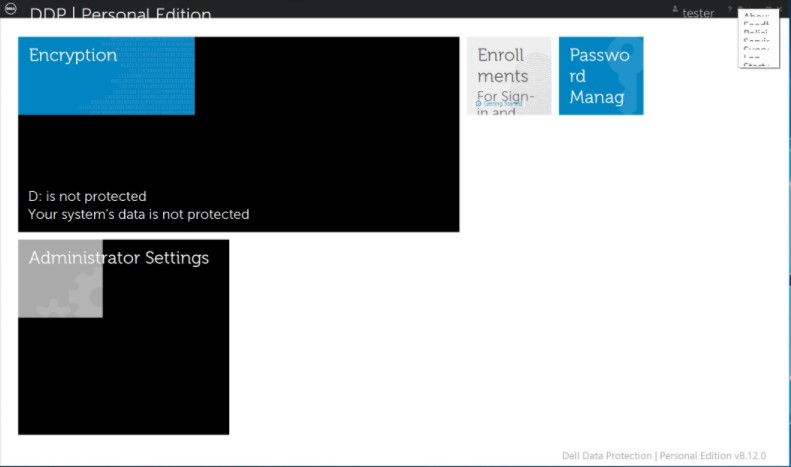
在 Windows 8 的相容模式下 執行 Dell Data Security Console 應用程式,即可暫時解決此問題。
若要啟用相容模式:
- 以滑鼠右鍵按一下圖示,然後選取 內容。
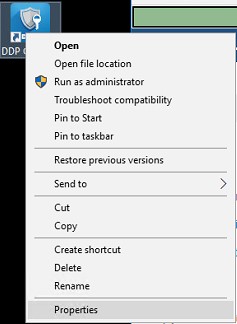
- 選取 相容性標籤。

- 檢查「相容模式」框是否標有「在相容模式下運行此程式」:並保留 Windows 8 上的設定。
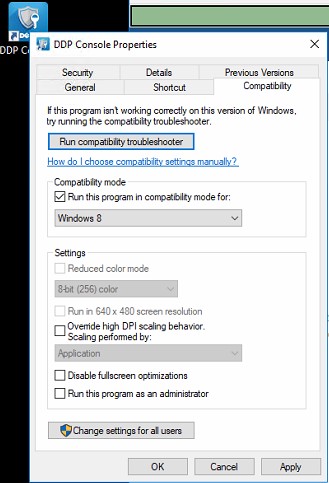
- 按一下套用,然後按一下確定以強制執行變更。
如要聯絡支援部門,請參閱 Dell Data Security 國際支援電話號碼。
請前往 TechDirect,以線上產生技術支援要求。
如需更多深入見解與資源,請加入 Dell 安全性社群論壇。
Additional Information
Videos
Affected Products
Dell Encryption, Dell Endpoint Security Suite Pro, Dell Endpoint Security Suite EnterpriseArticle Properties
Article Number: 000124977
Article Type: Solution
Last Modified: 18 Jun 2024
Version: 12
Find answers to your questions from other Dell users
Support Services
Check if your device is covered by Support Services.