BIOS Event Logs and Diagnostic Logging on Dell Laptops
Summary: Learn about the event logs stored in the BIOS on Dell Laptops.
This article applies to
This article does not apply to
This article is not tied to any specific product.
Not all product versions are identified in this article.
Instructions
Error Logs Stored in the BIOS
It began with some older Precisions, and the E-series of Latitude laptops. However, it continues today that the following information is logged within the BIOS.
- The diagnostics both ePSA (extended Preboot System Assessment) and DOS-based can be logged in the BIOS.
- Any BIOS thermal or power events can be logged in the BIOS.
The BIOS stores the logs for each category and moves the oldest in each category down.
Each log consists of a date and a timestamp, along with a description of the type of event. With the diagnostics, the event can also show the error code as shown in the images below.
NOTE: Most Dell computers allow you to enter the system setup or BIOS settings by pressing the F2 key at the Dell splash screen during start up. For more information about this topic, see the knowledge article: BIOS Update Guide
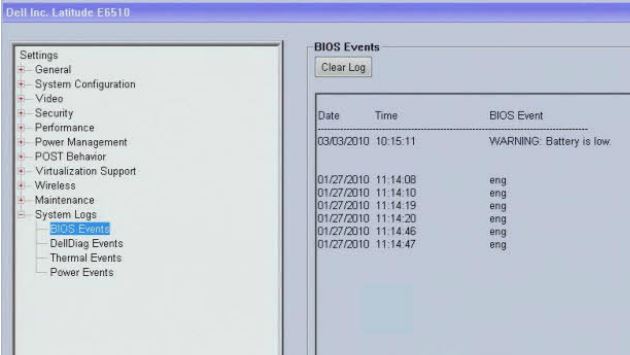

The logs come under the following categories:
- BIOS Events
- This field allows you to view and clear BIOS POST events. It includes the date and time of the event and the LED code.
- DellDiag Events
- This field allows you to view the diagnostic results from DellDiags and PSA. It includes the time and date, the diagnostic and version which was run and the resulting code.
- Thermal Events
- This field allows you to view and clear thermal events. It includes the date and time and the name of the event.
- Power Events
- This field allows you to view and clear power events. It includes the date and time of the event as well as the power state and reason.
Note: The BIOS log categories may vary depending on your computers model type and hardware.
These logs can be helpful in troubleshooting.
Especially when tracking down intermittent problems which can be the most difficult.
(For example: If the computer is randomly and intermittently shutting down, it might be due to a thermal event that is logged. It is easier to determine the cause from the time and type of thermal event to identify either a behavior, environment, or hardware failure.)
If you require further assistance, contact Dell Technical Support.
For related information, see these Dell Knowledge Base articles:
Affected Products
Dell Pro, Dell Pro Max, Dell Pro Plus, Dell Pro Premium, Latitude, Dell Pro Rugged, Mobile WorkstationsArticle Properties
Article Number: 000125003
Article Type: How To
Last Modified: 13 Nov 2025
Version: 11
Find answers to your questions from other Dell users
Support Services
Check if your device is covered by Support Services.