Alienware Update、Dell Update 和 Dell Command Update 无法检查更新
Summary: 有关使用 Alienware Update、Dell Update 或 Dell Command Update 时更新错误的信息。
This article applies to
This article does not apply to
This article is not tied to any specific product.
Not all product versions are identified in this article.
Symptoms
在 Alienware Update、Dell Update 或 Dell Command Update 中单击“检查更新”后,将显示“无法检索计算机清单信息”消息。以下是消息的示例: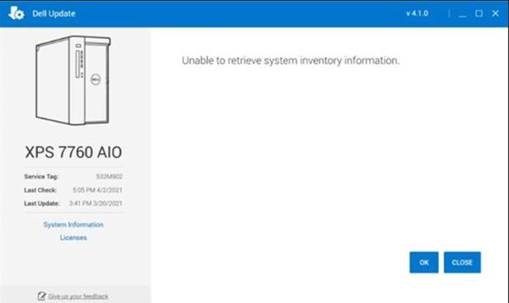
Cause
发生这种情况是因为软件的一个组成部分在完成计算机扫描时遇到问题。
Resolution
Dell 更新恢复实用程序
要解决此问题,请安装并运行 Dell Update Recovery Utility。必须在收到此消息的每台受影响的计算机上执行此作。
Affected Products
Alienware Update, Alienware, Dell All-in-One, Dell Pro All-in-One, Dell Pro Max Micro, Dell Pro Max Slim, Dell Pro Max Tower, Dell Pro Micro, Dell Pro Slim, Dell Pro Tower, Dell Slim, Dell Tower, Inspiron, OptiPlex, Vostro, XPS, G Series, G Series
, Alienware, Dell Plus, Dell Pro, Dell Pro Max, Dell Pro Plus, Dell Pro Premium, Inspiron, Latitude, Dell Pro Rugged, Vostro, XPS, Fixed Workstations, Mobile Workstations, Dell Command | Update, Dell Pro Max Micro XE FCM2250, Dell Pro Max Slim XE FCS1250, Dell Pro Max Tower T2 XE FCT2250, Dell Pro Max 16 XE MC16250, Dell Pro Micro Plus XE QBM1250, Dell Pro Slim Plus XE5 QBS1250, Dell Pro Tower Plus XE5 QBT1250, Dell Update
...
Article Properties
Article Number: 000185515
Article Type: Solution
Last Modified: 15 May 2025
Version: 4
Find answers to your questions from other Dell users
Support Services
Check if your device is covered by Support Services.