NetWorker GST crash after NMC upgrade with IM003: The specified driver could not be loaded due to system error.
Summary: The NetWorker Management Console (NMC) server is upgraded to a newer NetWorker release. The upgrade completes successfully, but the NMC is inaccessible. The NMC servers gstd log reports IM003: The specified driver could not be loaded due to system error 126: The specified module could not be found. (PostgreSQL ANSI(x64), C:\program files\emc networker\management\GST\postgres_latest ...
This article applies to
This article does not apply to
This article is not tied to any specific product.
Not all product versions are identified in this article.
Symptoms
A Microsoft Windows-based NetWorker Management Console (NMC) is upgraded to a newer NetWorker release.
The upgrade completes successfully; however, after completing the upgrade, the NMC is inaccessible.
The ..\Program Files\EMC NetWorker\Management\GST\logs\gstd.raw reports:
0 MM/DD/YYYY HH:mm:SS  gstd NSR notice MM/DD/YYYY HH:mm:SS gstd-D1 D:/views/nw/19.11/gst/liblgodbc/odbc_lib.c(713): lgodbc_alloc_connection(): SQLConnect()
0 MM/DD/YYYY HH:mm:SS  gstd NSR notice MM/DD/YYYY HH:mm:SS gstd-D1       ODBC environment handle:
0 MM/DD/YYYY HH:mm:SS  gstd NSR notice MM/DD/YYYY HH:mm:SS gstd-D1       ODBC database connection handle:
0 MM/DD/YYYY HH:mm:SS  gstd NSR notice MM/DD/YYYY HH:mm:SS gstd-D1     IM003: Specified driver could not be loaded due to system error  126: The specified module could not be found. (PostgreSQL ANSI(x64), C:\program files\emc networker\management\GST\postgres_latest\odbc\psqlodbc30a.dll).
0 MM/DD/YYYY HH:mm:SS  gstd NSR notice MM/DD/YYYY HH:mm:SS gstd-D1 Internal error: could not get database handle.
0 MM/DD/YYYY HH:mm:SS  gstd NSR notice MM/DD/YYYY HH:mm:SS gstd-D0 Internal error: could not get database handle.
0 MM/DD/YYYY HH:mm:SS  gstd NSR notice MM/DD/YYYY HH:mm:SS gstd-D0 Please also see the log files in 'pg_log'  directory inside the product's database directory for the database server's output messages
0 MM/DD/YYYY HH:mm:SS  gstd NSR notice MM/DD/YYYY HH:mm:SS gstd-D0 Internal error: could not release database handle.
NetWorker: How to use nsr_render_log to render .raw log files
Cause
The NMC installation path should include a symbolic link ..\Program Files\EMC NetWorker\Management\GST\postgres_latest which links to a postgres version folder under ..\Program Files\EMC NetWorker\Management\GST\postgres..
This problem is sometimes observed during NetWorker upgrades where the upgraded NetWorker version contains a newer postgres version. The upgrade process removed the postgres_latest symbolic link to the old postgres folder, but did not create a new link to the new postgres folder.
Resolution
Re-create the postgres latest symbolic Link.
- Locate the old postgres folder: <Install_Drive>:\Program Files\EMC NetWorker\Management\GST\postgres
- Open am administrative command prompt and run the following command:
Syntax:
mklink /D "path_to_new_symbolic_link "path_to_new_postgres_folder”
Example:
C:\Users\Administrator.NETWORKER>dir "C:\Program Files\EMC NetWorker\Management\GST\postgres"
 Volume in drive C is Windows
 Volume Serial Number is 46FA-BFBA

 Directory of C:\Program Files\EMC NetWorker\Management\GST\postgres

05/16/2025  02:26 PM    <DIR>          .
05/16/2025  02:51 PM    <DIR>          ..
05/13/2025  01:40 PM    <DIR>          11.21
05/13/2025  01:41 PM    <DIR>          12.18
05/13/2025  01:41 PM    <DIR>          16.4
05/13/2025  01:40 PM    <DIR>          9.2
               0 File(s)              0 bytes
               6 Dir(s)  47,118,540,800 bytes free

C:\Users\Administrator.NETWORKER>
C:\Users\Administrator.NETWORKER>mklink /D "C:\Program Files\EMC NetWorker\Management\GST\postgres_latest" "C:\Program Files\EMC NetWorker\Management\GST\postgres\16.4"
symbolic link created for C:\Program Files\EMC NetWorker\Management\GST\postgres_latest <<===>> C:\Program Files\EMC NetWorker\Management\GST\postgres\16.4
The
postgres_latest symbolic link folder should be visible from Windows File Explorer.
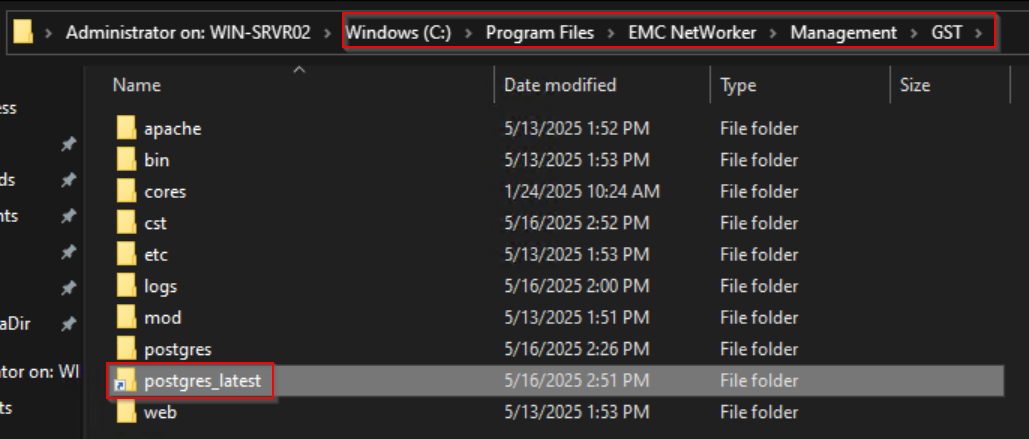
NOTE: If NetWorker is installed in another file path location; adjust your commands according to the path used on the server.
- Restart NMC services:
net stop gstd && net start gstd
Affected Products
NetWorker, NetWorker Management ConsoleProducts
NetWorker FamilyArticle Properties
Article Number: 000186359
Article Type: Solution
Last Modified: 16 May 2025
Version: 7
Find answers to your questions from other Dell users
Support Services
Check if your device is covered by Support Services.