Windows 无法在安装过程中验证 Dell Optimizer 戴尔智能调优软件驱动程序
Summary: 本文提供有关如何解决无法验证 Dell Optimizer 戴尔智能调优软件安装的驱动程序的安全警告的信息。
This article applies to
This article does not apply to
This article is not tied to any specific product.
Not all product versions are identified in this article.
Symptoms
受影响的产品:
- SupportAssist
- Dell Precision Optimizer
Cause
安装 Dell Precision Optimizer 时,Windows 安全消息可能会提供有关驱动程序软件的警告。
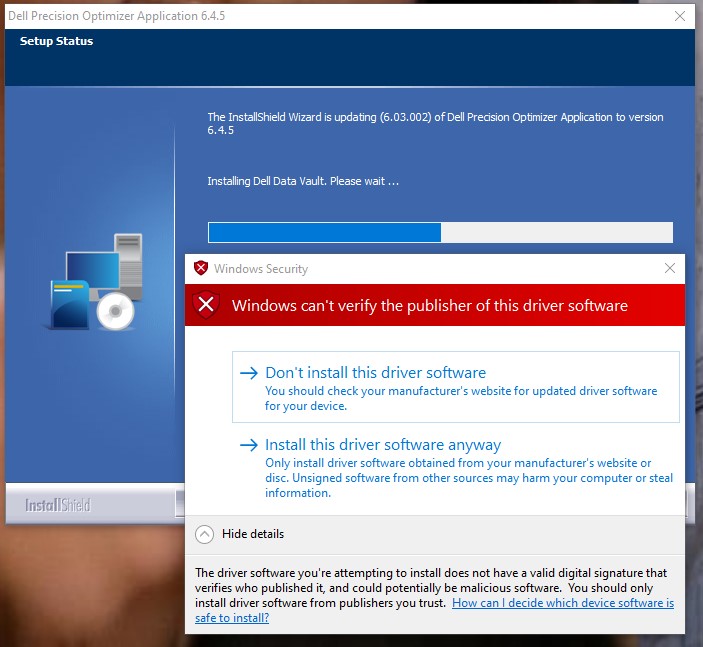
图 1:(仅限英文)Windows 安全中心消息
此错误是由于 Dell SupportAssist 和 Dell Precision Optimizer 之间存在的 Dell Data Vault 驱动程序不匹配所致。
Resolution
如果在安装 Dell Precision Optimizer 的过程中出现此错误,请单击 Don't install this driver software。Dell Precision Optimizer 使用 SupportAssist Dell Data Vault 驱动程序运行。
如果单击 “仍然安装此驱动程序软件 ”,则由于 SupportAssist 中的 Dell Data Vault 驱动程序版本依赖关系,计算机可能会遇到蓝屏问题。
要解决蓝屏问题,请执行以下操作:
- 启动至 Windows 安全模式。
- 右键单击 Windows“开始”菜单,然后单击 “应用和功能”。
- 单击 Dell SupportAssist 上的 卸载 。
- 删除 SupportAssist 后,单击 Dell Precision Optimizer 上的 卸载 。
- 重新启动计算机。
- 安装 SupportAssist。
提醒:要下载 Dell SupportAssist,请参阅 适用于 PC 的 Dell SupportAssist。
- 安装 Dell Precision Optimizer。
- 在 Windows 安全警报提示期间,单击 不要安装此驱动程序软件。
提醒:要下载 Dell Precision Optimizer,请选择您的 Precision 型号 ,然后单击 “驱动程序和下载”。
Affected Products
SupportAssist, Dell Precision OptimizerArticle Properties
Article Number: 000187096
Article Type: Solution
Last Modified: 07 May 2024
Version: 5
Find answers to your questions from other Dell users
Support Services
Check if your device is covered by Support Services.