NetWorker Module for Databases and Applications: DB2 online backup fails with error "SQL2413N online backup is not allowed because database is not recoverable"
Summary: NMDA DB2 online backup fails with error nsrdasv: unable to backup sample database due to backup request failure SQLCODE: -2413, SQL2413N online backup is not allowed because database is not recoverable. ...
This article applies to
This article does not apply to
This article is not tied to any specific product.
Not all product versions are identified in this article.
Symptoms
A NetWorker Module for Databases and Applications (NMDA) DB2 backup that is performed from either the NetWorker Management Console (NMC) or from the DB2 server fails with the following error:
"SQL2413N online backup is not allowed because database is not recoverable".
"SQL2413N online backup is not allowed because database is not recoverable".
Cause
Every DB2 database that is installed is in circular logging by default. Online backups are not possible in circular logging.
Resolution
Enable DB2 Archive logging.
Example steps that are shown below are for a DB2 database named 'Db4'.
Example steps that are shown below are for a DB2 database named 'Db4'.
1.Open DB2 command window on the client.
2.Check DB2 logging mode using command as shown in screenshot below:
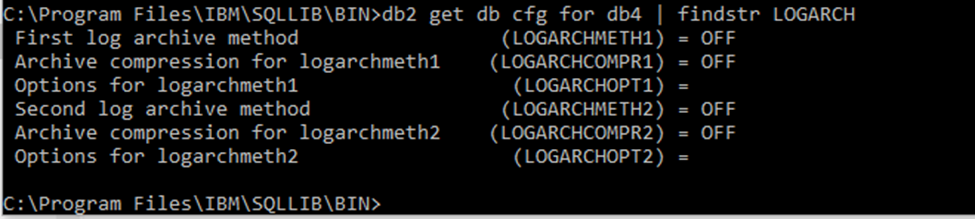
3. Update logarchmeth and logarchopt other than value "OFF." For example:

4. Using NMDA, DB2 transaction logs can be archived automatically to Data Domain storage. See NMDA administration guide for detailed steps.
2.Check DB2 logging mode using command as shown in screenshot below:
3. Update logarchmeth and logarchopt other than value "OFF." For example:
4. Using NMDA, DB2 transaction logs can be archived automatically to Data Domain storage. See NMDA administration guide for detailed steps.
Additional Information
The NetWorker Module for Databases and Applications Administration Guide is available from Dell Support at: https://www.dell.com/support/home/product-support/product/networker-module-for-databases-and-applications/docs.
Article Properties
Article Number: 000191364
Article Type: Solution
Last Modified: 09 Mar 2022
Version: 1
Find answers to your questions from other Dell users
Support Services
Check if your device is covered by Support Services.