How-To Set up Auto Clean on an ML3 Tape Library
Summary: How-To Set up Auto Clean on an ML3 Tape Library
This article applies to
This article does not apply to
This article is not tied to any specific product.
Not all product versions are identified in this article.
Instructions
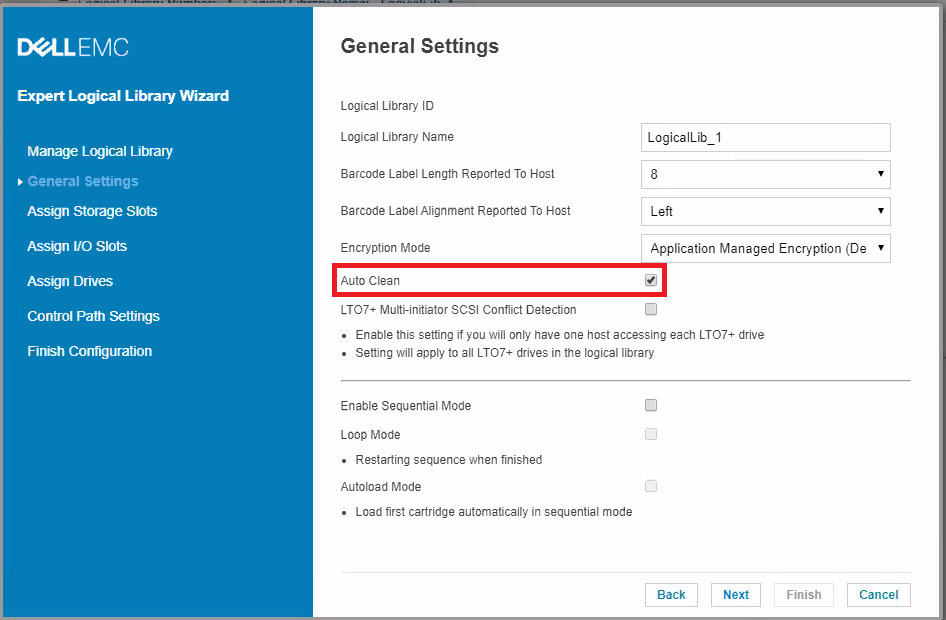
After the initial configuration, Auto Clean can be turned on or off by accessing the Logical Library Wizard Expert Mode.
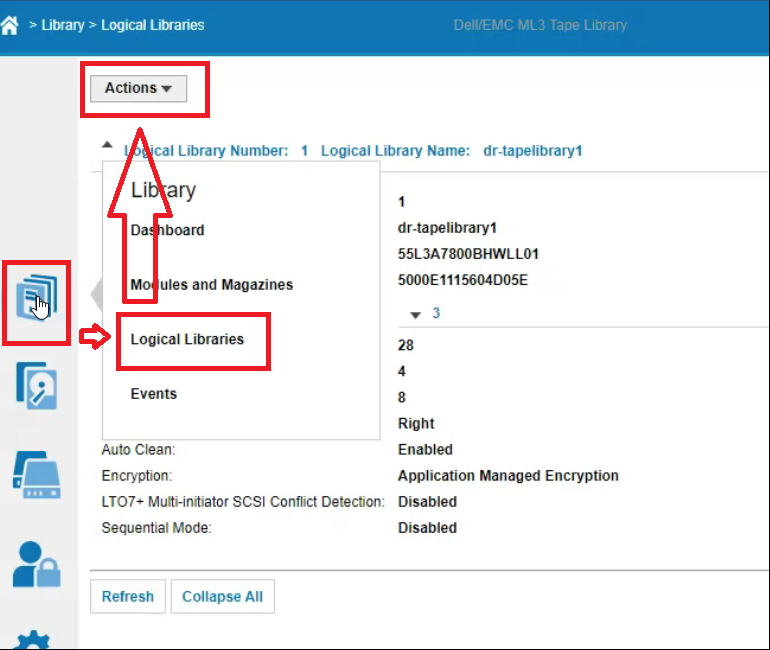
NOTE: Each logical library should have a cleaning tape. In the ML3 It is slot independent.
Without a cleaning tape, an amber light appears on the front of the ML3.
- Go to Library > Logical Libraries > Actions > Manage Logical Library (Expert Mode).
NOTE: If Expert Mode is not available, log in to the library as administrator.
Do NOT use LIBRARY>SETTINGS as logical library cannot be found in that location. - Select the logical library, then click Edit.
- Click Next to go to the General Settings screen.
- Check or clear Auto Clean, then click Next on the subsequent screens.
- If a change was made, click Finish, and the Logical Libraries are reconfigured. If no changes were made, click Cancel.
NOTE: Each logical library should have a cleaning tape. In the ML3 It is slot independent.
Without a cleaning tape, an amber light appears on the front of the ML3.
Additional Information
Sharing cleaning tapes between logical libraries:
It is preferred to put the cleaning tape cartridge into a storage slot that is not assigned to a logical library.
If you put the cleaning tape cartridge into a storage slot that is assigned to a logical library, it is visible to any hosts that are associated with that logical library.
If you do not want the cleaning tape cartridge to be visible to any hosts, put it into a storage slot that is not assigned to any logical libraries.
When a cleaning operation is initiated, the library first attempts to use an unexpired cleaning tape cartridge from the same logical library as the tape drive.
If the logical library does not contain an unexpired cleaning tape cartridge, the library attempts to use an unexpired cleaning tape cartridge from a storage slot that is not assigned to a logical library.
The library does not use a cleaning tape cartridge from a different logical library.
When auto cleaning is enabled, ensure that each logical library has an unexpired cleaning tape cartridge.
Or, place at least one unexpired cleaning tape cartridge into a storage slot that is not assigned to a logical library.
From: https://dl.dell.com/content/manual57892507-dell-emc-ml3-tape-library-user-s-guide.pdf?language=en-us PDF Page: 103
Important Note: When creating an unassigned storage slot an entire column must be removed. This causes the loss of five slots. A single storage slot cannot be removed on it is own.
Affected Products
Dell EMC ML3Article Properties
Article Number: 000202403
Article Type: How To
Last Modified: 24 Feb 2023
Version: 2
Find answers to your questions from other Dell users
Support Services
Check if your device is covered by Support Services.