MyDell Application's User Interface Audio Device List Reduced After Plugging A 3.5mm Audio Cable into the Docking Station Port
Summary: This article provides information about the reduction of the connectable audio device options in the MyDell Application's user interface when a 3.5mm aux cable is inserted into the dock. ...
This article applies to
This article does not apply to
This article is not tied to any specific product.
Not all product versions are identified in this article.
Symptoms
When a 3.5mm audio jack is plugged into the 3.5mm port on the dock, the MyDell User Interface (UI) connectable audio device option list is reduced. This symptom occurs on specific USB Type-C docking stations.
MyDell UI while docked, and the audio device option list is reduced:
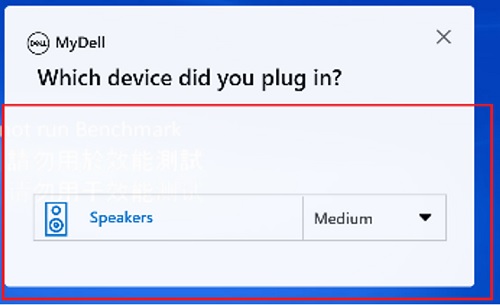
Figure 1:MyDell UI Docked and Cut Off
MyDell UI when not docked and the audio device option list is displayed in full:
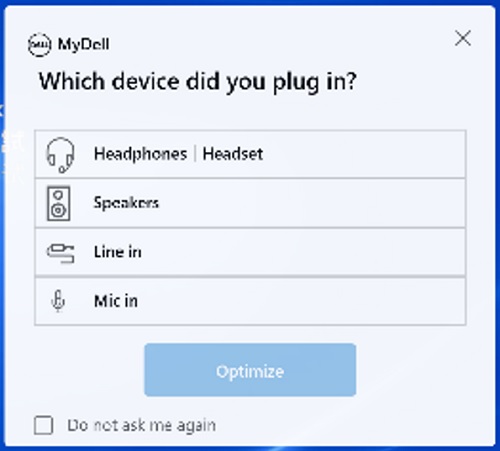
Figure 2: MyDell UI Not Docked, and Window is Fully Displayed.
Affected Docks:
MyDell UI while docked, and the audio device option list is reduced:
Figure 1:MyDell UI Docked and Cut Off
MyDell UI when not docked and the audio device option list is displayed in full:
Figure 2: MyDell UI Not Docked, and Window is Fully Displayed.
Affected Docks:
- WD19
- WD19TB
- WD19DC
- WD19S 130w
- WD19S 180w
- WD19TBS
- WD19DCS
- WD22TB4
Cause
This is expected behavior.
Resolution
This is not a hardware issue. Avoid using a 3.5 mm audio jack when connected to an affected Type-C docking station to regain full functionality.
Affected Products
Dell Dock WD19, Dell Performance Dock - WD19DC, Dell Performance Dock – WD19DCS, Dell Dock – WD19S, Dell Thunderbolt Dock - WD19TB, Dell Thunderbolt Dock – WD19TBS, MyDell, Dell Thunderbolt Dock – WD22TB4Article Properties
Article Number: 000207711
Article Type: Solution
Last Modified: 01 Oct 2025
Version: 4
Find answers to your questions from other Dell users
Support Services
Check if your device is covered by Support Services.