ECS GeoDrive klasörü eksik
Summary: ECS GeoDrive klasörü yerel sürücüde eksik.
This article applies to
This article does not apply to
This article is not tied to any specific product.
Not all product versions are identified in this article.
Symptoms
Kullanıcı, ana bilgisayar üzerindeki yerel sürücüsündeki GeoDrive klasörünü veya bir alt klasörü eksik olarak algılar.
Klasör, verileri içerir ancak görünmez/gizlidir.
- Örneğin GeoDrive'da bir "klasör1" klasörü eksik.

- Aynı adla yeni klasör oluşturmayı deneyin. Bu durumda klasörün gerçekten mevcut olduğu istem görüntülenir.
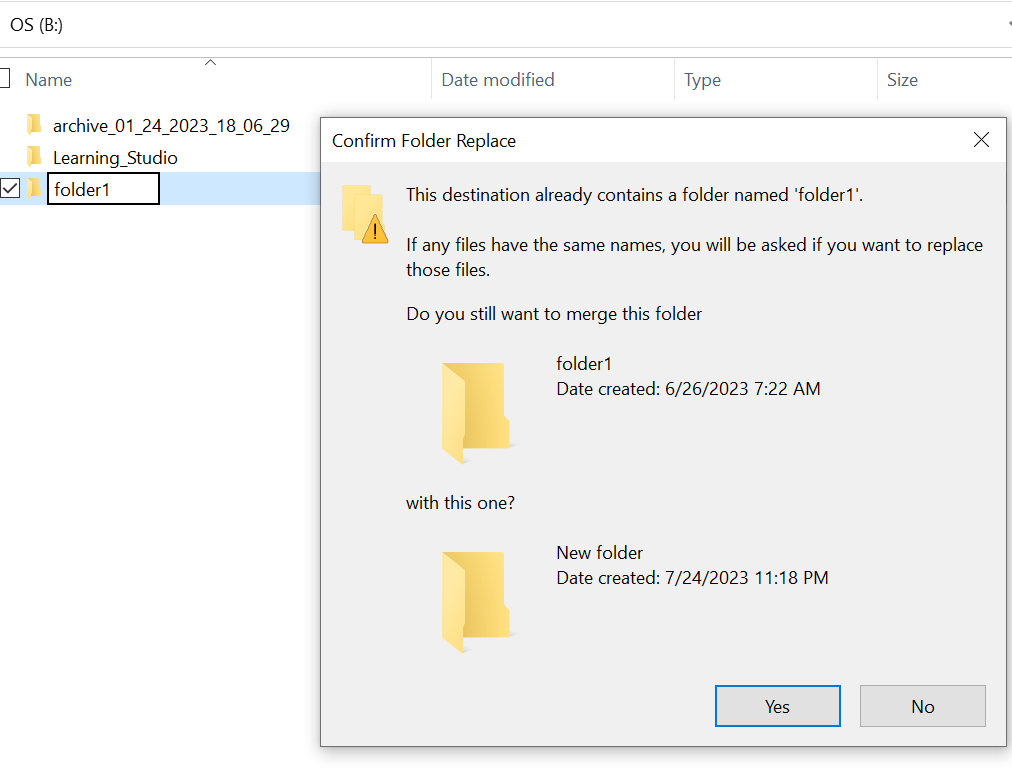
- Explorer'da eksik klasör yoluyla arama. İçerikleri görene kadar.

Cause
Bunun nedeni, klasörde ayarlanmış OLAN HIDDEN ve SYSTEM öznitelikleridir.
Resolution
Lütfen aşağıdaki adımları izleyin.
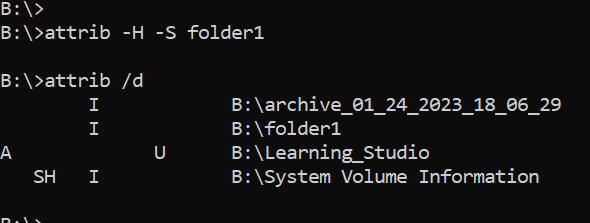
Bu komutu çalıştırdıktan sonra yerel sürücüyü tekrar kontrol edin. Eksik klasör normale geri döndü.

- Ana bilgisayar sistemindeki Windows komut istemine gidin.
- klasörün eksik olduğu ana dizine cd takın ve "attrib /d" komutunu çalıştırın.
- Dizinlerin bir listesini ve eksik klasörün listede olması gerekir.
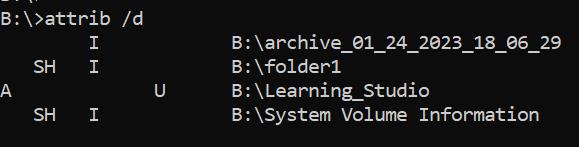
- Önceki harfler öznitelikleri belirtir. Dosyadan (SİSER ve GİDİS) önce SH'i görüyor olun.
- Ardından yukarıdaki iki özniteliği kaldırmak için bu komutu çalıştırın: attrib -H -S folder_name
Additional Information
Attrib komutu için başka birçok seçenek mevcuttur.
B:\>attrib /?
Displays or changes file attributes.

ATTRIB [+R | -R] [+A | -A] [+S | -S] [+H | -H] [+O | -O] [+I | -I] [+X | -X] [+P | -P] [+U | -U]
       [drive:][path][filename] [/S [/D]] [/L]

  +   Sets an attribute.
  -   Clears an attribute.
  R   Read-only file attribute.
  A   Archive file attribute.
  S   System file attribute.
  H   Hidden file attribute.
  O   Offline attribute.
  I   Not content indexed file attribute.
  X   No scrub file attribute.
  V   Integrity attribute.
  P   Pinned attribute.
  U   Unpinned attribute.
  B   SMR Blob attribute.
  [drive:][path][filename]
      Specifies a file or files for attrib to process.
  /S  Processes matching files in the current folder
      and all subfolders.
  /D  Processes folders as well.
  /L  Work on the attributes of the Symbolic Link versus
      the target of the Symbolic Link
Affected Products
ECS, Elastic Cloud StorageArticle Properties
Article Number: 000215245
Article Type: Solution
Last Modified: 13 Sept 2023
Version: 3
Find answers to your questions from other Dell users
Support Services
Check if your device is covered by Support Services.