Dell Unity: Storage Processors (SPs) reboot frequently without generating dump files (User Correctable)
Summary: Unity Storage Processors (SPs) reboot frequently without generating dump files.
This article applies to
This article does not apply to
This article is not tied to any specific product.
Not all product versions are identified in this article.
Symptoms
- Unity array is running operating system 5.3 with SupportAssist enabled.
- Unity Storage Processors (SPs) reboot frequently (every 2 or 3 hours) without generating dump files.
- The start_c4.log shows that the SP reboots are because of an Embedded Service Enabler (ESE) failure.
- The SP logs show frequent error messages for SupportAssist service has stopped working.
- The ese_startup.log shows the ESE container restarting frequently.
Live Analysis: /EMC/C4Core/log/start_c4.log
DC Analysis: \spx\EMC\C4Core\log\start_c4.log
A       08/09/23 15:10:50 ha_policy.pl              requested to reboot spa with hint because of ese failure
B       08/09/23 16:22:04 ha_policy.pl              requested to reboot spb with hint because of ese failure
A       08/09/23 17:39:14 ha_policy.pl              requested to reboot spa with hint because of ese failure
B       08/09/23 18:55:40 ha_policy.pl              requested to reboot spb with hint because of ese failure
A       08/09/23 20:07:35 ha_policy.pl              requested to reboot spa with hint because of ese failure
B       08/09/23 22:20:21 ha_policy.pl              requested to reboot spb with hint because of ese failure
A       08/10/23 02:57:41 ha_policy.pl              requested to reboot spa with hint because of ese failure
B       08/10/23 04:09:59 ha_policy.pl              requested to reboot spb with hint because of ese failure
SP_LOG
A       08/10/23 02:06:01.321 mlu               12d0004 [INFO] System: Operation Evacuate Slices: Completed 1, Failed 0 completed on 20000004b. [ALU 36360]
--
A       08/10/23 02:39:41.283 mlu               12d0004 [INFO] System: Operation Evacuate Slices: Completed 59, Failed 0 completed on 200000054. [ALU 32903]
A       08/10/23 02:39:51.306 EmcSupportSvcs     380057 [ERROR] User: SupportAssist service has stopped working. Repair it using svc_supportassist service command.
A       08/10/23 02:41:13.581 mlu               12d0004 [INFO] System: Operation Evacuate Slices: Completed 1, Failed 0 completed on 200000054. [ALU 32903]
--
B       08/10/23 03:12:40.818 CASAuth            560001 [INFO] Audit: Authentication successful.Username: p985_cb2153784@fspa.myntet.se ClientIP: 10.99.104.138.
B       08/10/23 03:13:14.081 EmcSupportSvcs     380057 [ERROR] User: SupportAssist service has stopped working. Repair it using svc_supportassist service command.
A       08/10/23 03:13:20.044 mlu               12d0004 [INFO] System: Operation freeze_file_system_ufs64 completed on 2800033134.
--
A       08/10/23 03:33:07.710 mlu               12d0004 [INFO] System: Operation Evacuate Slices: Completed 1, Failed 0 completed on 200000043. [ALU 36228]
B       08/10/23 03:34:21.402 EmcSupportSvcs     380057 [ERROR] User: SupportAssist service has stopped working. Repair it using svc_supportassist service command.
A       08/10/23 03:34:24.984 mlu               12d0004 [INFO] System: Operation Truncate File completed on 9000effcb.
--
A       08/10/23 04:08:33.303 mlu               16d0020 [INFO] System: Destroy of snapshot Destroying_20230810040736.870+00-000 completed.
B       08/10/23 04:08:53.910 EmcSupportSvcs     380057 [ERROR] User: SupportAssist service has stopped working. Repair it using svc_supportassist service command.
B       08/10/23 04:09:07.162 PEService         1660402 [INFO] System: Relocation is stopped for Storage Pool 0.
--
A       08/10/23 05:39:40.278 mlu               12d0004 [INFO] System: Operation Evacuate Slices: Completed 1, Failed 0 completed on 200000046. [ALU 35864]
A       08/10/23 05:42:16.903 EmcSupportSvcs     380057 [ERROR] User: SupportAssist service has stopped working. Repair it using svc_supportassist service command.
A       08/10/23 05:42:39.223 MnsvcServer           7d8 [INFO] Authentication: Authentication session Session_61_1691640760: User p985_cb2153784 successfully authenticated in authority LDAP/fspa.myntet.se
Live Analysis: /EMC/CEM/log/ese/ese_startup.log
DC Analysis: SPA:/spa/EMC/CEM/log/ese/ ese_startup.log
251707:Thu Aug 10 04:10:35 2023 ready(22517): Container is not running
251771-Thu Aug 10 04:10:35 2023 start(22513): Running: /usr/bin/sudo /usr/bin/setfacl -m u:ecom:rwx /EMC/backend/CEM/ese
251885-Thu Aug 10 04:10:35 2023 start(22513): Command success
251940-Thu Aug 10 04:10:35 2023 start(22513): Mounting container host mount directory
252019-Thu Aug 10 04:10:35 2023 start(22513): Running: /EMC/Platform/bin/ese/ese_mount.sh --mount
--
254071-Thu Aug 10 04:10:37 2023 start(22513): Container has been successfully created
254150-Thu Aug 10 04:10:37 2023 start(22513): Running: /usr/bin/sudo /usr/bin/docker ps -f name=ese -f status=running --no-trunc
254272-Thu Aug 10 04:10:37 2023 start(22513): Result is: CONTAINER ID   IMAGE     COMMAND   CREATED   STATUS    PORTS     NAMES
254393-(0)
254397:Thu Aug 10 04:10:37 2023 start(22513): Container is not running
254461-Thu Aug 10 04:10:37 2023 start(22513): Starting container
254519-Thu Aug 10 04:10:37 2023 start(22513): Running: /usr/bin/sudo /usr/bin/docker start ese
254607-Thu Aug 10 04:10:38 2023 start(22513): Command success: ese
254667-
--
292902-Thu Aug 10 05:44:39 2023 ready(13520): Running: /usr/bin/sudo /usr/bin/docker ps -f name=ese -f status=running --no-trunc
293024-Thu Aug 10 05:44:39 2023 start(13517): Running: /usr/bin/sudo /usr/bin/docker images dell-ese:latest
293125-Thu Aug 10 05:44:39 2023 ready(13520): Result is: CONTAINER ID   IMAGE     COMMAND   CREATED   STATUS    PORTS     NAMES
293246-(0)
293250:Thu Aug 10 05:44:39 2023 ready(13520): Container is not running
293314-Thu Aug 10 05:44:39 2023 start(13517): Result is: REPOSITORY   TAG       IMAGE ID       CREATED        SIZE
293422-dell-ese     latest    97771f418a09   7 months ago   249MB
293481-(0)
293485-Thu Aug 10 05:44:39 2023 start(13517): Image is loaded
--
295840-Thu Aug 10 05:44:40 2023 start(13517): Container has been successfully created
295919-Thu Aug 10 05:44:40 2023 start(13517): Running: /usr/bin/sudo /usr/bin/docker ps -f name=ese -f status=running --no-trunc
296041-Thu Aug 10 05:44:41 2023 start(13517): Result is: CONTAINER ID   IMAGE     COMMAND   CREATED   STATUS    PORTS     NAMES
296162-(0)
296166:Thu Aug 10 05:44:41 2023 start(13517): Container is not running
296230-Thu Aug 10 05:44:41 2023 start(13517): Starting container
296288-Thu Aug 10 05:44:41 2023 start(13517): Running: /usr/bin/sudo /usr/bin/docker start ese
296376-Thu Aug 10 05:44:41 2023
Live Analysis: Live Analysis: /EMC/CEM/log/ese/ese_startup.log
DC Analysis: SPB:/spb/EMC/CEM/log/ese/ ese_startup.log
949027:Thu Aug 10 03:34:14 2023 ready(14205): Container is not running
949091-Thu Aug 10 03:34:14 2023 start(14202): Command success
949146-Thu Aug 10 03:34:14 2023 start(14202): Mounting container host mount directory
949225-Thu Aug 10 03:34:14 2023 start(14202): Running: /EMC/Platform/bin/ese/ese_mount.sh --mount
949316-Thu Aug 10 03:34:14 2023 start(14202): Command success: Start to mount.
--
951277-Thu Aug 10 03:34:16 2023 start(14202): Container has been successfully created
951356-Thu Aug 10 03:34:16 2023 start(14202): Running: /usr/bin/sudo /usr/bin/docker ps -f name=ese -f status=running --no-trunc
951478-Thu Aug 10 03:34:16 2023 start(14202): Result is: CONTAINER ID   IMAGE     COMMAND   CREATED   STATUS    PORTS     NAMES
951599-(0)
951603:Thu Aug 10 03:34:16 2023 start(14202): Container is not running
951667-Thu Aug 10 03:34:16 2023 start(14202): Starting container
951725-Thu Aug 10 03:34:16 2023 start(14202): Running: /usr/bin/sudo /usr/bin/docker start ese
951813-Thu Aug 10 03:34:16 2023 start(14202): Command success: ese
951873-
--
973168-Thu Aug 10 03:51:55 2023 start(3243): Image is loaded
973222-Thu Aug 10 03:51:55 2023 start(3243): Running: /usr/bin/sudo /usr/bin/setfacl -m u:ecom:rwx /EMC/backend/CEM/ese
973335-Thu Aug 10 03:51:55 2023 ready(3246): Result is: CONTAINER ID   IMAGE     COMMAND   CREATED   STATUS    PORTS     NAMES
973455-(0)
973459:Thu Aug 10 03:51:55 2023 ready(3246): Container is not running
973522-Thu Aug 10 03:51:55 2023 start(3243): Command success
973576-Thu Aug 10 03:51:55 2023 start(3243): Mounting container host mount directory
973654-Thu Aug 10 03:51:55 2023 start(3243): Running: /EMC/Platform/bin/ese/ese_mount.sh --mount
973744-Thu Aug 10 03:51:55 2023 start(3243): Command success: Start to mount.
--
975689-Thu Aug 10 03:51:57 2023 start(3243): Container has been successfully created
975767-Thu Aug 10 03:51:57 2023 start(3243): Running: /usr/bin/sudo /usr/bin/docker ps -f name=ese -f status=running --no-trunc
975888-Thu Aug 10 03:51:57 2023 start(3243): Result is: CONTAINER ID   IMAGE     COMMAND   CREATED   STATUS    PORTS     NAMES
976008-(0)
976012:Thu Aug 10 03:51:57 2023 start(3243): Container is not running
976075-Thu Aug 10 03:51:57 2023 start(3243): Starting container
976132-Thu Aug 10 03:51:57 2023 start(3243): Running: /usr/bin/sudo /usr/bin/docker start ese
976219-Thu Aug 10 03:51:57 2023 start(3243): Command success: ese
976278-
Cause
In rare instances, multiple ESE threads of different types show a condition that causes them to become deadlocked, including the threads that listen to API requests. The deadlock condition eventually leads to ESE not answering API requests, resulting in the SP reboots.
Resolution
Fix:
This issue is fixed in Unity operating system 5.3.1.0.5.008.
Workarounds:
There are two workarounds available for this issue. See the Additional Information section for more information.
Additional Information
See the Dell Unity Family Release Notes 5.3.1.0.5.008 for more information.
Workaround Option #1:
If the ESE deadlock issue has been encountered and the SPs reboot frequently, the steps outlined below can be used to clear the ESE deadlock, stop the SP reboots, and reestablish SupportAssist connectivity.
1. Back up the SupportAssist configuration and make a note of the IP addresses or FQDNs used for the existing SupportAssist environment. This is a precautionary step.
svc_supportassist --backup /home/service/user/
2. Clean up the SupportAssist configuration:
svc_supportassist -c
3. Reconfigure SupportAssist from the user interface manually as a new configuration. Do not restore the configuration using:
svc_supportasist --restore
That command would also restore the deadlocked events.
Customers may have to get the accesskey from the product support portal to reenable it.
See the Dell Unity Family Configuring SupportAssist document for step-by-step details to configure SupportAssist:
https://dl.dell.com/content/manual40912271-dell-unity-family-configuring-supportassist.pdf?language=en-us
Workaround Option #2:
A new UDoctor package (udoctor_update_supportassist) has been developed and is available to connected Unity arrays in a staggered rollout. UDoctor packages are used to apply targeted updates, workarounds, and configuration changes to the Unity array, independent of a full software OE upgrade.
The UDoctor script is pushed automatically to systems with callhome enabled and which call home and indicate that version 5.3.0 is installed. An alert similar to the following shown here appears once the package has been pushed to your system:
The new UDoctor script, if accepted and installed, prevents SP reboots from occurring if the ESE deadlock issue is encountered and the SupportAssist service stops working. Instead, an alert is generated to identify that the SupportAssist service has stopped working and manual intervention is required: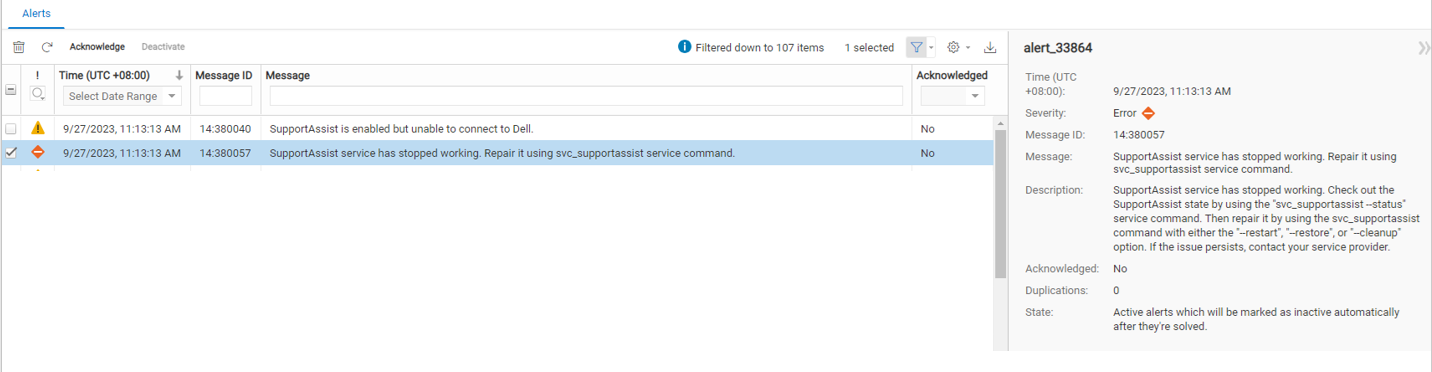
If the Unity Message ID 14:380057 "SupportAssist service has stopped working" is received, the steps outlined in Workaround Option #1 should be followed to clear the ESE deadlock and reestablish SupportAssist connectivity.
See KB article Dell Unity: UDoctor package (xxxxxx) is now available for installation. (User Correctable) for how to identify if a new UDoctor package is available and how to accept and install a new UDoctor package.
NOTE:
When a Unity OE nondisruptive upgrade (NDU) is run, it overwrites any changes made by the UDoctor package. This means that when the software fix becomes available in new Unity OE releases, a standard NDU can be run, and no additional steps are required.
When a Unity OE nondisruptive upgrade (NDU) is run, it overwrites any changes made by the UDoctor package. This means that when the software fix becomes available in new Unity OE releases, a standard NDU can be run, and no additional steps are required.
NOTE:
There is no way to override the inventory and or push process and force the UDoctor package to be pushed to any particular Unity system. The inventory and or push process occurs weekly. For customers who want the fix sooner, the correct solution is to upgrade to Unity OE version 5.3.1.0.5.008 (5.3 SP1). Alternatively, customers can use the other workarounds listed above.
There is no way to override the inventory and or push process and force the UDoctor package to be pushed to any particular Unity system. The inventory and or push process occurs weekly. For customers who want the fix sooner, the correct solution is to upgrade to Unity OE version 5.3.1.0.5.008 (5.3 SP1). Alternatively, customers can use the other workarounds listed above.
Affected Products
Dell EMC Unity FamilyArticle Properties
Article Number: 000216860
Article Type: Solution
Last Modified: 30 Oct 2025
Version: 14
Find answers to your questions from other Dell users
Support Services
Check if your device is covered by Support Services.