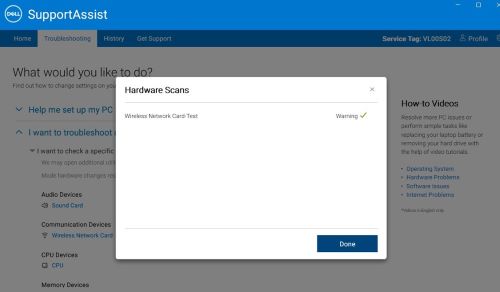
SupportAssist 무선 네트워크 카드 테스트 녹색 체크 표시와 함께 경고 표시
Summary: 이 문서에서는 진단 테스트가 완료된 후 무선 네트워크 카드 테스트에서 녹색 선택 표시와 함께 경고를 표시하는 SupportAssist에 대해 설명합니다.
This article applies to
This article does not apply to
This article is not tied to any specific product.
Not all product versions are identified in this article.
Symptoms
해당되는 플랫폼:
- OptiPlex 타워 7020
- OptiPlex 소형 폼 팩터 7020
- OptiPlex 마이크로 Plus 7020
- OptiPlex 마이크로 7020
- Inspiron 3030 소형 데스크탑
- Vostro 3030 소형 데스크탑
- Precision 3280 컴팩트
- Precision 3280 XE 컴팩트
영향을 받는 제품:
- SupportAssist
영향을 받는 버전:
- v3.14.1.14
SupportAssist 테스트 결과는 RTL8851BE 및 BE200 WLAN 카드가 설치된 상태에서 진단이 완료된 후 무선 네트워크 카드 테스트에서 녹색 선택 표시와 함께 경고를 표시합니다.
Cause
무선 네트워크 진단 문제입니다.
Resolution
SupportAssist를 v4.0.x로 업데이트하여 문제를 해결하십시오.
Affected Products
SupportAssist, Inspiron 3030 Small Desktop, OptiPlex Micro 7020, OptiPlex Micro Plus 7020, OptiPlex Small Form Factor 7020, OptiPlex Tower 7020, Precision 3280 XE Compact, Precision 3280 Compact, Vostro 3030 Small DesktopArticle Properties
Article Number: 000223197
Article Type: Solution
Last Modified: 10 Sept 2025
Version: 6
Find answers to your questions from other Dell users
Support Services
Check if your device is covered by Support Services.