Dell Unity: Unity NAS에서 Eicar 맬웨어 테스트에 네트워크 오류가 발생함
Summary: 사용자가 Unity NAS 서버에서 Eicar 멀웨어 테스트로 테스트했으며, 이 메시지에는 네트워크 오류 "There is a problem accessing \\172.xx.xx.xx\abc (NasIP \testfolder)"가 표시됩니다. 이 오류는 사용자가 수정할 수 있습니다.
This article applies to
This article does not apply to
This article is not tied to any specific product.
Not all product versions are identified in this article.
Symptoms
EICAR 안티 바이러스 테스트 파일 또는 EICAR 테스트 파일은 컴퓨터 안티 바이러스 (AV) 프로그램의 응답을 테스트하기 위해 EICAR (European Institute for Computer Anti-Virus Research) 및 CARO (Computer Anti-Virus Research Organization)에서 개발 한 컴퓨터 파일입니다.
사용자는 Sophos Central Intercept X인 AV 타사 엔진입니다.
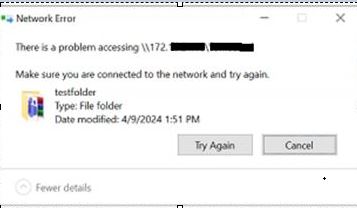
사용자는 Sophos Central Intercept X인 AV 타사 엔진입니다.
There is a problem accessing \\172.xx.xx.xx\abc  (NasIP \testfolder )
You have received this message because an event that has occurred on your Unity system requires your attention. The alert is:
"The virus checker server 172.xx.xx.xx has encountered an error and is no longer operational.(Error: OFFLINE, httpStatus: 1006 Connection Disconnected)"
The virus checker server 172.xx.xx.xx has encountered an error and is no longer operational.(Error: ERROR_AVINTERFACE)"
"No virus checker server is available."
Cause
이 오류는 타사 AV 소프트웨어 및 Cava 에이전트를 실행하는 Windows Server가 알림 기간 동안 서비스를 제공할 수 없다는 분명한 표시입니다. Unity 어플라이언스가 정상이면 네트워크 중단 관련 문제이거나 Windows-Server 문제이거나 AV 서비스 관련 문제일 수 있습니다. 사용자 또는 Windows 관리자는 'Windows 경고 로그'에서 명확한 근본 원인을 검사해야 합니다.
Resolution
Unity의 문제 해결 단계:
- Unity 로그 위치에서 검색:
EMCSystemBackup.log  - cd /EMC/C4core/log/
grep -i infect EMCSystemBackup.log
grep -i blocked EMCSystemBackup.log

c4_safe_ktrace.log – cd /EMC/C4core/log/
grep -i "virus checker" c4_safe_ktrace.log
zgrep -i "virus checker" /EMC/C4core/log/c4_safe_ktrace.log*
Uemcli svc_cava NAS 서버 이름이 포함된 서비스 스크립트는 CAVA 버전 및 안티바이러스 엔진 이름을 제공합니다.
Nas server name/IP : OV-xx-x-xxx-xx-001/ 172.xx.xx.xx
AV server IP address: 172.xx.xx.xx
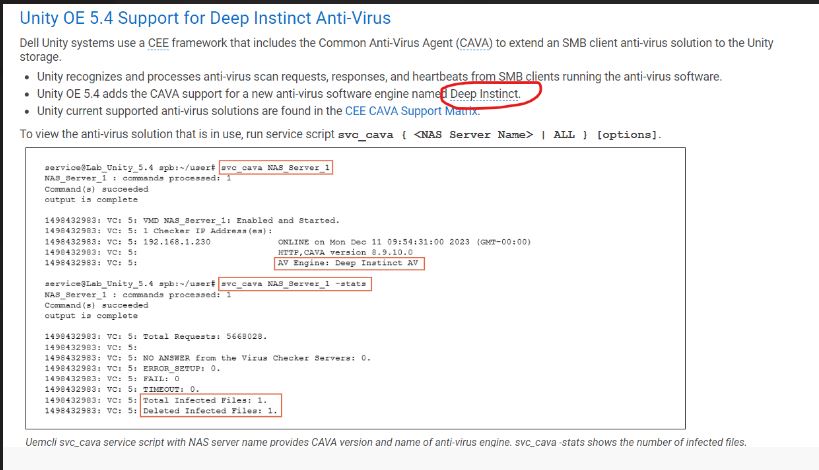
명령 목록:
Command Usage: svc_cava
svc_cava { <NAS_Server_Name> | ALL }
 [-h | --help]
 | <no option>
 | -stats
 | [ -set accesstime={ now | none | [[[[yy]mm]dd]hh]mm[.ss] }]
 | [ -fsscan [<fs_mountpath> { -list | -create | -delete } ]
Example : svc_cava -stats
svc_cava nas1 -stats
svc_cava nas1
명령 사용법:
08:38:39 root@DE4142343780xx spa:/EMC/C4Core/log# svc_cava OV-xxx-x-xxx-xx-001 -stats
OV-xxx-x-xxx-xx-001 : commands processed: 1
command(s) succeeded
output is complete
1712653384: VC: 5: Total Requests: 0.
1712653384: VC: 5:
1712653384: VC: 5: NO ANSWER from the Virus Checker Servers: 0.
1712653384: VC: 5: ERROR_SETUP: 0.
1712653384: VC: 5: FAIL: 0.
1712653384: VC: 5: TIMEOUT: 0.
1712653384: VC: 5:
1712653384: VC: 5: 0 files in the collector queue.
1712653384: VC: 5: 0 files processed by the AV threads.
Command succeeded
- viruschecker.config 파일을 다운로드하고 shutdown=no 또는 shutdown=viruschecking이 표시되는지 확인합니다.
Unity UI> 를 엽니다. 스토리지 > NAS 서버 >보안>안티바이러스 > 현재 구성 검색(파일 보기)
- viruschecker.conf 값을 업데이트하고(새 구성 업로드) 변경 내용을 적용합니다.
# Example: OV-xxx-x-xxx-xx-001
#
masks=*.EXE:*.COM:*.DOC:*.DOT:*.XL?:*.MD?:*.VXD:*.386:*.SYS:*.BIN:*.ppt:*docx:*.rar:*.zip:*.txt
excl=pagefile.sys:*.tmp
# masks=*.RTF:*.OBD:*.DLL:*.SCR:*.OBT:*.PP?:*.POT:*.OLE:*.SHS:*.MPP
# masks=*.MPT:*.XTP:*.XLB:*.CMD:*.OVL:*.DEV
# masks=*.ZIP:*.TAR:*.ARJ:*.ARC:*.Z
addr=172.xx.xx.xx >> AV Server IP address
shutdown=no (update the value to shutdown=viruschecking and upload the viruschecker.conf file to unity GUI)
# Stops SMB/CIFS if no AV machine available.(No Windows clients can access any Unity share)
08:18:51 root@DE414234378xxx spa:/cores/service/user# svc_cava OV-xxx-x-xxx-xx-001
OV-xxx-x-xxx-xx-001: commands processed: 1
command(s) succeeded
output is complete
1712650760: VC: 5: OV-xxx-x-xxx-xx-001: Enabled and Started.
1712650760: VC: 5: 1 Checker IP Address(es):
1712650760: VC: 5: 172.xx.xx.xx                                   ONLINE at Tue Apr  9 08:19:14 2024 (GMT-00:00)
1712650760: VC: 5:                                                HTTP, CAVA version: 8.9.10.0
1712650760: VC: 5:                                                AV Engine: Microsoft Antivirus ( Third party AV Engine )
1712650760: VC: 5:                                                Remediation Window: 30 seconds
1712650760: VC: 5:                                                Server Name: 172.xx.xx.xx
1712650760: VC: 5:                                                Last time signature updated: Tue Apr  9 05:29:36 2024 (GMT-00:00)
1712650760: VC: 5:
1712650760: VC: 5: 15 File Mask(s):
1712650760: VC: 5: *.EXE *.COM *.DOC *.DOT *.XL? *.MD? *.VXD *.386 *.SYS *.BIN *.PPT *DOCX *.RAR
1712650760: VC: 5: *.ZIP *.TXT
1712650760: VC: 5: 2 Excluded File(s):
1712650760: VC: 5: PAGEFILE.SYS *.TMP
1712650760: VC: 5: Share \\ov-yml-p-ser-fs-001.yoma.com.mm\CHECK$.
1712650760: VC: 5: RPC request timeout=25000 milliseconds.
1712650760: VC: 5: RPC retry timeout=5000 milliseconds.
1712650760: VC: 5: High water mark=200.
1712650760: VC: 5: Low water mark=50.
1712650760: VC: 5: Scan all virus checkers every 10 seconds.
1712650760: VC: 5: When all virus checkers are offline:
1712650760: VC: 5: Continue to work with Virus Checking and CIFS.
1712650760: VC: 5: Scan on read disable.
1712650760: VC: 5: MS-RPC User: OV-xxx-x-xxx-xx-001-FS$
1712650760: VC: 5: MS-RPC ClientName: ov-xxx-x-xxx-xx-001.abc
 Command succeeded
문제가 해결되었으며 네트워크 IP를 변경한 후 CAVA가 제대로 작동하기 시작했습니다.
권장 사항 문제 해결:
- viruschecker.conf 설정을 확인합니다. (shutdown=viruschecking)
- CAVA 서비스가 AV 사용자 계정으로 실행되고 있는지 확인합니다.
- 설치된 안티바이러스(Sophos, TrendMicro, McAfee 등) 서비스가 로컬 시스템 계정으로 실행되고 있는지 확인합니다.
-
AV 사용자가 각 AV 서버에서 로컬 관리자 그룹의 구성원인지 확인합니다.
-
안티바이러스 및 CEE가 올바른 순서로 설치되었는지 확인합니다. CEE를 먼저 사용한 다음 안티바이러스를 설치합니다
-
CAVA 서비스 재부팅
-
AV 서버를 한 번 재부팅합니다
-
CAVA 서버에 하나의 네트워크 인터페이스만 있는지 확인합니다.
-
클라이언트 컴퓨터가 NAS 서버와 동일하거나 다른 네트워크 IP로 할당되었는지 여부를 사용자와 함께 확인합니다(항상 동일한 네트워크에 있는 것이 권장됨)
1712650760: VC: 5:                                                HTTP, CAVA version: 8.9.10.0
1712650760: VC: 5:                                                AV Engine: Microsoft Antivirus ( Third party AV Engine )
모범 사례:
- 정책 VirusChecking=아니요를 설정하지 마십시오. 이는 차단된 스레드로 이어질 수 있으며 모범 사례로 간주되지 않습니다.
- 단일 AV 서버는 사용하지 않는 것이 좋습니다.
- 단일 AV 서버를 여러 플랫폼에 사용하지 않는 것이 좋습니다. 이는 권장되지 않으며 지원되지 않는 것으로 간주되어야 합니다.
문제가 지속되면 사용자는 타사 안티바이러스 공급업체 지원에 문의하여 추가 지원을 받아야 합니다.
Additional Information
자세한 내용은 아래 문서를 참조하십시오.

Affected Products
Dell EMC Unity Family |Dell EMC Unity All Flash, Dell EMC Unity FamilyArticle Properties
Article Number: 000224432
Article Type: Solution
Last Modified: 16 Oct 2025
Version: 3
Find answers to your questions from other Dell users
Support Services
Check if your device is covered by Support Services.