IDPA:无法在 ACM 控制面板中同步 DDBoost 用户密码。
Summary: 融合备份一体机 (IDPA) ACM 控制面板在 Data Domain 面板中标记 DDBoost 用户密码不同步,而密码有效且与通用密码匹配。
This article applies to
This article does not apply to
This article is not tied to any specific product.
Not all product versions are identified in this article.
Symptoms
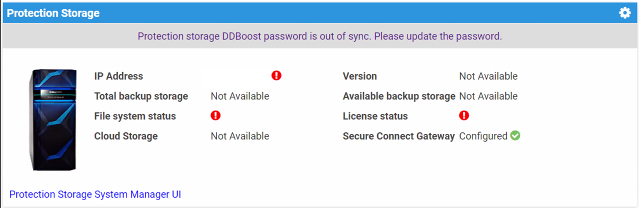
- Data Domain 在 ACM 控制面板中显示 DDBoost 用户密码不同步。
- DDboost 密码有效,并且与 ACM 通用密码匹配。
- Data Domain 中没有 Avamar 备份失败
- Avamar 没有抱怨与 Data Domain 没有通信。
Cause
DDBoost 用户名不称为“DDboostUser”,因为它是在 ACM 中预定义的。
例如:
DDBoost_User ACM 使用“DDBoostUser”向 Data Domain 进行身份验证。由于在客户的 Data Domain 上创建的用户名与预期不同,因此会失败并将 DDBoost 用户标记为不同步。
ACM server.log显示以下错误:
16042:2024-04-23 19:34:18,098 INFO  [Thread-88485]-util.SSHUtil: Creating session using SSH parameters:          Host     : [x.x.x.x]       User     : [DDBoostUser]        Password : [**********]
17537:2024-04-23 19:34:23,230 ERROR [Thread-88485]-dashboard.DataDomainDashboard: Auth failed to DDBoost user, so marking DDBoost user as OOS.
17538:2024-04-23 19:34:23,230 ERROR [Thread-88485]-dashboard.DataDomainDashboard: Exception occurred while connecting to DDBoost using sshUtil. 17539:com.emc.vcedpa.common.exception.ApplianceException: Protection storage DDBoost password is out of sync. Please update the password.
Resolution
更新或创建与 ACM 需要的用户名匹配的 DDBoost 用户名。
Additional Information
如果修改了 ddboost 用户,请编辑 Avamar 上的“DDBoost 用户”,以匹配从 Data Domain 检索到的“DDBoost
用户”。一个。登录 Avamar Administrator UI。
b.服务器 -->“服务器管理 ”选项卡 --> 选择 Data Domain 主机名
c. 操作 -->编辑 Data Domain 系统
d. 在用户名字段中输入正确的“DDBoost 用户”。
Affected Products
Integrated Data Protection Appliance FamilyArticle Properties
Article Number: 000225369
Article Type: Solution
Last Modified: 28 Jan 2025
Version: 1
Find answers to your questions from other Dell users
Support Services
Check if your device is covered by Support Services.