PowerFlex: Network Path Disqualification Alerts
Summary: PowerFlex version 3.6 and above detects when a port or socket frequently disconnects (flapping) and proactively disqualifies the path, preventing general disruption across the system. Customers must investigate the source of the interruptions with their internal team. ...
Symptoms
Users may see one or more alerts such as these:
- One path is disqualified: "the path between x.x.x.x and x.x.x.x" (the level of severity of this alert is "Minor")
- Or several paths are disqualified: "the paths between x.x.x.x, and x.x.x.x, x.x.x.x, and x.x.x.x are disqualified" (the level of severity of this alert is "Major")
PowerFlex 3.6: Alerts in the Presentation Server
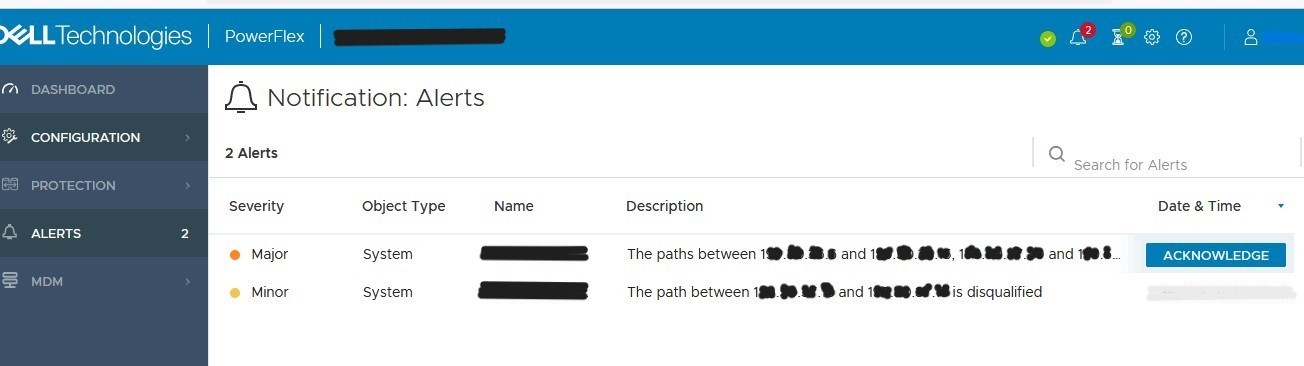
PowerFlex 4.x: Alerts in PowerFlex Manger

Cause
Network Path Disqualification alerts occur when a port or socket experiences frequent disconnects (flapping), which can cause system performance issues in PowerFlex’s fully distributed architecture. PowerFlex detects this and proactively disqualifies the path, preventing general disruption across the system. Among the most common causes for port flapping are: Faulty NIC, cable issues, or network drop
Resolution
To isolate the source of the issue, follow these steps:
- Ping the IP address of the component or components listed in the alert. If the ping is successful, you do not need to do any additional troubleshooting.
- Open an SSH session to the primary MDM and enter the following command:
scli --query_port_flapping_status --all
Usually, the port automatically comes back up when the source of the issue is resolved. The user should not have to manually bring a port up unless the port goes into Err-disabled on the switch. If that happens, performing a 'shutdown' and 'no shutdown' on the switch port should resolve the issue.
Once the port is back online, the alert should clear on its own over time; however, if the user must clear the alert, the following steps will help to achieve this:
-
To clear the alerts in versions PowerFlex version 3.x and below, follow the next steps:
- Reset the Oscillating Failure Counter Parameters Steps in below articles
- Reboot the Presentation Server (this operation is non-impactful and should only take a few minutes): There are two ways to achieve this:
- Via vSphere: Access Presentation Server VM > Reboot VM
- Via CLI: Open SSH to the Presentation Server IP> Perform the commands below:
# systemctl stop mgmt-server
# systemctl start mgmt-server
-
To clear alerts in PowerFlex version 4.0 and above, follow the steps listed in this article PowerFlex Management Platform - How To Manually Clear Alerts From 4.X PowerFlex Manager UI
If additional support is needed during the investigation, create a case with PowerFlex support case and provide the following items:
- Screenshot of the alert
- Primary MDM Get_Info logs (the list of steps to gather these logs are listed in article How to generate get_info logs
Additional Information
https://www.youtube.com/watch?v=eABbCq-a9Yc

Refer to this video:
Proactive Network Disqualification in Dell PowerFlex: Enhancing System Performance
Duration: 00:05:18 (hh:mm:ss)
When available, closed caption (subtitles) language settings can be chosen using the CC icon on this video player.
You can also view this video on YouTube.